Ch 1 — Concurrency and Asynchronous Programming: a Detailed Overview
Concurrency and Asynchronous Programming: a Detailed Overview Asynchronous programming is one of those topics many programmers find confusing. You come to the point when you think you’ve got it, only to later realize that the rabbit hole is much deeper than you thought. If you participate in discussions, listen to enough talks, and read about the topic on the internet, you’ll probably also come across statements that seem to contradict each other. At least, this describes how I felt when I first was introduced to the subject. The cause of this confusion is often a lack of context, or authors assuming a specific context without explicitly stating so, combined with terms surrounding concurrency and asynchronous programming that are rather poorly defined. In this chapter, we’ll be covering a lot of ground, and we’ll divide the content into the following main topics:
• Async history • Concurrency and parallelism • The operating system and the CPU • Interrupts, firmware, and I/O
This chapter is general in nature. It doesn’t specifically focus on Rust, or any specific programming language for that matter, but it’s the kind of background information we need to go through so we know that everyone is on the same page going forward. The upside is that this will be useful no matter what programming language you use. In my eyes, that fact also makes this one of the most interesting chapters in this book.
4 Concurrency and Asynchronous Programming: a Detailed Overview
    There’s not a lot of code in this chapter, so we’re off to a soft start. It’s a good time to make a cup of
    tea, relax, and get comfortable, as we’re about start this journey together.
    Technical requirements
    All examples will be written in Rust, and you have two alternatives for running the examples:
       • Write and run the examples we’ll write on the Rust playground
       • Install Rust on your machine and run the examples locally (recommended)
    The ideal way to read this chapter is to clone the accompanying repository (https://github.
    com/PacktPublishing/Asynchronous-Programming-in-Rust/tree/main/
    ch01/a-assembly-dereference) and open the ch01 folder and keep it open while you read
    the book. There, you’ll find all the examples we write in this chapter and even some extra information
    that you might find interesting as well. You can of course also go back to the repository later if you
    don’t have that accessible right now.
    An evolutionary journey of multitasking
    In the beginning, computers had one CPU that executed a set of instructions written by a programmer
    one by one. No operating system (OS), no scheduling, no threads, no multitasking. This was how
    computers worked for a long time. We’re talking back when a program was assembled in a deck of
    punched cards, and you got in big trouble if you were so unfortunate that you dropped the deck onto
    the floor.
    There were operating systems being researched very early and when personal computing started to
    grow in the 80s, operating systems such as DOS were the standard on most consumer PCs.
    These operating systems usually yielded control of the entire CPU to the program currently executing,
    and it was up to the programmer to make things work and implement any kind of multitasking for
    their program. This worked fine, but as interactive UIs using a mouse and windowed operating systems
    became the norm, this model simply couldn’t work anymore.
    Non-preemptive multitasking
    Non-preemptive multitasking was the first method used to be able to keep a UI interactive (and
    running background processes).
    This kind of multitasking put the responsibility of letting the OS run other tasks, such as responding
    to input from the mouse or running a background task, in the hands of the programmer.
    Typically, the programmer yielded control to the OS.
An evolutionary journey of multitasking 5
Besides offloading a huge responsibility to every programmer writing a program for your platform, this method was naturally error-prone. A small mistake in a program’s code could halt or crash the entire system.
Note Another popular term for what we call non-preemptive multitasking is cooperative multitasking. Windows 3.1 used cooperative multitasking and required programmers to yield control to the OS by using specific system calls. One badly-behaving application could thereby halt the entire system.
Preemptive multitasking While non-preemptive multitasking sounded like a good idea, it turned out to create serious problems as well. Letting every program and programmer out there be responsible for having a responsive UI in an operating system can ultimately lead to a bad user experience, since every bug out there could halt the entire system. The solution was to place the responsibility of scheduling the CPU resources between the programs that requested it (including the OS itself) in the hands of the OS. The OS can stop the execution of a process, do something else, and switch back. On such a system, if you write and run a program with a graphical user interface on a single-core machine, the OS will stop your program to update the mouse position before it switches back to your program to continue. This happens so frequently that we don’t usually observe any difference whether the CPU has a lot of work or is idle. The OS is responsible for scheduling tasks and does this by switching contexts on the CPU. This process can happen many times each second, not only to keep the UI responsive but also to give some time to other background tasks and IO events. This is now the prevailing way to design an operating system.
Note Later in this book, we’ll write our own green threads and cover a lot of basic knowledge about context switching, threads, stacks, and scheduling that will give you more insight into this topic, so stay tuned.
Hyper-threading As CPUs evolved and added more functionality such as several arithmetic logic units (ALUs) and additional logic units, the CPU manufacturers realized that the entire CPU wasn't fully utilized. For
6 Concurrency and Asynchronous Programming: a Detailed Overview
    example, when an operation only required some parts of the CPU, an instruction could be run on the
    ALU simultaneously. This became the start of hyper-threading.
    Your computer today, for example, may have 6 cores and 12 logical cores.. This is exactly where hyper-
    threading comes in. It “simulates” two cores on the same core by using unused parts of the CPU to
    drive progress on thread 2 and simultaneously running the code on thread 1. It does this by using a
    number of smart tricks (such as the one with the ALU).
    Now, using hyper-threading, we could actually offload some work on one thread while keeping the
    UI interactive by responding to events in the second thread even though we only had one CPU core,
    thereby utilizing our hardware better.
       You might wonder about the performance of hyper-threading
       It turns out that hyper-threading has been continuously improved since the 90s. Since you’re
       not actually running two CPUs, there will be some operations that need to wait for each other
       to finish. The performance gain of hyper-threading compared to multitasking in a single core
       seems to be somewhere close to 30% but it largely depends on the workload.
    Multicore processors
    As most know, the clock frequency of processors has been flat for a long time. Processors get faster by
    improving caches, branch prediction, and speculative execution, and by working on the processing
    pipelines of the processors, but the gains seem to be diminishing.
    On the other hand, new processors are so small that they allow us to have many on the same chip. Now,
    most CPUs have many cores and most often, each core will also have the ability to perform hyper-threading.
    Do you really write synchronous code?
    Like many things, this depends on your perspective. From the perspective of your process and the
    code you write, everything will normally happen in the order you write it.
    From the operating system’s perspective, it might or might not interrupt your code, pause it, and run
    some other code in the meantime before resuming your process.
    From the perspective of the CPU, it will mostly execute instructions one at a time.* It doesn’t care
    who wrote the code, though, so when a hardware interrupt happens, it will immediately stop and
    give control to an interrupt handler. This is how the CPU handles concurrency.
Concurrency versus parallelism 7
Note *However, modern CPUs can also do a lot of things in parallel. Most CPUs are pipelined, meaning that the next instruction is loaded while the current one is executing. It might have a branch predictor that tries to figure out what instructions to load next. The processor can also reorder instructions by using out-of-order execution if it believes it makes things faster this way without ‘asking’ or ‘telling’ the programmer or the OS, so you might not have any guarantee that A happens before B. The CPU offloads some work to separate ‘coprocessors’ such as the FPU for floating-point calculations, leaving the main CPU ready to do other tasks et cetera. As a high-level overview, it’s OK to model the CPU as operating in a synchronous manner, but for now, let’s just make a mental note that this is a model with some caveats that become especially important when talking about parallelism, synchronization primitives (such as mutexes and atomics), and the security of computers and operating systems.
Concurrency versus parallelism Right off the bat, we’ll dive into this subject by defining what concurrency is. Since it is quite easy to confuse concurrent with parallel, we will try to make a clear distinction between the two from the get-go.
Important Concurrency is about dealing with a lot of things at the same time. Parallelism is about doing a lot of things at the same time.
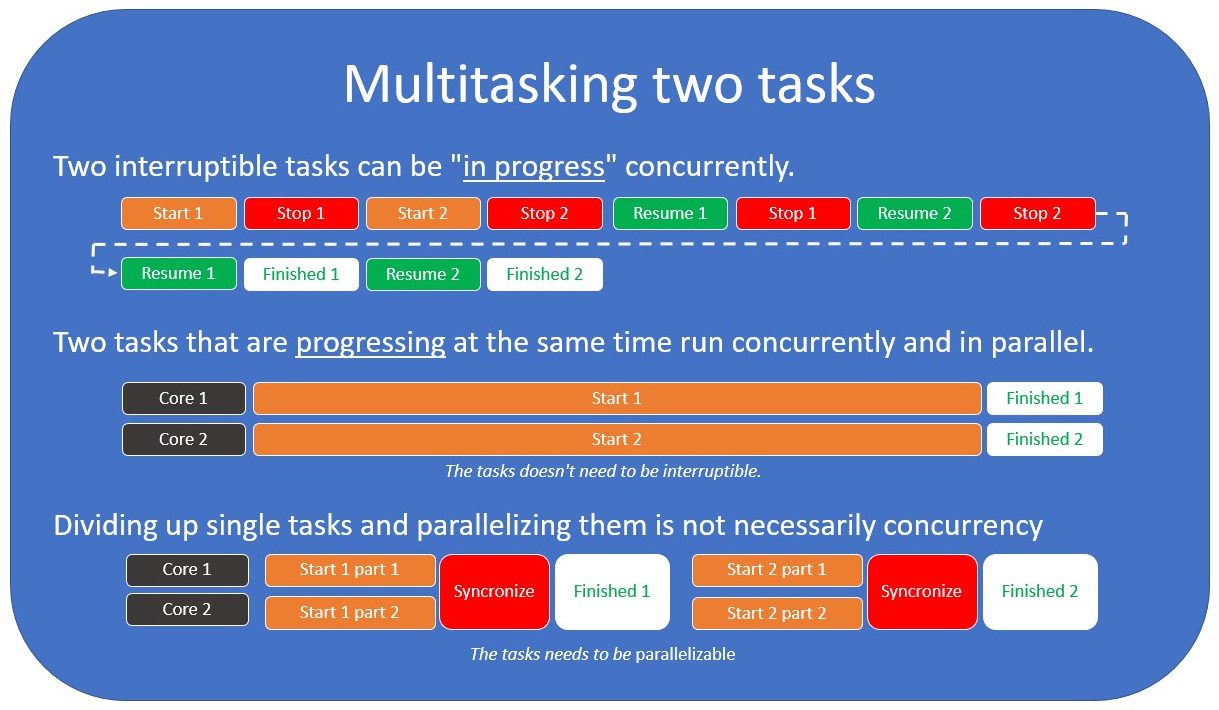
We call the concept of progressing multiple tasks at the same time multitasking. There are two ways to multitask. One is by progressing tasks concurrently, but not at the same time. Another is to progress tasks at the exact same time in parallel. Figure 1.1 depicts the difference between the two scenarios:
8 Concurrency and Asynchronous Programming: a Detailed Overview
Figure 1.1 – Multitasking two tasks
First, we need to agree on some definitions:
       • Resource: This is something we need to be able to progress a task. Our resources are limited.
         This could be CPU time or memory.
       • Task: This is a set of operations that requires some kind of resource to progress. A task must
         consist of several sub-operations.
       • Parallel: This is something happening independently at the exact same time.
       • Concurrent: These are tasks that are in progress at the same time, but not necessarily
         progressing simultaneously.
    This is an important distinction. If two tasks are running concurrently, but are not running in parallel,
    they must be able to stop and resume their progress. We say that a task is interruptible if it allows for
    this kind of concurrency.
    The mental model I use
    I firmly believe the main reason we find parallel and concurrent programming hard to differentiate
    stems from how we model events in our everyday life. We tend to define these terms loosely, so our
    intuition is often wrong.
Concurrency versus parallelism 9
Note It doesn’t help that concurrent is defined in the dictionary as operating or occurring at the same time, which doesn’t really help us much when trying to describe how it differs from parallel.
For me, this first clicked when I started to understand why we want to make a distinction between parallel and concurrent in the first place! The why has everything to do with resource utilization and efficiency. Efficiency is the (often measurable) ability to avoid wasting materials, energy, effort, money, and time in doing something or in producing a desired result. Parallelism is increasing the resources we use to solve a task. It has nothing to do with efficiency. Concurrency has everything to do with efficiency and resource utilization. Concurrency can never make one single task go faster. It can only help us utilize our resources better and thereby finish a set of tasks faster.
Let’s draw some parallels to process economics In businesses that manufacture goods, we often talk about LEAN processes. This is pretty easy to compare with why programmers care so much about what we can achieve if we handle tasks concurrently. Let’s pretend we’re running a bar. We only serve Guinness beer and nothing else, but we serve our Guinness to perfection. Yes, I know, it’s a little niche, but bear with me. You are the manager of this bar, and your goal is to run it as efficiently as possible. Now, you can think of each bartender as a CPU core, and each order as a task. To manage this bar, you need to know the steps to serve a perfect Guinness:
• Pour the Guinness draught into a glass tilted at 45 degrees until it’s 3-quarters full (15 seconds). • Allow the surge to settle for 100 seconds. • Fill the glass completely to the top (5 seconds). • Serve.
Since there is only one thing to order in the bar, customers only need to signal using their fingers how many they want to order, so we assume taking new orders is instantaneous. To keep things simple, the same goes for payment. In choosing how to run this bar, you have a few alternatives.
Alternative 1 – Fully synchronous task execution with one bartender
You start out with only one bartender (CPU). The bartender takes one order, finishes it, and progresses to the next. The line is out the door and going two blocks down the street – great! One month later, you’re almost out of business and you wonder why.
10 Concurrency and Asynchronous Programming: a Detailed Overview
     Well, even though your bartender is very fast at taking new orders, they can only serve 30 customers
     an hour. Remember, they’re waiting for 100 seconds while the beer settles and they’re practically just
     standing there, and they only use 20 seconds to actually fill the glass. Only after one order is completely
     finished can they progress to the next customer and take their order.
     The result is bad revenue, angry customers, and high costs. That’s not going to work.
Alternative 2 – Parallel and synchronous task execution
     So, you hire 12 bartenders, and you calculate that you can serve about 360 customers an hour. The
     line is barely going out the door now, and revenue is looking great.
     One month goes by and again, you’re almost out of business. How can that be?
     It turns out that having 12 bartenders is pretty expensive. Even though revenue is high, the costs
     are even higher. Throwing more resources at the problem doesn’t really make the bar more efficient.
Alternative 3 – Asynchronous task execution with one bartender
     So, we’re back to square one. Let’s think this through and find a smarter way of working instead of
     throwing more resources at the problem.
     You ask your bartender whether they can start taking new orders while the beer settles so that they’re
     never just standing and waiting while there are customers to serve. The opening night comes and...
     Wow! On a busy night where the bartender works non-stop for a few hours, you calculate that they now
     only use just over 20 seconds on an order. You’ve basically eliminated all the waiting. Your theoretical
     throughput is now 240 beers per hour. If you add one more bartender, you’ll have higher throughput
     than you did while having 12 bartenders.
     However, you realize that you didn’t actually accomplish 240 beers an hour, since orders come
     somewhat erratically and not evenly spaced over time. Sometimes, the bartender is busy with a new
     order, preventing them from topping up and serving beers that are finished almost immediately. In
     real life, the throughput is only 180 beers an hour.
     Still, two bartenders could serve 360 beers an hour this way, the same amount that you served while
     employing 12 bartenders.
     This is good, but you ask yourself whether you can do even better.
Alternative 4 – Parallel and asynchronous task execution with two bartenders
     What if you hire two bartenders, and ask them to do just what we described in Alternative 3, but with
     one change: you allow them to steal each other’s tasks, so bartender 1 can start pouring and set the
     beer down to settle, and bartender 2 can top it up and serve it if bartender 1 is busy pouring a new
     order at that time? This way, it is only rarely that both bartenders are busy at the same time as one of
     the beers-in-progress becomes ready to get topped up and served. Almost all orders are finished and
Concurrency versus parallelism 11
served in the shortest amount of time possible, letting customers leave the bar with their beer faster and giving space to customers who want to make a new order. Now, this way, you can increase throughput even further. You still won’t reach the theoretical maximum, but you’ll get very close. On the opening night, you realize that the bartenders now process 230 orders an hour each, giving a total throughput of 460 beers an hour. Revenue looks good, customers are happy, costs are kept at a minimum, and you’re one happy manager of the weirdest bar on earth (an extremely efficient bar, though).
The key takeaway Concurrency is about working smarter. Parallelism is a way of throwing more resources at the problem.
Concurrency and its relation to I/O As you might understand from what I’ve written so far, writing async code mostly makes sense when you need to be smart to make optimal use of your resources. Now, if you write a program that is working hard to solve a problem, there is often no help in concurrency. This is where parallelism comes into play, since it gives you a way to throw more resources at the problem if you can split it into parts that you can work on in parallel. Consider the following two different use cases for concurrency:
• When performing I/O and you need to wait for some external event to occur • When you need to divide your attention and prevent one task from waiting too long
The first is the classic I/O example: you have to wait for a network call, a database query, or something else to happen before you can progress a task. However, you have many tasks to do so instead of waiting, you continue to work elsewhere and either check in regularly to see whether the task is ready to progress, or make sure you are notified when that task is ready to progress. The second is an example that is often the case when having a UI. Let’s pretend you only have one core. How do you prevent the whole UI from becoming unresponsive while performing other CPU-intensive tasks? Well, you can stop whatever task you’re doing every 16 ms, run the update UI task, and then resume whatever you were doing afterward. This way, you will have to stop/resume your task 60 times a second, but you will also have a fully responsive UI that has a roughly 60 Hz refresh rate.
12 Concurrency and Asynchronous Programming: a Detailed Overview
     What about threads provided by the operating system?
     We’ll cover threads a bit more when we talk about strategies for handling I/O later in this book, but
     I’ll mention them here as well. One challenge when using OS threads to understand concurrency is
     that they appear to be mapped to cores. That’s not necessarily a correct mental model to use, even
     though most operating systems will try to map one thread to one core up to the number of threads
     equal to the number of cores.
     Once we create more threads than there are cores, the OS will switch between our threads and progress
     each of them concurrently using its scheduler to give each thread some time to run. You also must
     consider the fact that your program is not the only one running on the system. Other programs might
     spawn several threads as well, which means there will be many more threads than there are cores on
     the CPU.
     Therefore, threads can be a means to perform tasks in parallel, but they can also be a means to
     achieve concurrency.
     This brings me to the last part about concurrency. It needs to be defined in some sort of reference frame.
     Choosing the right reference frame
     When you write code that is perfectly synchronous from your perspective, stop for a second and
     consider how that looks from the operating system perspective.
     The operating system might not run your code from start to end at all. It might stop and resume your
     process many times. The CPU might get interrupted and handle some inputs while you think it’s only
     focused on your task.
     So, synchronous execution is only an illusion. But from the perspective of you as a programmer, it’s
     not, and that is the important takeaway:
     When we talk about concurrency without providing any other context, we are using you as a programmer
     and your code (your process) as the reference frame. If you start pondering concurrency without keeping
     this in the back of your head, it will get confusing very fast.
     The reason I’m spending so much time on this is that once you realize the importance of having the
     same definitions and the same reference frame, you’ll start to see that some of the things you hear and
     learn that might seem contradictory really are not. You’ll just have to consider the reference frame first.
     Asynchronous versus concurrent
     So, you might wonder why we’re spending all this time talking about multitasking, concurrency, and
     parallelism, when the book is about asynchronous programming.
     The main reason for this is that all these concepts are closely related to each other, and can even have
     the same (or overlapping) meanings, depending on the context they’re used in.
The role of the operating system 13
In an effort to make the definitions as distinct as possible, we’ll define these terms more narrowly than you’d normally see. However, just be aware that we can’t please everyone and we do this for our own sake of making the subject easier to understand. On the other hand, if you fancy heated internet debates, this is a good place to start. Just claim someone else’s definition of concurrent is 100 % wrong or that yours is 100 % correct, and off you go. For the sake of this book, we’ll stick to this definition: asynchronous programming is the way a programming language or library abstracts over concurrent operations, and how we as users of a language or library use that abstraction to execute tasks concurrently. The operating system already has an existing abstraction that covers this, called threads. Using OS threads to handle asynchrony is often referred to as multithreaded programming. To avoid confusion, we’ll not refer to using OS threads directly as asynchronous programming, even though it solves the same problem. Given that asynchronous programming is now scoped to be about abstractions over concurrent or parallel operations in a language or library, it’s also easier to understand that it’s just as relevant on embedded systems without an operating system as it is for programs that target a complex system with an advanced operating system. The definition itself does not imply any specific implementation even though we’ll look at a few popular ones throughout this book. If this still sounds complicated, I understand. Just sitting and reflecting on concurrency is difficult, but if we try to keep these thoughts in the back of our heads when we work with async code I promise it will get less and less confusing.
The role of the operating system The operating system (OS) stands in the center of everything we do as programmers (well, unless you’re writing an operating system or working in the embedded realm), so there is no way for us to discuss any kind of fundamentals in programming without talking about operating systems in a bit of detail.
Concurrency from the operating system’s perspective This ties into what I talked about earlier when I said that concurrency needs to be talked about within a reference frame, and I explained that the OS might stop and start your process at any time. What we call synchronous code is, in most cases, code that appears synchronous to us as programmers. Neither the OS nor the CPU lives in a fully synchronous world. Operating systems use preemptive multitasking and as long as the operating system you’re running is preemptively scheduling processes, you won’t have a guarantee that your code runs instruction by instruction without interruption. The operating system will make sure that all important processes get some time from the CPU to make progress.
14 Concurrency and Asynchronous Programming: a Detailed Overview
        Note
        This is not as simple when we’re talking about modern machines with 4, 6, 8, or 12 physical
        cores, since you might actually execute code on one of the CPUs uninterrupted if the system
        is under very little load. The important part here is that you can’t know for sure and there is
        no guarantee that your code will be left to run uninterrupted.
     Teaming up with the operating system
     When you make a web request, you’re not asking the CPU or the network card to do something for
     you – you’re asking the operating system to talk to the network card for you.
     There is no way for you as a programmer to make your system optimally efficient without playing to
     the strengths of the operating system. You basically don’t have access to the hardware directly. You
     must remember that the operating system is an abstraction over the hardware.
     However, this also means that to understand everything from the ground up, you’ll also need to know
     how your operating system handles these tasks.
     To be able to work with the operating system, you’ll need to know how you can communicate with
     it, and that’s exactly what we’re going to go through next.
     Communicating with the operating system
     Communication with an operating system happens through what we call a system call (syscall). We
     need to know how to make system calls and understand why it’s so important for us when we want
     to cooperate and communicate with the operating system. We also need to understand how the basic
     abstractions we use every day use system calls behind the scenes. We’ll have a detailed walkthrough
     in Chapter 3, so we’ll keep this brief for now.
     A system call uses a public API that the operating system provides so that programs we write in
     ‘userland’ can communicate with the OS.
     Most of the time, these calls are abstracted away for us as programmers by the language or the runtime
     we use.
     Now, a syscall is an example of something that is unique to the kernel you’re communicating with, but
     the UNIX family of kernels has many similarities. UNIX systems expose this through libc.
     Windows, on the other hand, uses its own API, often referred to as WinAPI, and it can operate
     radically differently from how the UNIX-based systems operate.
     Most often, though, there is a way to achieve the same things. In terms of functionality, you might
     not notice a big difference but as we’ll see later, and especially when we dig into how epoll, kqueue,
     and IOCP work, they can differ a lot in how this functionality is implemented.
The CPU and the operating system 15
However, a syscall is not the only way we interact with our operating system, as we’ll see in the following section.
The CPU and the operating system Does the CPU cooperate with the operating system? If you had asked me this question when I first thought I understood how programs work, I would most likely have answered no. We run programs on the CPU and we can do whatever we want if we know how to do it. Now, first of all, I wouldn’t have thought this through, but unless you learn how CPUs and operating systems work together, it’s not easy to know for sure. What started to make me think I was very wrong was a segment of code that looked like what you’re about to see. If you think inline assembly in Rust looks foreign and confusing, don’t worry just yet. We’ll go through a proper introduction to inline assembly a little later in this book. I’ll make sure to go through each of the following lines until you get more comfortable with the syntax: Repository reference: ch01/ac-assembly-dereference/src/main.rs
  fn main() {
      let t = 100;
      let t_ptr: *const usize = &t;
      let x = dereference(t_ptr);
      println!("{}", x);
  }
  fn dereference(ptr: *const usize) -> usize {
      let mut res: usize;
      unsafe {
          asm!("mov {0}, [{1}]", out(reg) res, in(reg) ptr)
      };
      res
  }
What you’ve just looked at is a dereference function written in assembly. The mov {0}, [{1}] line needs some explanation. {0} and {1} are templates that tell the compiler that we’re referring to the registers that out(reg) and in(reg) represent. The number is just an index, so if we had more inputs or outputs they would be numbered {2}, {3}, and so on. Since we only specify reg and not a specific register, we let the compiler choose what registers it wants to use. The mov instruction instructs the CPU to take the first 8 bytes (if we’re on a 64-bit machine) it gets when reading the memory location that {1} points to and place that in the register represented by {0}. The [] brackets will instruct the CPU to treat the data in that register as a memory address,
16 Concurrency and Asynchronous Programming: a Detailed Overview
     and instead of simply copying the memory address itself to {0}, it will fetch what’s at that memory
     location and move it over.
     Anyway, we’re just writing instructions to the CPU here. No standard library, no syscall; just raw
     instructions. There is no way the OS is involved in that dereference function, right?
     If you run this program, you get what you’d expect:
     Now, if you keep the dereference function but replace the main function with a function that
     creates a pointer to the 99999999999999 address, which we know is invalid, we get this function:
       fn main() {
           let t_ptr = 99999999999999 as *const usize;
           let x = dereference(t_ptr);
           println!("{}", x);
       }
     Now, if we run that we get the following results.
     This is the result on Linux:
Segmentation fault (core dumped)
This is the result on Windows:
       error: process didn't exit successfully: `target\debug\ac-assembly-
       dereference.exe` (exit code: 0xc0000005, STATUS_ACCESS_VIOLATION)
     We get a segmentation fault. Not surprising, really, but as you also might notice, the error we get is
     different on different platforms. Surely, the OS is involved somehow. Let’s take a look at what’s really
     happening here.
     Down the rabbit hole
     It turns out that there is a great deal of cooperation between the OS and the CPU, but maybe not in
     the way you would naively think.
     Many modern CPUs provide some basic infrastructure that operating systems use. This infrastructure
     gives us the security and stability we expect. Actually, most advanced CPUs provide a lot more options
     than operating systems such as Linux, BSD, and Windows actually use.
     There are two in particular that I want to address here:
        • How the CPU prevents us from accessing memory we’re not supposed to access
        • How the CPU handles asynchronous events such as I/O
The CPU and the operating system 17
We’ll cover the first one here and the second in the next section.
How does the CPU prevent us from accessing memory we’re not supposed to access? As I mentioned, modern CPU architectures define some basic concepts by design. Some examples of this are as follows:
• Virtual memory • Page table • Page fault • Exceptions • Privilege level
Exactly how this works will differ depending on the specific CPU, so we’ll treat them in general terms here. Most modern CPUs have a memory management unit (MMU). This part of the CPU is often etched on the same dye, even. The MMU’s job is to translate the virtual address we use in our programs to a physical address. When the OS starts a process (such as our program), it sets up a page table for our process and makes sure a special register on the CPU points to this page table. Now, when we try to dereference t_ptr in the preceding code, the address is at some point sent for translation to the MMU, which looks it up in the page table to translate it to a physical address in the memory where it can fetch the data. In the first case, it will point to a memory address on our stack that holds the value 100. When we pass in 99999999999999 and ask it to fetch what’s stored at that address (which is what dereferencing does), it looks for the translation in the page table but can’t find it. The CPU then treats this as a page fault. At boot, the OS provided the CPU with an interrupt descriptor table. This table has a predefined format where the OS provides handlers for the predefined conditions the CPU can encounter. Since the OS provided a pointer to a function that handles page fault, the CPU jumps to that function when we try to dereference 99999999999999 and thereby hands over control to the operating system. The OS then prints a nice message for us, letting us know that we encountered what it calls a segmentation fault. This message will therefore vary depending on the OS you run the code on.
18 Concurrency and Asynchronous Programming: a Detailed Overview
     But can’t we just change the page table in the CPU?
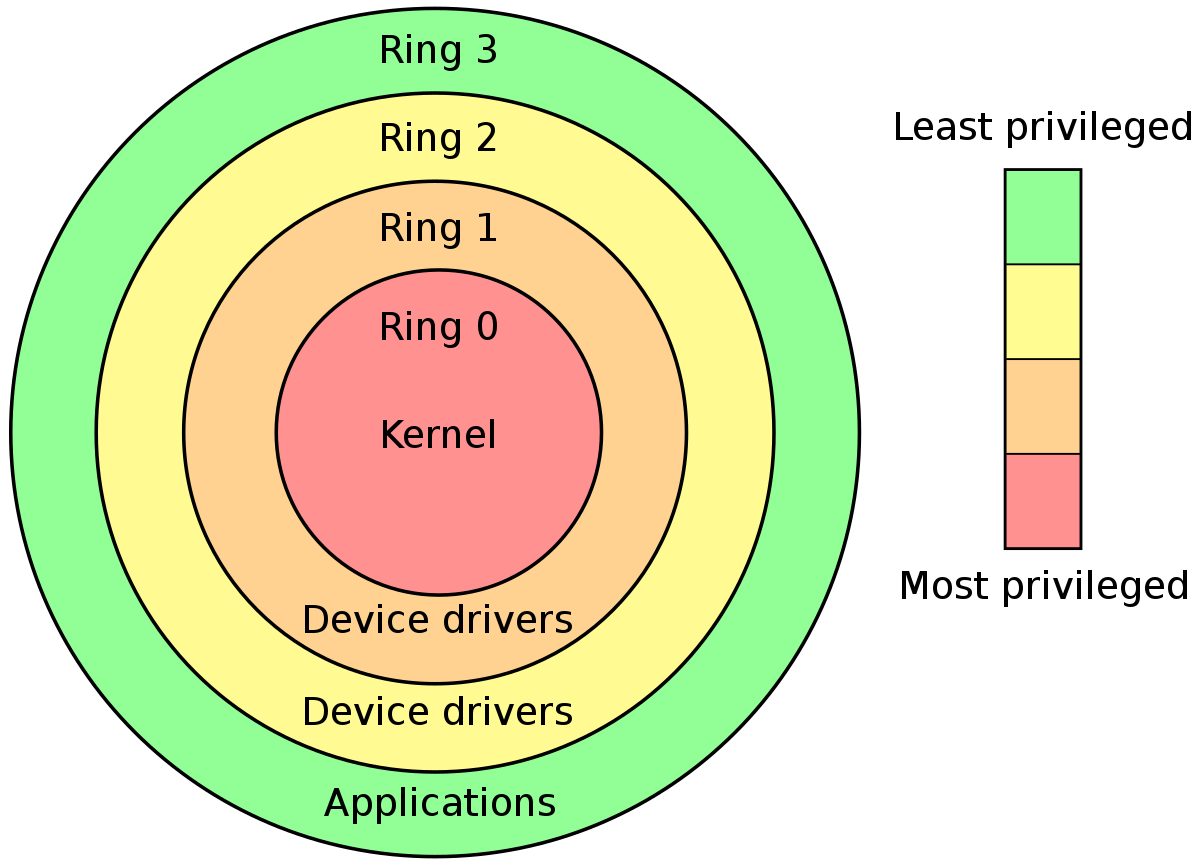
     Now, this is where the privilege level comes in. Most modern operating systems operate with two ring
     levels: ring 0, the kernel space, and ring 3, the user space.
Figure 1.2 – Privilege rings
     Most CPUs have a concept of more rings than what most modern operating systems use. This has
     historical reasons, which is also why ring 0 and ring 3 are used (and not 1 and 2).
     Every entry in the page table has additional information about it. Amongst that information is the
     information about which ring it belongs to. This information is set up when your OS boots up.
     Code executed in ring 0 has almost unrestricted access to external devices and memory, and is free
     to change registers that provide security at the hardware level.
     The code you write in ring 3 will typically have extremely restricted access to I/O and certain CPU
     registers (and instructions). Trying to issue an instruction or setting a register from ring 3 to change
     the page table will be prevented by the CPU. The CPU will then treat this as an exception and jump
     to the handler for that exception provided by the OS.
     This is also the reason why you have no other choice than to cooperate with the OS and handle I/O
     tasks through syscalls. The system wouldn’t be very secure if this wasn’t the case.
     So, to sum it up: yes, the CPU and the OS cooperate a great deal. Most modern desktop CPUs are
     built with an OS in mind, so they provide the hooks and infrastructure that the OS latches onto
     upon bootup. When the OS spawns a process, it also sets its privilege level, making sure that normal
     processes stay within the borders it defines to maintain stability and security.
Interrupts, firmware, and I/O 19
Interrupts, firmware, and I/O We’re nearing the end of the general CS subjects in this book, and we’ll start to dig our way out of the rabbit hole soon. This part tries to tie things together and look at how the whole computer works as a system to handle I/O and concurrency. Let’s get to it!
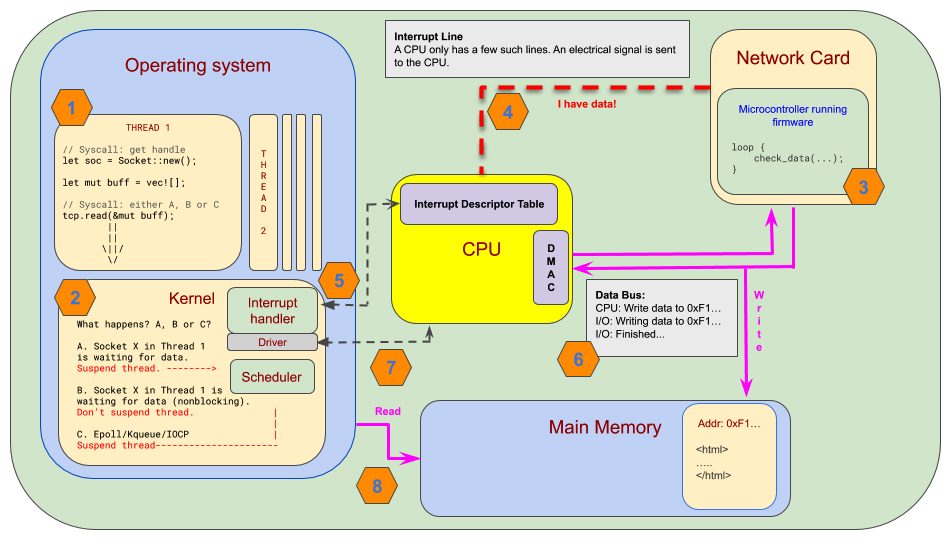
A simplified overview Let’s look at some of the steps where we imagine that we read from a network card:
Remember that we’re simplifying a lot here. This is a rather complex operation but we’ll focus on the parts that are of most interest to us and skip a few steps along the way.
Step 1 – Our code
We register a socket. This happens by issuing a syscall to the OS. Depending on the OS, we either get a file descriptor (macOS/Linux) or a socket (Windows). The next step is that we register our interest in Read events on that socket.
20 Concurrency and Asynchronous Programming: a Detailed Overview
Step 2 – Registering events with the OS
This is handled in one of three ways:
       1.   We tell the operating system that we’re interested in Read events but we want to wait for it to
            happen by yielding control over our thread to the OS. The OS then suspends our thread
            by storing the register state and switches to some other thread
            From our perspective, this will be blocking our thread until we have data to read.
       2.   We tell the operating system that we’re interested in Read events but we just want a handle to
            a task that we can poll to check whether the event is ready or not.
            The OS will not suspend our thread, so this will not block our code.
       3.   We tell the operating system that we are probably going to be interested in many events, but
            we want to subscribe to one event queue. When we poll this queue, it will block our thread
            until one or more events occur.
            This will block our thread while we wait for events to occur.
     Chapters 3 and 4 will go into detail about the third method, as it’s the most used method for modern
     async frameworks to handle concurrency.
Step 3 – The network card
     We’re skipping some steps here, but I don’t think they’re vital to our understanding.
     On the network card, there is a small microcontroller running specialized firmware. We can imagine
     that this microcontroller is polling in a busy loop, checking whether any data is incoming.
     The exact way the network card handles its internals is a little different from what I suggest here, and
     will most likely vary from vendor to vendor. The important part is that there is a very simple but
     specialized CPU running on the network card doing work to check whether there are incoming events.
     Once the firmware registers incoming data, it issues a hardware interrupt.
Step 4 – Hardware interrupt
     A modern CPU has a set of interrupt request line (IRQs) for it to handle events that occur from
     external devices. A CPU has a fixed set of interrupt lines.
     A hardware interrupt is an electrical signal that can occur at any time. The CPU immediately interrupts
     its normal workflow to handle the interrupt by saving the state of its registers and looking up the
     interrupt handler. The interrupt handlers are defined in the interrupt descriptor table (IDT).
Interrupts, firmware, and I/O 21
Step 5 – Interrupt handler
The IDT is a table where the OS (or a driver) registers handlers for different interrupts that may occur. Each entry points to a handler function for a specific interrupt. The handler function for a network card would typically be registered and handled by a driver for that card.
Note The IDT is not stored on the CPU as it might seem in Figure 1.3. It’s located in a fixed and known location in the main memory. The CPU only holds a pointer to the table in one of its registers.
Step 6 – Writing the data
This is a step that might vary a lot depending on the CPU and the firmware on the network card. If the network card and the CPU support direct memory access (DMA), which should be the standard on all modern systems today, the network card will write data directly to a set of buffers that the OS already has set up in the main memory. In such a system, the firmware on the network card might issue an interrupt when the data is written to memory. DMA is very efficient, since the CPU is only notified when the data is already in memory. On older systems, the CPU needed to devote resources to handle the data transfer from the network card. The direct memory access controller ( DMAC) is added to the diagram since in such a system, it would control the access to memory. It’s not part of the CPU as indicated in the previous diagram. We’re deep enough in the rabbit hole now, and exactly where the different parts of a system are is not really important to us right now, so let’s move on.
Step 7 – The driver
The driver would normally handle the communication between the OS and the network card. At some point, the buffers are filled and the network card issues an interrupt. The CPU then jumps to the handler of that interrupt. The interrupt handler for this exact type of interrupt is registered by the driver, so it’s actually the driver that handles this event and, in turn, informs the kernel that the data is ready to be read.
Step 8 – Reading the data
Depending on whether we chose method 1, 2, or 3, the OS will do as follows:
• Wake our thread • Return Ready on the next poll • Wake the thread and return a Read event for the handler we registered
22 Concurrency and Asynchronous Programming: a Detailed Overview
     Interrupts
     As you know by now, there are two kinds of interrupts:
        • Hardware interrupts
        • Software interrupts
They are very different in nature.
Hardware interrupts
     Hardware interrupts are created by sending an electrical signal through an IRQ. These hardware lines
     signal the CPU directly.
Software interrupts
     These are interrupts issued from software instead of hardware. As in the case of a hardware interrupt,
     the CPU jumps to the IDT and runs the handler for the specified interrupt.
     Firmware
     Firmware doesn’t get much attention from most of us; however, it’s a crucial part of the world we
     live in. It runs on all kinds of hardware and has all kinds of strange and peculiar ways to make the
     computers we program on work.
     Now, the firmware needs a microcontroller to be able to work. Even the CPU has firmware that makes it
     work. That means there are many more small ‘CPUs’ on our system than the cores we program against.
     Why is this important? Well, you remember that concurrency is all about efficiency, right? Since we
     have many CPUs/microcontrollers already doing work for us on our system, one of our concerns is
     to not replicate or duplicate that work when we write code.
     If a network card has firmware that continually checks whether new data has arrived, it’s pretty wasteful
     if we duplicate that by letting our CPU continually check whether new data arrives as well. It’s much
     better if we either check once in a while, or even better, get notified when data has arrived.
Summary 23
Summary This chapter covered a lot of ground, so good job on doing all that legwork. We learned a little bit about how CPUs and operating systems have evolved from a historical perspective and the difference between non-preemptive and preemptive multitasking. We discussed the difference between concurrency and parallelism, talked about the role of the operating system, and learned that system calls are the primary way for us to interact with the host operating system. You’ve also seen how the CPU and the operating system cooperate through an infrastructure designed as part of the CPU. Lastly, we went through a diagram on what happens when you issue a network call. You know there are at least three different ways for us to deal with the fact that the I/O call takes some time to execute, and we have to decide which way we want to handle that waiting time. This covers most of the general background information we need so that we have the same definitions and overview before we go on. We’ll go into more detail as we progress through the book, and the first topic that we’ll cover in the next chapter is how programming languages model asynchronous program flow by looking into threads, coroutines and futures.