Ch 4 — TableGen Development
TableGen Development TableGen is a domain-specific language (DSL) that was originally developed in Low-Level Virtual Machine (LLVM) to express processors' instruction set architecture (ISA) and other hardware-specific details, similar to the GNU Compiler Collection's (GCC's) Machine Description (MD). Thus, many people learn TableGen when they're dealing with LLVM's backend development. However, TableGen is not just for describing hardware specifications: it is a general DSL useful for any tasks that involve non-trivial static and structural data. LLVM has also been using TableGen on parts outside the backend. For example, Clang has been using TableGen for its command-line options management. People in the community are also exploring the possibility to implement InstCombine rules (LLVM's peephole optimizations) in TableGen syntax. Despite TableGen's universality, the language's core syntax has never been widely understood by many new developers in this field, creating lots of copy-and-pasted boilerplate TableGen code in LLVM's code base since they're not familiar with the language itself. This chapter tries to shed a little bit of light on this situation and show the way to apply this amazing technique to a wide range of applications.
48 TableGen Development
The chapter starts with an introduction to common and important TableGen syntax, which prepares you for writing a delicious donut recipe in TableGen as a practice, culminating in a demonstration of TableGen's universality in the second part. Finally, the chapter will end with a tutorial to develop a custom emitter, or a TableGen backend, to convert those nerdy sentences in the TableGen recipe into normal plaintext descriptions that can be put in the kitchen. Here is the list of the sections we will be covering:
     • Introduction to TableGen syntax
     • Writing a donut recipe in TableGen
     • Printing a recipe via the TableGen backend
Technical requirements This chapter focuses on one tool in the utils folder: llvm-tblgen. To build it, launch the following command:
$ ninja llvm-tblgen
          Note
          If you chose to build llvm-tblgen in Release mode regardless of the global
          build type, using the LLVM_OPTIMIZED_TABLEGEN CMake variable
          introduced in the first chapter, you might want to change that setting since it's
          always better to have a debug version of llvm-tblgen in this chapter.
All of the source code in this chapter can be found in this GitHub repository: https://github.com/PacktPublishing/LLVM-Techniques-Tips-andBest-Practices-Clang-and-Middle-End-Libraries/tree/main/ Chapter04.
Introduction to TableGen syntax This section serves as a quick tour of all the important and common TableGen syntax, providing all the essential knowledge to get hands-on, writing a donut recipe in TableGen in the next section.
Introduction to TableGen syntax 49
TableGen is a domain-specific programming language used for modeling custom data layouts. Despite being a programming language, it does something quite different from conventional languages. Conventional programming languages usually describe actions performed on the (input) data, how they interact with the environment, and how they generate results, regardless of the programming paradigms (imperative, functional, eventdriven…) you adopt. TableGen, in contrast, barely describes any actions. TableGen is designed only to describe structural static data. First, developers define the layout—which is essentially just a table with many fields—of their desired data structure. They then need to fill data into those layouts right away as most of the fields are populated/initialized. The latter part is probably what makes TableGen unique: many programming languages or frameworks provide ways to design your domain-specific data structures (for example, Google's Protocol Buffers), but in those scenarios, data is usually filled in dynamically, mostly in the code that consumes the DSL part. Structured Query Language (SQL) shares many aspects with TableGen: both SQL and TableGen (only) handle structural data and have a way to define the layout. In SQL, it's TABLE; and in TableGen, it's class, which will be introduced later on in this section. However, SQL provides much more functions other than crafting the layout. It can also query (actually, that's where its name came from: Structured Query Language) and update data dynamically, which are absent in TableGen. However, later in this chapter, you will see that TableGen provides a nice framework to flexibly process and interpret this TableGen-defined data. We'll now introduce four important TableGen constructions, as follows:
• Layout and records • Bang operators • Multiclass • The Directed-Acyclic Graph (DAG) data type
50 TableGen Development
Layout and records Given the fact that TableGen is just a more fancy and expressive way to describe structural data, it's pretty straightforward to think that there is a primitive representation for the data's layout, and representation for the instantiated data. The layout is realized by the class syntax, as shown in the following code snippet:
  class Person {
    string Name = "John Smith";
    int Age;
As shown here, a class is similar to a struct in C and many other programming languages, which only contains a group of data fields. Each field has a type, which can be any of the primitive types (int, string, bit, and so on) or another user-defined class type. A field can also assign a default value such as John Smith. After looking a layout, it's time to create an instance (or a record, in TableGen's terms), out of it, as follows:
def john_smith : Person;
Here, john_smith is a record using Person as a template so that it also has two fields— Name and Age—with the Name field filled with the value John Smith. This looks pretty straightforward, but recall that TableGen should define static data and that most fields should be filled with values. Also, in this case, the Age field is still left uninitialized. You can populate its value by overriding with a bracket closure and statements within, as follows:
  def john_smith : Person {
    let Age = 87;
You can even define new fields specifically for the john_smith record, as follows:
  def john_smith : Person {
    let Age = 87;
    string Job = "Teacher";
Just be aware that you can only override fields (using the let keyword) that have been declared, just as with many other programming languages.
Introduction to TableGen syntax 51
Bang operators Bang operators are a group of functions performing simple tasks such as basic arithmetic or casting on values in TableGen. Here is a simple example of converting kilograms to grams:
  class Weight<int kilogram> {
    int Gram = !mul(kilogram, 1000);
Common operators include arithmetic and bitwise operators (to name but a few), and some of these are outlined here:
• !add(a, b): For arithmetic addition • !sub(a, b): For arithmetic subtraction • !mul(a, b): For arithmetic multiplication • !and(a, b): For logical AND operations • !or(a, b): For logical OR operations • !xor(a, b): For logical XOR operations
We also use conditional operators, and a few are outlined here:
• !ge(a, b): Returns 1 if a >= b, and 0 otherwise • !gt(a, b): Returns 1 if a > b, and 0 otherwise • !le(a, b): Returns 1 if a <= b, and 0 otherwise • !lt(a, b): Returns 1 if a < b, and 0 otherwise • !eq(a, b): Returns 1 if a == b, and 0 otherwise
Other interesting operators include the following:
   • !cast<type>(x): This operator performs type casting on the x operand,
     according to the type parameter. In cases where the type is a numerical type, such
     as with int or bits, this performs normal arithmetic type casting. In some special
     cases, we have the following scenarios:
      If type is string and x is a record, this returns the record's name.
      If x is a string, it is treated as the name of a record. TableGen will look up all the
      record definitions so far and cast the one with the name of x and return it with a
      type that matches the type parameter.
52 TableGen Development
     • !if(pred, then, else): This operator returns the then expression if pred
       is 1, and returns the else expression otherwise.
     • !cond(cond1 : val1, cond2 : val2, …, condN : valN): This
       operator is an enhanced version of the !if operator. It will continuously evaluate
       cond1…condN until one of the expressions returns 1, before returning its
       associated val expression.
          Note
          Unlike functions, which are evaluated during runtime, bang operators are
          more like macros, which are evaluated during build time—or in TableGen's
          terminology, when those syntaxes are processed by TableGen backends.
Multiclass There are many cases where we want to define multiple records at once. For example, the following snippet tries to create auto part records for multiple cars:
class AutoPart<int quantity> {…}
def car1_fuel_tank : AutoPart<1>; def car1_engine : AutoPart<1>; def car1_wheels : AutoPart<4>; … def car2_fuel_tank : AutoPart<1>; def car2_engine : AutoPart<1>; def car2_wheels : AutoPart<4>; …
We can further simplify these by using the multiclass syntax, as follows:
class AutoPart<int quantity> {…}
  multiclass Car<int quantity> {
    def _fuel_tank : AutoPart<quantity>;
    def _engine : AutoPart<quantity>;
    def _wheels : AutoPart<!mul(quantity, 4)>;
    …
Introduction to TableGen syntax 53
When creating record instances, use the defm syntax instead of def, as follows:
defm car1 : Car<1>; defm car2 : Car<1>;
Thus, at the end, it will still generate records with names such as car1_fuel_tank, car1_engine, car2_fuel_tank, and so on. Despite having class in its name, multiclass has nothing to do with a class. Instead of describing the layout of a record, multiclass acts as a template to generate records. Inside a multiclass template are the prospective records to be created and the records' name suffix after the template is expanded. For example, the defm car1 : Car<1> directive in the preceding snippet will eventually be expanded into three def directives, as follows: • def car1_fuel_tank : AutoPart<1>; • def car1_engine : AutoPart<1>; • def car1_wheels : AutoPart<!mul(1, 4)>;
As you can see in the preceding list, the name suffixes we found inside multiclass (for instance, _fuel_tank) was concatenated with the name appearing after defm— car1 in this case. Also, the quantity template argument from multiclass, was also instantiated into every expanded record. In short, multiclass tries to extract common parameters from multiple record instances and make it possible to create them at once.
The DAG data type In addition to conventional data types, TableGen has a pretty unique first-class type: the dag type that is used for expressing DAG instances. To create a DAG instance, you can use the following syntax:
(operator operand1, operand2,…, operandN)
54 TableGen Development
While the operator can only be a record instance, operands (operand1…operandN) can have arbitrary types. Here is an example of trying to model an arithmetic expression, x * 2 + y + 8 * z:
class Variable {…} class Operator {…} class Expression<dag expr> {…}
// define variables def x : Variable; def y : Variable; def z : Variable;
// define operators def mul : Operator; def plus : Operator;
// define expression def tmp1 : Expression<(mul x, 2)>; def tmp2 : Expression<(mul 8, z)>; def result : Expression<(plus tmp1, tmp2, y)>;
Optionally, you can associate operator and/or each operand with a tag, as follows:
… def tmp1 : Expression<(mul:$op x, 2)>; def tmp2 : Expression<(mul:$op 8, z)>; def result : Expression<(plus tmp1:$term1, tmp2:$term2, y:$term3)>;
A tag always starts with a dollar sign, $, followed by a user-defined tag name. These tags provide a logical description of each dag component and can be useful when processing DAGs in the TableGen backend. In this section, we have gone through the principal components of the TableGen language and introduced some essential syntax. In the next section, we are going to get hands-on, writing a delicious donut recipe using TableGen.
Writing a donut recipe in TableGen 55
Writing a donut recipe in TableGen With the knowledge from previous sections, it's time to write our own donut recipe! We'll proceed as follows:
  1. The first file to create is Kitchen.td. It defines the environment for cooking,
     including measuring units, equipment, and procedures, to name but a few aspects.
     We are going to start with the measuring units, as follows:
         class Unit {
           string Text;
           bit Imperial;
      Here, the Text field is the textual format showing on the recipe, and Imperial is
      just a Boolean flag marking whether this unit is imperial or metric. Each weight or
      volume unit will be a record inheriting from this class—have a look at the following
      code snippet for an example of this:
         def gram_unit : Unit {
           let Imperial = false;
           let Text = "g";
         def tbsp_unit : Unit {
           let Imperial = true;
           let Text = "tbsp";
      There are plenty of measuring units we want to create, but the code is already pretty
      lengthy. A way to simplify and make it more readable is by using class template
      arguments, as follows:
         class Unit<bit imperial, string text> {
           string Text = text;
           bit Imperial = imperial;
         def gram_unit : Unit<false, "g">;
         def tbsp_unit : Unit<true, "tbsp">;
      In contrast to C++'s template arguments, the template arguments in TableGen only
      accept concrete values. They're just an alternative way to assign values to fields.
56 TableGen Development
 2. Since TableGen doesn't support floating-point numbers, we need to define some
    way to express numberings, such as 1 and ¼ cups or 94.87g of flour. One solution
    is to use a fixed point, as follows:
         class FixedPoint<int integral, int decimal = 0> {
           int Integral = integral;
           int DecimalPoint = decimal;
         def one_plus_one_quarter : FixedPoint<125, 2>; // Shown
         as 1.25
      With the Integral and DecimalPoint fields mentioned, the value represented
      by this FixedPoint class is equal to the following formula:
      Integral * 10^(-DecimalPoint)
      Since ¼, ½, and ¾ are apparently commonly used in measuring (especially for
      imperial units such as a US cup), it's probably a good idea to use a helper class to
      create them, as follows:
         class NplusQuarter<int n, bits<2> num_quarter> :
         FixedPoint<?, 2> {…}
         def one_plus_one_quarter : NplusQuarter<1,1>; // Shown as
      This will make expressing quantities such as N and ¼ cups or N and ½ cups a lot
      easier.
      TableGen classes also have inheritance—a class can inherit one or more classes.
      Since TableGen doesn't have the concept of member functions/methods, inheriting
      class is simply just integrating its fields.
 3. To implement NplusQuarter, especially the conversion from the
    NplusQuarter class template parameters to that of FixedPoint, we need some
    simple arithmetic calculations, which is where TableGen's bang operators come into
    place, as follows:
         class NplusQuarter<int n, bits<2> num_quarter> :
         FixedPoint<?, 2> {
           int Part1 = !mul(n, 100);
           int Part2 = !mul(25, !cast<int>(num_quarter{1...0}));
           let Integral = !add(Part1, Part2);
Writing a donut recipe in TableGen 57
    Another interesting syntax that appeared is the bit extraction (or slicing) on the
    num_quarter variable. By writing num_quarter{1…0}, this gives you a bits
    value that is equal to the 0th and first bit of num_quarter. There are some other
    variants of this technique. For example, it can slice a non-continuous range of bits,
    as follows:
       num_quarter{8…6,4,2…0}
    Or, it can extract bits in reversed ordering, as follows:
       num_quarter{1…7}
      Note
      You might wonder why the code needs to extract the smallest 2 bits explicitly
      even it has declared that num_quarter has a width of 2 bits (the bits<2>
      type). It turned out that for some reason, TableGen will not stop anyone from
      assigning values greater than 3 into num_quarter, like this: def x :
      NplusQuarter<1,999>.
4. With the measuring units and number format, we can finally deal with the ingredients needed for this recipe. First, let's use a separated file, Ingredients. td, to store all the ingredient records. To use all the things mentioned earlier, we can import Kitchen.td by using the include syntax, as follows: // In Ingredients.td… include "Kitchen.td"
    Then, a base class of all ingredients is created to carry some common fields, as
    follows:
       class IngredientBase<Unit unit> {
         Unit TheUnit = unit;
         FixedPoint Quantity = FixedPoint<0>;
58 TableGen Development
      Each kind of ingredient is represented by a class derived from IngredientBase,
      with parameters to specify the quantity needed by a recipe, and the unit used to
      measure this ingredient. Take milk, for example, as shown in the following code
      snippet:
         class Milk<int integral, int num_quarter> :
         IngredientBase<cup_unit> {
           let Quantity = NplusQuarter<integral, num_quarter>;
      The cup_unit put at the template argument for IngredientBase tells us that
      milk is measured by a US cup unit, and its quantity is to be determined later by the
      Milk class template arguments.
      When writing a recipe, each required ingredient is represented by a record created
      from one of these ingredient class types:
         def ingredient_milk : Milk<1,2>; // Need 1.5 cup of milk
 5. Some ingredients, however, always come together—for example, lemon peel
    and lemon juice, egg yolk, and egg white. That is, if you have two egg yolks, then
    there must be two servings of egg white. However, if we need to create a record
    and assign a quantity for each of the ingredients one by one, there will be a lot of
    duplicate code. A more elegant way to solve this problem is by using TableGen's
    multiclass syntax.
      Taking the following egg example, assume we want to create WholeEgg,
      EggWhite, and EggYolk records at once with the same quantity, and define the
      multiclass first:
         multiclass Egg<int num> {
           def _whole : WholeEgg {
             let Quantity = FixedPoint<num>;
           def _yolk : EggYolk {
             let Quantity = FixedPoint<num>;
           def _white : EggWhite {
             let Quantity = FixedPoint<num>;
Writing a donut recipe in TableGen 59
    When writing the recipe, use the defm syntax to create multiclass records, as
    follows:
       defm egg_ingredient : Egg<3>;
    After using defm, three records will actually be created: egg_ingredient_
    whole, egg_ingredient_yolk, and egg_ingredient_white, inheriting
    from WholeEgg, EggYolk, and EggWhite, respectively.
6. Finally, we need a way to describe the steps to make a donut. Many recipes have
   some preparation steps that don't need to be done in a specific order. Take the
   donut recipe here, for example: preheating the oil can be done at any time before the
   donuts are ready to be fried. Thus, it might be a good idea to express baking steps in
   a dag type.
    Let's first create the class to represent a baking step, as follows:
       class Step<dag action, Duration duration, string custom_
       format> {
         dag Action = action;
         Duration TheDuration = duration;
         string CustomFormat = custom_format;
         string Note;
    The Action field carries the baking instructions and information about the
    ingredients used. Here is an example:
       def mix : Action<"mix",…>;
       def milk : Milk<…>;
       def flour : Flour<…>;
       def step_mixing : Step<(mix milk, flour), …>;
    Action is just a class used for describing movements. The following snippet
    represents the fact that step_mixing2 is using the outcome from step_mixing
    (maybe a raw dough) and mixing it with butter:
       …
       def step_mixing : Step<(mix milk, flour), …>;
       def step_mixing2 : Step<(mix step_mixing, butter), …>;
    Eventually, all of the Step records will form a DAG, in which a vertex will either be
    a step or an ingredient record.
60 TableGen Development
      We're also annotating our dag operator and operand with tags, as follows:
         def step_mixing2 : Step<(mix:$action step_mixing:$dough,
         butter)>
      In the previous section, Introduction to TableGen syntax, we said that these dag
      tags have no immediate effect in TableGen code, except affecting how TableGen
      backends handle the current record—for example, if we have a string type field,
      CustomFormat, in the Step class, as follows:
         def step_prep : Step<(heat:$action fry_oil:$oil, oil_
         temp:$temp)> {
           let CustomFormat = "$action the $oil until $temp";
      With the field content shown, we can replace $action, $oil, and $temp in the
      string with the textual representation of those records, generating a string such as
      heat the peanut oil until it reaches 300 F.
And that wraps up this section of this chapter. In the next section, the goal is to develop a
custom TableGen backend to take the TableGen version recipe here as input and print out
a normal plaintext recipe.
Printing a recipe via the TableGen backend Following up on the last part of the previous section, after composing the donut recipe in TableGen's syntax, it's time to print out a normal recipe from that via a custom-built TableGen backend.
        Note
        Please don't confuse a TableGen backend with a LLVM backend: the former
        converts (or transpiles) TableGen files into an arbitrary textual content, C/C++
        header files being the most common form. An LLVM backend, on the other
        hand, lowers LLVM intermediate representations (IR) into low-level
        assembly code.
Printing a recipe via the TableGen backend 61
In this section, we're developing the TableGen backend to print the donut we composed in the previous section into content, like this:
=======Ingredients======= 1. oil 500 ml 2. flour 300 g 3. milk 1.25 cup 4. whole egg 1 5. yeast 1.50 tsp 6. butter 3.50 tbsp 7. sugar 2.0 tbsp 8. salt 0.50 tsp 9. vanilla extract 1.0 tsp
=======Instructions======= 1. use deep fryer to heat oil until 160 C 2. use mixer to mix flour, milk, whole egg, yeast, butter, sugar, salt, and vanilla extract. stir in low speed. 3. use mixer to mix outcome from (step 2). stir in medium speed. 4. use bowl to ferment outcome from (step 3). 5. use rolling pin to flatten outcome from (step 4). 6. use cutter to cut outcome from (step 5). 7. use deep fryer to fry outcome from (step 1) and outcome from (step 6).
First, we will give an overview of llvm-tblgen, the program for driving the TableGen translation process. Then, we will show you how to develop our recipe-printing TableGen backend. Finally, we'll show you how to integrate our backend into the llvm-tblgen executable.
62 TableGen Development
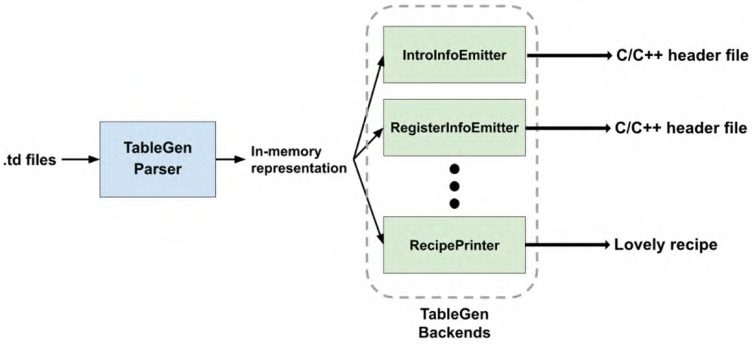
TableGen's high-level workflow The TableGen backend takes in-memory representation (in the form of C++ objects) of the TableGen code we just learned and transforms it into arbitrary textual content. The whole process is driven by the llvm-tblgen executable, whose workflow can be illustrated by this diagram:
Figure 4.1 – Workflow of llvm-tblgen TableGen code's in-memory representation (which consists of C++ types and APIs) plays an important role in the TableGen backend development. Similar to LLVM IR, it is organized hierarchically. Starting from the top level, here is a list of its hierarchy, where each of the items is a C++ class:
  1. RecordKeeper: A collection (and owner) of all Record objects in the current
     translation unit.
  2. Record: Represents a record or a class. The enclosing fields are represented by
     RecordVal. If it's a class, you can also access its template arguments.
  3. RecordVal: Represents a pair of record fields and their initialized value, along
     with supplementary information such as the field's type and source location.
  4. Init: Represents the initialized value of a field. It is a parent class of many, which
     represents different types of initialized values—For example, IntInit for integer
     values and DagInit for DAG values.
Printing a recipe via the TableGen backend 63
To give you a little task on the practical aspect of a TableGen backend, here is the skeleton of it:
  class SampleEmitter {
     RecordKeeper &Records;
  public:
     SampleEmitter(RecordKeeper &RK) : Records(RK) {}
     void run(raw_ostream &OS);
  };
This emitter basically takes a RecordKeeper object (passed in by the constructor) as the input and prints the output into the raw_ostream stream—the function argument of SampleEmitter::run. In the next section, we're going to show you how to set up the development environment and get handson, writing a TableGen backend.
Writing the TableGen backend In this section, we're showing you the steps of writing a backend to print out recipes written in TableGen. Let's start with the setup.
Project setup To get started, LLVM has already provided a skeleton for writing a TableGen backend. So, please copy the llvm/lib/TableGen/TableGenBackendSkeleton.cpp file from the LLVM Project's source tree into the llvm/utils/TableGen folder, as follows:
$ cd llvm $ cp lib/TableGen/TableGenBackendSkeleton.cpp \ utils/TableGen/RecipePrinter.cpp
Then, refactor the cSkeletonEmitter class into RecipePrinter. RecipePrinter has the following workflow:
1. Collect all baking steps and ingredient records. 2. Print individual ingredients in textual formats using individual functions to print measuring units, temperature, equipment, and so on in textual formats. 3. Linearize the DAG of all baking steps. 4. Print each linearized baking step using a function to print custom formatting.
64 TableGen Development
We're not going to cover all the implementation details since lots of backend codes are actually not directly related to TableGen (text formatting and string processing, for example). Therefore, the following subsections only focus on how to retrieve information from TableGen's in-memory objects.
Getting all the baking steps In the TableGen backend, a TableGen record is represented by the Record C++ class. When we want to retrieve all the records derived from a specific TableGen class, we can use one of the functions of RecordKeeper: getAllDerivedDefinitions. For instance, let's say we want to fetch all the baking steps records that derived from the Step TableGen class in this case. Here is how we do with getAllDerivedDefinitions:
// In RecipePrinter::run method… std::vector<Record*> Steps = Records. getAllDerivedDefinitions("Step");
This gives us a list of Record pointers that represent all of the Step records.
         Note
         For the rest of this section, we will use Record in this format (with Courier
         font face) to refer to the C++ counterpart of a TableGen record.
Retrieving field values Retrieving field values from Record is probably the most basic operation. Let's say we're working on a method for printing Unit record objects introduced earlier, as follows:
void RecipePrinter::printUnit(raw_ostream& OS, Record* UnitRecord) { OS << UnitRecord->getValueAsString("Text");
The Record class provides some handy functions, such as getValueAsString, to retrieve the value of a field and try to convert it into a specific type so that you don't need to retrieve the RecordVal value of a specific field (in this case, the Text field) before getting the real value. Similar functions include the following: • Record* getValueAsDef(StringRef FieldName) • bool getValueAsBit(StringRef FieldName)
Printing a recipe via the TableGen backend 65
• int64_t getValueAsInt(StringRef FieldName) • DagInit* getValueAsDag(StringRef FieldName)
In addition to these utility functions, we sometimes just want to check if a specific field exists in a record. In such cases, call Record::getValue(StringRef FieldName) and check if the returned value is null. But just be aware that not every field needs to be initialized; you may still need to check if a field exists, but is uninitialized. When that happens, let Record::isValueUnset help you.
        Note
        TableGen actually uses a special Init class, UnsetInit, to represent an
        uninitialized value.
Type conversion Init represents initialization values, but most of the time we're not directly working with it but with one of its children's classes. For example, StepOrIngredient is an Init type object that represents either a Step record or an ingredient record. It would be easier for us to convert it to its underlying DefInit object since DefInit provides richer functionalities. We can use the following code to typecast the Init type StepOrIngredient into a DefInit type object:
const auto* SIDef = cast<const DefInit>(StepOrIngredient);
You can also use isa<…>(…) to check its underlying type first, or dyn_cast<…>(…) if you don't want to receive an exception when the conversion fails. Record represents a TableGen record, but it would be better if we can find out its parent class, which further tells us the field's information. For example, after getting the underlying Record object for SIDef, we can use the isSubClassOf function to tell if that Record is a baking step or ingredient, as follows:
  Record* SIRecord = SIDef->getDef();
  if (SIRecord->isSubClassOf("Step")) {
    // This Record is a baking step!
  } else if (SIRecord->isSubClassOf("IngredientBase")){
    // This Record is an ingredient!
66 TableGen Development
Knowing what the underlying TableGen class actually is can help us to print that record in its own way.
Handling DAG values Now, we are going to print out the Step records. Recall that we used the dag type to represent the action and the ingredients required for a baking step. Have a look at the following code example:
def step_prep : Step<(heat:$action fry_oil:$oil, oil_ temp:$temp)> { let CustomFormat = "$action $oil until $temp";
Here, the highlighted dag is stored in the Action field of the Step TableGen class. So, we use getValueAsDag to retrieve that field as a DagInit object, as follows:
DagInit* DAG = StepRecord->getValueAsDag("Action");
DagInit is just another class derived from Init, which wasintroduced earlier. It contains some DAG-specific APIs. For example, we can iterate through all of its operands and get their associated Init object using the getArg function, as follows:
  for(i = 0; i < DAG->arg_size; ++i) {
    Init* Arg = DAG->getArg(i);
Furthermore, we can use the getArgNameStr function to retrieve the token (if there is any), which is always represented in string type in the TableGen backend, associated with a specific operand, as illustrated in the following code snippet:
  for(i = 0; i < DAG->arg_size; ++i) {
    StringRef ArgTok = DAG->getArgNameStr(i);
If ArgTok is empty, this means there is no token associated with that operand. To get the token associated with the operator, we can use the getNameStr API.
        Note
        Both DagInit::getArgNameStr and DagInit::getNameStr
        return the token string without the leading dollar sign.
Printing a recipe via the TableGen backend 67
This section has shown you some of the most important aspects of working with TableGen directives' in-memory C++ representation, which is the building block of writing a TableGen backend. In the next section, we will show you the final step to put everything together and run our custom TableGen backend.
Integrating the RecipePrinter TableGen backend After finishing the utils/TableGen/RecipePrinter.cpp file, it's time to put everything together. As mentioned before, a TableGen backend is always associated with the llvm-tblgen tool, which is also the only interface to use the backend. llvm-tblgen uses simple command-line options to choose a backend to use. Here is an example of choosing one of the backends, IntrInfoEmitter, to generate a C/C++ header file from a TableGen file that carries instruction set information of X86:
$ llvm-tblgen -gen-instr-info /path/to/X86.td -o GenX86InstrInfo.inc
Let's now see how to integrate RecipePrinter source file to TableGen backend:
  1. To link the RecipePrinter source file into llvm-tblgen and add a
     command-line option to select it, we're going to use utils/TableGen/
     TableGenBackends.h first. This file only contains a list of TableGen backend
     entry functions, which are functions that take a raw_ostream output stream and
     the RecordKeeper object as arguments. We're also putting our EmitRecipe
     function into the list, as follows:
         …
         void EmitX86FoldTables(RecordKeeper &RK, raw_ostream
         &OS);
         void EmitRecipe(RecordKeeper &RK, raw_ostream &OS);
         void EmitRegisterBank(RecordKeeper &RK, raw_ostream &OS);
         …
  2. Next, inside llvm/utils/TableGen/TableGen.cpp, we're first adding a new
     ActionType enum element and the selected command-line option, as follows:
         enum Action Type {
         …
           GenRecipe,
68 TableGen Development
         …
         …
         cl::opt<ActionType> Action(
             cl::desc("Action to perform:"),
             cl::values(
                 …
                 clEnumValN(GenRecipe, "gen-recipe",
                            "Print delicious recipes"),
                 …
             ));
 3. After that, go to the LLVMTableGenMain function and insert the function call to
    EmitRecipe, as follows:
         bool LLVMTableGenMain(raw_ostream &OS, RecordKeeper
         &Records) {
           switch (Action) {
           …
           case GenRecipe:
             EmitRecipe(Records, OS);
             break;
 4. Finally, don't forget to update utils/TableGen/CMakeLists.txt, as follows:
         add_tablegen(llvm-tblgen LLVM
           …
           RecipePrinter.cpp
           …)
 5. That's all there is to it! You can now run the following command:
         $ llvm-tblgen -gen-recipe DonutRecipe.td
(You can optionally redirect the output to a file using the -o option.)
Printing a recipe via the TableGen backend 69
      The preceding command will print out a (mostly) normal donut recipe, just
      like this:
         =======Ingredients=======
         1. oil 500 ml
         2. flour 300 g
         3. milk 1.25 cup
         4. whole egg 1
         5. yeast 1.50 tsp
         6. butter 3.50 tbsp
         7. sugar 2.0 tbsp
         8. salt 0.50 tsp
         9. vanilla extract 1.0 tsp
         =======Instructions=======
         1. use deep fryer to heat oil until 160 C
         2. use mixer to mix flour, milk, whole egg, yeast,
         butter, sugar, salt, and vanilla extract. stir in low
         speed.
         3. use mixer to mix outcome from (step 2). stir in medium
         speed.
         4. use bowl to ferment outcome from (step 3).
         5. use rolling pin to flatten outcome from (step 4).
         6. use cutter to cut outcome from (step 5).
         7. use deep fryer to fry outcome from (step 1) and
         outcome from (step 6).
In this section, we have learned how to build a custom TableGen backend to transform a recipe written in TableGen into normal plaintext format. Things we learned here include how llvm-tblgen, the driver of translating TableGen code, works; how to use the TableGen backend's C++ APIs to operate TableGen directive's in-memory representation; and how to integrate our custom backend into llvm-tblgen in order to run it. Combining the skills you learned in this chapter and in the previous one, you can create a complete and standalone toolchain that implements your custom logic, using TableGen as a solution.
70 TableGen Development
Summary In this chapter, we introduced TableGen, a powerful DSL for expressing structural data. We have shown you its universality in solving a variety of tasks, albeit it originally being created for compiler development. Through the lens of writing a donut recipe in TableGen, we have learned its core syntax. The following section on developing a custom TableGen backend taught you how to use C++ APIs to interact with in-memory TableGen directives parsed from the source input, giving you the power to create a complete and standalone TableGen toolchain to implement your own custom logic. Learning how to master TableGen can not only help your development in LLVM-related projects but also gives you more options to solve structural data problems in arbitrary projects. This section marks the end of the first part—an introduction to all kinds of useful supporting components in the LLVM project. Starting from the next chapter, we will move into the core compilation pipeline of LLVM. The first important topic we will cover is Clang, LLVM's official frontend for C-family programming languages.
Further reading
     • This LLVM page provides a good reference on the TableGen syntax:
       https://llvm.org/docs/TableGen/ProgRef.html
     • This LLVM page provides a good reference on developing a TableGen backend:
       https://llvm.org/docs/TableGen/BackGuide.html
                                   Section 2:
                                   Frontend
                                Development
In this section, you will learn about topics related to the frontend, including Clang and its tooling (for example, semantic reasoning) infrastructures. We will exclusively focus on plugin developments and how to write your custom toolchains. This section includes the following chapters:
• Chapter 5, Exploring Clang's Architecture • Chapter 6, Extending the Preprocessor • Chapter 7, Handling AST • Chapter 8, Working with Compiler Flags and Toolchains