Ch 9 — Working with PassManager and AnalysisManager
Working with PassManager and AnalysisManager In the previous section of this book, Frontend Development, we began with an introduction to the internals of Clang, which is LLVM's official frontend for the C family of programming languages. We went through various projects, involving skills and knowledge, that can help you to deal with problems that are tightly coupled with source code. In this part of the book, we will be working with LLVM IR – a target-independent intermediate representation (IR) for compiler optimization and code generation. Compared to Clang's Abstract Syntax Tree (AST), LLVM IR provides a different level of abstraction by encapsulating extra execution details to enable more powerful program analyses and transformations. In addition to the design of LLVM IR, there is a mature ecosystem around this IR format, which provides countless resources, such as libraries, tools, and algorithm implementations. We will cover a variety of topics in LLVM IR, including the most common LLVM Pass development, using and writing program analysis, and the best practices and tips for working with LLVM IR APIs. Additionally, we will review more advanced skills such as Program Guided Optimization (PGO) and sanitizer development.
184 Working with PassManager and AnalysisManager
In this chapter, we are going to talk about writing a transformation Pass and program analysis for the new PassManager. LLVM Pass is one of the most fundamental, and crucial, concepts within the entire project. It allows developers to encapsulate program processing logic into a modular unit that can be freely composed with other Passes by the PassManager, depending on the situation. In terms of the design of the Pass infrastructure, LLVM has actually gone through an overhaul of both PassManager and AnalysisManager to improve their runtime performance and optimization quality. The new PassManager uses a quite different interface for its enclosing Passes. This new interface, however, is not backward-compatible to the legacy one, meaning you cannot run legacy Passes in the new PassManager and vice versa. What is worse, there aren't many learning resources online that talk about this new interface, even though, now, they are enabled, by default, in both LLVM and Clang. The content of this chapter will fill this gap and provide you with an up-to-date guide to this crucial subsystem in LLVM. In this chapter, we will cover the following topics:
• Writing an LLVM Pass for the new PassManager • Working with the new AnalysisManager • Learning instrumentations in the new PassManager
With the knowledge learned from this chapter, you should be able to write an LLVM Pass, using the new Pass infrastructure, to transform or even optimize your input code. You can also further improve the quality of your Pass by leveraging the analysis data provided by LLVM's program analysis framework.
Technical requirements In this chapter, we will, primarily, use a command-line utility, called opt, to test our Passes. You can build it using a command like this:
$ ninja opt
The code example for this chapter can be found at https://github.com/ PacktPublishing/LLVM-Techniques-Tips-and-Best-Practices-Clangand-Middle-End-Libraries/tree/main/Chapter09.
Writing an LLVM Pass for the new PassManager 185
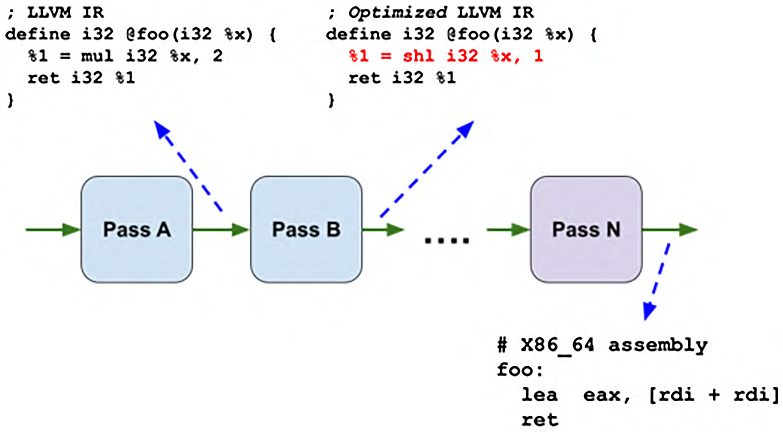
Writing an LLVM Pass for the new PassManager A Pass in LLVM is the basic unit that is required to perform certain actions against LLVM IR. It is similar to a single production step in a factory, where the products that need to be processed are LLVM IR and the factory workers are the Passes. In the same way that a normal factory usually has multiple manufacturing steps, LLVM also consists of multiple Passes that are executed in sequential order, called the Pass pipeline. Figure 9.1 shows an example of the Pass pipeline:
Figure 9.1 – An example of the LLVM Pass pipeline and its intermediate results In the preceding diagram, multiple Passes are arranged in a straight line. The LLVM IR for the foo function is processed by one Pass after another. Pass B, for instance, performs code optimization on foo and replaces an arithmetic multiplication (mul) by 2 with left shifting (shl) by 1, which is considered easier than multiplication in most hardware architectures. In addition, this figure also illustrates that the code generation steps are modeled as Passes. Code generation in LLVM transforms LLVM IR, which is target independent, into assembly code for certain hardware architecture (for example, x86_64 in Figure 9.1). Each detailed procedure, such as the register allocation, instruction selection, or instruction scheduling, is encapsulated into a single Pass and is executed in a certain order.
        Code generation Passes
        Passes for code generation have a different API than normal LLVM IR Passes.
        Additionally, during the code generation phase, LLVM IR is actually converted
        into another kind of IR, called Machine IR (MIR). However, in this chapter, we
        will only be covering LLVM IR and its Passes.
186 Working with PassManager and AnalysisManager
This Pass pipeline is conceptually managed by an infrastructure called PassManager. PassManager owns the plan – their execution order, for example – to run these Passes. Conventionally, we actually use the terms Pass pipeline and PassManager interchangeably since they have nearly identical missions. In the Learning instrumentations in the new PassManager section, we will go into more detail about the pipeline itself and discuss how to customize the execution order of these enclosing Passes. Code transformations in modern compilers can be complex. Because of this, multiple transformation Passes might need the same set of program information, which is called analysis in LLVM, in order to do their work. Furthermore, to achieve maximum efficiency, LLVM also caches this analysis data so that it can be reused if possible. However, since a transformation Pass might change the IR, some cached analysis data, which was previously collected, might be outdated after running that Pass. To solve these challenges, in addition to PassManager, LLVM has also created AnalysisManager to manage everything related to program analysis. We will go deeper into AnalysisManager in the Working with the new AnalysisManager section. As mentioned in the introduction of this chapter, LLVM has gone through a series of overhauls on its Pass and PassManager (and AnalysisManager) infrastructure. The new infrastructure runs faster and generates results with better quality. Nevertheless, the new Pass differs in many places from the old one; we will briefly explain these differences along the way. However, aside from that, we will only be discussing the new Pass infrastructure, by default, for the rest of the chapter. In this section, we will show you how to develop a simple Pass for the new PassManager. As usual, we will begin with a description of the sample project we are about to use. Then, we will show you the steps to create a Pass that can be dynamically loaded from a plugin into the Pass pipeline, which was mentioned earlier, using the opt utility.
Project overview In this section, the sample project we are using is called StrictOpt. It is a Pass and Pass plugin that adds a noalias attribute to every function parameter that has a pointer type. Effectively, it adds a restrict keyword to the function parameters in C code. First, let's explain what the restrict keyword does.
        The restrict keyword in C and C++
        The restrict keyword was introduced in C99. However, it doesn't have a
        counterpart in C++. Nevertheless, mainstream compilers such as Clang, GCC,
        and MSVS all support the same functionality in C++. For example, in Clang
        and GCC, you can use __restrict__ or __restrict in C++ code and
        it has the same effect as restrict in C.
Writing an LLVM Pass for the new PassManager 187
The restrict keyword can also be used alongside pointer type variables in C. In the most common cases, it is used with pointer type function parameters. The following is an example:
  int foo(int* restrict x, int* restrict y) {
    *x = *y + 1;
    return *y;
Essentially, this additional attribute tells the compiler that argument x will never point to the same memory region as argument y. In other words, programmers can use this keyword to persuade the compilers that they will never call the foo function, as follows:
  …
  // Programmers will NEVER write the following code
  int main() {
    int V = 1;
    return foo(&V, &V);
The rationale behind this is that if the compiler knows that two pointers – in this case, the two pointer arguments – will never point to the same memory region, it can do more aggressive optimizations. To give you a more concrete understanding of this, if you compare the assembly code of the foo function with and without the restrict keyword, the latter version takes five instructions to execute (on x86_64):
  foo:
         mov     eax, dword ptr [rsi]
         add     eax, 1
         mov     dword ptr [rdi], eax
         mov     eax, dword ptr [rsi]
         ret
The version with the restrict keyword added only takes four instructions:
  foo:
         mov     eax, dword ptr [rsi]
         lea     ecx, [rax + 1]
         mov     dword ptr [rdi], ecx
         ret
188 Working with PassManager and AnalysisManager
Although the difference here seems subtle, in the version without restrict, the compiler needs to insert an extra memory load to assure that the last argument *y (in the original C code) always reads the latest value. This extra cost might gradually accumulate in a more complex code base and, eventually, create a performance bottleneck. Now, you have learned how restrict works and its importance for ensuring good performance. In LLVM IR, there is also a corresponding directive to model the restrict keyword: the noalias attribute. This attribute is attached to the pointer function parameters if hints such as restrict have been given by programmers in the original source code. For example, the foo function (with the restrict keywords) can be translated into the following LLVM IR:
  define i32 @foo(i32* noalias %0, i32* noalias %1) {
    %3 = load i32, i32* %1
    %4 = add i32 %3, 1
    store i32 %4, i32* %0
    ret i32 %3
Furthermore, we can also generate the LLVM IR code of the foo function without restrict in C code, as follows:
  define i32 @foo(i32* %0, i32* %1) {
    %3 = load i32, i32* %1
    %4 = add i32 %3, 1
    store i32 %4, i32* %0
    %5 = load i32, i32* %1
    ret i32 %5
Here, you will find that there is an extra memory load (as shown in the highlighted instruction of the preceding snippet), which is similar to what happened to the assembly examples from earlier. That is, LLVM is unable to perform more aggressive optimization to remove that memory load since it's not sure whether those pointers overlap each other.
Writing an LLVM Pass for the new PassManager 189
In this section, we are going to write a Pass to add a noalias attribute to every pointer argument of a function. The Pass will be built as a plugin, and once it's loaded into opt, users can use the --passes argument to explicitly trigger StrictOpt, as follows:
  $ opt --load-pass-plugin=StrictOpt.so \
        --passes="function(strict-opt)" \
        -S -o – test.ll
Alternatively, we can make StrictOpt run before other optimizations if the optimization level is greater or equal to -O3. The following is an example:
  $ opt -O3 --enable-new-pm \
        --load-pass-plugin=StrictOpt.so \
        -S -o – test.ll
We will show you how to switch between these two modes shortly.
        A demo-only Pass
        Note that StrictOpt is merely a demo-only Pass, and adding noalias to
        every pointer function argument is absolutely not the thing you should do in
        real-world use cases. This is because it might break the correctness of the target
        program.
In the next section, we will show you detailed steps of how to create this Pass.
Writing the StrictOpt Pass The following instructions will take you through the process of developing the core Pass logic before covering how to register StrictOpt into the Pass pipeline dynamically:
  1. We only have two source files this time: StrictOpt.h and StrictOpt.cpp.
     In the former file, we place the skeleton of the StrictOpt Pass:
         #include "llvm/IR/PassManager.h"
         struct StrictOpt : public PassInfoMixin<StrictOpt> {
            PreservedAnalyses run(Function &F,
                                  FunctionAnalysisManager &FAM);
         };
190 Working with PassManager and AnalysisManager
      The Pass we are writing here is a function Pass; namely, it runs on the Function IR
      unit. The run method is the primary entry point for this Pass, which we are going
      to fill in later. It takes two arguments: a Function class that we will work on and
      a FunctionAnalysisManager class that can give you analysis data. It returns a
      PreservedAnalyses instance, which tells PassManager (and AnalysisManager)
      what analysis data was invalidated by this Pass.
      If you have prior experience in writing LLVM Pass for the legacy PassManager, you
      might find several differences between the legacy Pass and the new Pass:
      a) The Pass class no longer derives from one of the FunctionPass, ModulePass,
         or LoopPass. Instead, the Passes running on different IR units are all
         deriving from PassInfoMixin<YOUR_PASS>. In fact, deriving from
         PassInfoMixin is not even a requirement for a functional Pass anymore – we
         will leave this as an exercise for you.
      b) Instead of overriding methods, such as runOnFunction or runOnModule,
         you will define a normal class member method, run (be aware that run does not
         have an override keyword that follows), which operates on the desired IR unit.
      Overall, the new Pass has a cleaner interface compared to the legacy one. This
      difference also allows the new PassManager to have less overhead runtime.
 2. To implement the skeleton from the previous step, we are heading to StrictOpt.
    cpp. In this file, first, we create the following method definition:
         #include "StrictOpt.h"
         using namespace llvm;
         PreservedAnalyses StrictOpt::run(Function &F,
                                   FunctionAnalysisManager &FAM) {
           return PreservedAnalyses::all(); // Just a placeholder
      The returned PreservedAnalyses::all() instance is just a placeholder that
      will be removed later.
 3. Now, we are finally creating the code to add a noalias attribute to the pointer
    function arguments. The logic is simple: for each Argument instance in
    a Function class, attach noalias if it fulfills the criteria:
         // Inside StrictOpt::run…
         bool Modified = false;
         for (auto &Arg : F.args()) {
Writing an LLVM Pass for the new PassManager 191
           if (Arg.getType()->isPointerTy() &&
               !Arg.hasAttribute(Attribute::NoAlias)) {
             Arg.addAttr(Attribute::NoAlias);
             Modified |= true;
    The args() method of the Function class will return a range of Argument
    instances representing all of the formal parameters. We check each of their types to
    make sure there isn't an existing noalias attribute (which is represented by the
    Attribute::NoAlias enum). If everything looks good, we use addAttr to
    attach noalias.
    Here, the Modified flag here records whether any of the arguments were modified
    in this function. We will use this flag shortly.
4. Certain analysis data might become outdated after a transformation Pass since
   the latter might change the program's IR. Therefore, when writing a Pass, we need
   to return a PreservedAnalyses instance to show which analysis was affected
   and should be subject to recalculation. While there are many analyses available in
   LLVM, we don't need to enumerate each of them. Instead, there are some handy
   utility functions to create PreservedAnalyses instances, representing all
   analyses or none of the analyses, such that we only need to subtract or add (un)
   affected analysis from it. Here is what we do in StrictOpt:
       #include "llvm/Analysis/AliasAnalysis.h"
       …
       // Inside StrictOpt::run…
       auto PA = PreservedAnalyses::all();
       if (Modified)
         PA.abandon<AAManager>();
       return PA;
    Here, we first create a PreservedAnalyses instance, PA, which represents all
    analyses. Then, if the Function class we are working on here has been modified,
    we discard the AAManager analysis via the abandon method. AAManager
    represents the alias analysis in LLVM.
192 Working with PassManager and AnalysisManager
      Without going into the details of this, the alias analysis asks whether two pointers
      point to the same memory region, or whether the memory regions they are pointing
      to overlap with each other. The noalias attribute we are discussing here has strong
      relations with this analysis since they're working on a nearly identical problem.
      Therefore, if any new noalias attribute was generated, all the cached alias analysis
      data would be outdated. This is why we invalidate it using abandon.
      Note that you can always return a PreservedAnalyses::none() instance,
      which tells AnalysisManager to mark every analysis as outdated if you are not
      sure what analyses have been affected. This comes at a cost, of course, since
      AnalysisManager then needs to spend extra effort to recalculate the analyses that
      might contain expensive computations.
 5. The core logic of StrictOpt is essentially finished. Now, we are going to show
    you how to dynamically register the Pass into the pipeline. In StrictOpt.cpp,
    we create a special global function, called llvmGetPassPluginInfo, with an
    outline like this:
         extern "C" ::llvm::PassPluginLibraryInfo LLVM_ATTRIBUTE_
         WEAK
         llvmGetPassPluginInfo() {
           return {
              LLVM_PLUGIN_API_VERSION, "StrictOpt", "v0.1",
             [](PassBuilder &PB) {…}
           };
      This function returns a PassPluginLibraryInfo instance, which contains
      various pieces of information such as the plugin API version (LLVM_PLUGIN_
      API_VERSION) and the Pass name (StrictOpt). One of its most important
      fields is a lambda function that takes a single PassBuilder& argument. In that
      particular function, we are going to insert our StrictOpt into a proper position
      within the Pass pipeline.
Writing an LLVM Pass for the new PassManager 193
PassBuilder, as its name suggests, is an entity LLVM that is used to build the Pass pipeline. In addition to its primary job, which involves configuring the pipeline according to the optimization level, it also allows developers to insert Passes into some of the places in the pipeline. Furthermore, to increase its flexibility, PassBuilder allows you to specify a textual description of the pipeline you want to run by using the --passes argument on opt, as we have seen previously. For instance, the following command will run InstCombine, PromoteMemToReg, and SROA (SROA: Scalar Replacement of Aggregates) in sequential order: $ opt --passes="instcombine,mem2reg,sroa" test.ll -S -o –
What we are going to do in this step is ensure that after the plugin has been loaded, opt will run our Pass if strict-opt appears in the --passes argument, as follows: $ opt --passes="strict-opt" test.ll -S -o –
To do this, we leverage the registerPipelineParsingCallback method in
PassBuilder:
   …
   [](PassBuilder &PB) {
     using PipelineElement = typename
   PassBuilder::PipelineElement;
     PB.registerPipelineParsingCallback(
       [](StringRef Name,
          FunctionPassManager &FPM,
   ArrayRef<PipelineElement>){
         if (Name == "strict-opt") {
           FPM.addPass(StrictOpt());
           return true;
         return false;
       });
194 Working with PassManager and AnalysisManager
      The registerPipelineParsingCallback method takes another lambda
      callback as the argument. This callback is invoked whenever PassBuilder
      encounters an unrecognized Pass name while parsing the textual pipeline
      representation. Therefore, in our implementation, we simply insert our StrictOpt
      pass into the pipeline via FunctionPassManager::addPass when the
      unrecognized Pass name, that is, the Name parameter, is strict-opt.
 6. Alternatively, we also want to trigger our StrictOpt at the beginning of the
    Pass pipeline without using the textual pipeline description, as we described in the
    Project overview section. This means that the Pass will be run before other Passes
    after it is loaded into opt using the following command:
         $ opt -O2 --enable-new-pm \
               --load-pass-plugin=StrictOpt.so test.ll -S -o –
      (The --enable-new-pm flag in the preceding command forced opt to use the
      new PassManager since it's still using the legacy one by default. We haven't used
      this flag before because --passes implicitly enables the new PassManager under
      the hood.)
      To do this, instead of using
      PassBuilder::registerPipelineParsingCallback
      to register a custom (pipeline) parser callback, we are going to use
      registerPipelineStartEPCallback to handle this. Here is the alternative
      version of the code snippet from the previous step:
         …
         [](PassBuilder &PB) {
           using OptimizationLevel
             = typename PassBuilder::OptimizationLevel;
           PB.registerPipelineStartEPCallback(
             [](ModulePassManager &MPM, OptimizationLevel OL) {
               if (OL.getSpeedupLevel() >= 2) {
                 MPM.addPass(
                   createModuleToFunctionPassAdaptor(StrictOpt()));
             });
Writing an LLVM Pass for the new PassManager 195
There are several things worth noting in the preceding snippet:
   • The registerPipelineStartEPCallback method we are using here registers
     a callback that can customize certain places in the Pass pipeline, called extension
     points (EPs). The EP we are going to customize here is one of the earliest points in
     the pipeline.
   • In comparison to the lambda callback we saw in
     registerPipelineParsingCallback, the lambda callback for
     registerPipelineStartEPCallback only provides ModulePassManager,
     rather than FunctionPassManager, to insert our StrictOpt Pass, which is
     a function Pass. We are using ModuleToFunctionPassAdapter to overcome
     this issue.
      ModuleToFunctionPassAdapter is a module Pass that can run a given
      function Pass over a module's enclosing functions. It is suitable for running
      a function Pass in contexts where only ModulePassManager is available,
      such as in this scenario. The createModuleToFunctionPassAdaptor
      function highlighted in the preceding code is used to create a new
      ModuleToFunctionPassAdapter instance from a specific function Pass.
   • Finally, in this version, we are only enabling StrictOpt when the optimization
     level is greater or equal to -O2. Therefore, we leverage the OptimizationLevel
     argument passing into the lambda callback to determine whether we want to insert
     StrictOpt into the pipeline or not.
      With these Pass registration steps, we have also learned how to trigger our
      StrictOpt without explicitly specifying the textual Pass pipeline.
To summarize, in this section, we learned the essentials of the LLVM Pass and Pass
pipeline. Through the StrictOpt project, we have learned how to develop a Pass –
which is also encapsulated as a plugin – for the new PassManager and how to dynamically
register it against the Pass pipeline in opt in two different ways: first, by triggering
the Pass explicitly via a textual description, and second, by running it at a certain time
point (EP) in the pipeline. We also learned how to invalidate analyses depending on the
changes made in the Pass. These skills can help you develop high-quality and modern
LLVM Passes to process IR in a composable fashion with maximum flexibility. In the
next section, we will dive into the program analysis infrastructure of LLVM. This greatly
improves the capability of normal LLVM transformation Passes.
196 Working with PassManager and AnalysisManager
Working with the new AnalysisManager Modern compiler optimizations can be complex. They usually require lots of information from the target program in order to make correct decisions and optimal transformations. For example, in the Writing an LLVM Pass for the new PassManager section, LLVM used the noalias attribute to calculate memory aliasing information, which might eventually be used to remove redundant memory loads. Some of this information – called analysis, in LLVM – is expensive to evaluate. In addition, a single analysis might also depend on other analyses. Therefore, LLVM creates an AnalysisManager component to handle all tasks related to program analysis in LLVM. In this section, we are going to show you how to use AnalysisManager in your own Passes for the sake of writing more powerful and sophisticated program transformations or analyses. We will also use a sample project, HaltAnalyzer, to drive our tutorial here. The next section will provide you with an overview of HaltAnalyzer before moving on to the detailed development steps.
Overview of the project HaltAnalyzer is set up in a scenario where target programs are using a special function, my_halt, that terminates the program execution when it is called. The my_halt function is similar to the std::terminate function, or the assert function when its sanity check fails. The job of HaltAnalyzer is to analyze the program to find basic blocks that are guaranteed to be unreachable because of the my_halt function. To be more specific, let's take the following C code as an example:
  int foo(int x, int y) {
    if (x < 43) {
      my_halt();
      if (y > 45)
        return x + 1;
      else {
        bar();
        return x;
    } else {
      return y;
Working with the new AnalysisManager 197
Because my_halt was called at the beginning of the true block for the if (x < 43) statement, the code highlighted in the preceding snippet will never be executed (that is, my_halt stopped all of the program executions before even getting to those lines). HaltAnalyzer should identify these basic blocks and print out warning messages to stderr. Just like the sample project from the previous section, HaltAnalyzer is also a function Pass wrapped inside a plugin. Therefore, if we use the preceding snippet as the input to our HaltAnalyzer Pass, it should print out the following messages:
$ opt --enable-new-pm --load-pass-plugin ./HaltAnalyzer.so \ --disable-output ./test.ll [WARNING] Unreachable BB: label %if.else [WARNING] Unreachable BB: label %if.then2 $
The %if.else and %if.then2 strings are just names for the basic blocks in the if (y > 45) statement (you might see different names on your side). Another thing worth noting is the --disable-output command-line flag. By default, the opt utility will print out the binary form of LLVM IR (that is, the LLVM bitcode) anyway unless users redirect the output to other places via the -o flag. Using the aforementioned flag is merely to tell opt not to do that since we are not interested in the final content of LLVM IR (because we are not going to modify it) this time. Although the algorithm of HaltAnalyzer seems pretty simple, writing it from scratch might be a pain. That's why we are leveraging one of the analyses provided by LLVM: the Dominator Tree (DT). The concept of Control Flow Graph (CFG) domination has been taught in most entry-level compiler classes, so we are not going to explain it in depth here. Simply speaking, if we say a basic block dominates another block, every execution flow that arrives at the latter is guaranteed to go through the former first. A DT is one of the most important and commonly used analyses in LLVM; most control flow-related transformations cannot live without it. Putting this idea into HaltAnalyzer, we are simply looking for all of the basic blocks that are dominated by the basic blocks that contain a function call to my_halt (we are excluding the basic blocks that contain the my_halt call sites from the warning messages). In the next section, we will show you detailed instructions on how to write HaltAnalyzer.
198 Working with PassManager and AnalysisManager
Writing the HaltAnalyzer Pass In this project, we will only create a single source file, HaltAnalyzer.cpp. Most of the infrastructure, including CMakeListst.txt, can be reused from the StrictOpt project in the previous section:
 1. Inside HaltAnalyzer.cpp, first, we create the following Pass skeleton:
         class HaltAnalyzer : public PassInfoMixin<HaltAnalyzer> {
           static constexpr const char* HaltFuncName = "my_halt";
           // All the call sites to "my_halt"
           SmallVector<Instruction*, 2> Calls;
           void findHaltCalls(Function &F);
         public:
            PreservedAnalyses run(Function &F,
                                  FunctionAnalysisManager &FAM);
         };
      In addition to the run method that we saw in the previous section, we are
      creating an additional method, findHaltCalls, which will collect all of the
      Instruction calls to my_halt in the current function and store them inside the
      Calls vector.
 2. Let's implement findHaltCalls first:
         void HaltAnalyzer::findHaltCalls(Function &F) {
           Calls.clear();
           for (auto &I : instructions(F)) {
             if (auto *CI = dyn_cast<CallInst>(&I)) {
               if (CI->getCalledFunction()->getName() ==
                   HaltFuncName)
                 Calls.push_back(&I);
      This method uses llvm::instructions to iterate through every
      Instruction call in the current function and check them one by one. If the
      Instruction call is a CallInst – representing a typical function call site – and
      the callee name is my_halt, we will push it into the Calls vector for later use.
Working with the new AnalysisManager 199
     Function name mangling
     Be aware that when a line of C++ code is compiled into LLVM IR or native
     code, the name of any symbol – including the function name – will be different
     from what you saw in the original source code. For example, a simple function
     that has the name of foo and takes no argument might have _Z3foov as its name
     in LLVM IR. We call such a transformation in C++ name mangling. Different
     platforms also adopt different name mangling schemes. For example, in Visual
     Studio, the same function name becomes ?foo@@YAHH@Z in LLVM IR.
3. Now, let's go back to the HaltAnalyzer::run method. There are two things we
   are going to do. We will collect the call sites to my_halt via findHaltCalls,
   which we just wrote, and then retrieve the DT analysis data:
      #include "llvm/IR/Dominators.h"
      …
      PreservedAnalyses
      HaltAnalyzer::run(Function &F, FunctionAnalysisManager
      &FAM) {
        findHaltCalls(F);
        DominatorTree &DT = FAM.
          getResult<DominatorTreeAnalysis>(F);
        …
   The highlighted line in the preceding snippet is the main character of this section.
   It shows us how to leverage the provided FunctionAnalysisManager type
   argument to retrieve specific analysis data (in this case, DominatorTree) for
   a specific Function class.
   Although, so far, we have (kind of) used the words analysis and analysis data
   interchangeably, in a real LLVM implementation, they are actually two different
   entities. Take the DT that we are using here as an example:
   a) D
       ominatorTreeAnalysis is a C++ class that evaluates dominating relationships
      from the given Function. In other words, it is the one that performs the
      analysis.
   b) D
       ominatorTree is a C++ class that represents the result generated from
      DominatorTreeAnalysis. This is just static data that will be cached by
      AnalysisManager until it is invalidated.
200 Working with PassManager and AnalysisManager
      Furthermore, LLVM asks every analysis to clarify its affiliated result type via the
      Result member type. For example, DominatorTreeAnalysis::Result is
      equal to DominatorTree.
      To make this even more formal, to associate the analysis data of an analysis class, T,
      with a Function variable, F, we can use the following snippet:
         // `FAM` is a FunctionAnalysisManager
         typename T::Result &Data = FAM.getResult<T>(F);
 4. After we retrieve DominatorTree, it's time to find all of the basic blocks
    dominated by the Instruction call sites that we collected earlier:
         PreservedAnalyses
         HaltAnalyzer::run(Function &F, FunctionAnalysisManager
         &FAM) {
           …
           SmallVector<BasicBlock*, 4> DomBBs;
           for (auto *I : Calls) {
             auto *BB = I->getParent();
             DomBBs.clear();
             DT.getDescendants(BB, DomBBs);
               for (auto *DomBB : DomBBs) {
               // excluding the block containing `my_halt` call site
                 if (DomBB != BB) {
                   DomBB->printAsOperand(
                          errs() << "[WARNING] Unreachable BB: ");
                   errs() << "\n";
             return PreservedAnalyses::all();
Working with the new AnalysisManager 201
    By using the DominatorTree::getDescendants method, we can retrieve all
    of the basic blocks dominated by a my_halt call site. Note that the results from
    getDescendants will also contain the block you put into the query (in this
    case, the block containing the my_halt call sites), so we need to exclude it before
    printing the basic block name using the BasicBlock::printAsOperand
    method.
    With the ending of the returning PreservedAnalyses::all(), which tells
    AnalysisManager that this Pass does not invalidate any analysis since we don't
    modify the IR at all, we will wrap up the HaltAnalyzer::run method here.
5. Finally, we need to dynamically insert our HaltAnalyzer Pass into the Pass pipeline.
   We are using the same method that we did in the last section, by implementing the
   llvmGetPassPluginInfo function and using PassBuilder to put our Pass at
   one of the EPs in the pipeline:
       extern "C" ::llvm::PassPluginLibraryInfo LLVM_ATTRIBUTE_
       WEAK
       llvmGetPassPluginInfo() {
         return {
            LLVM_PLUGIN_API_VERSION, "HaltAnalyzer", "v0.1",
            [](PassBuilder &PB) {
              using OptimizationLevel
                = typename PassBuilder::OptimizationLevel;
              PB.registerOptimizerLastEPCallback(
                [](ModulePassManager &MPM, OptimizationLevel OL)
       {
                  MPM.addPass(createModuleToFunctionPassAdaptor
                   (HaltAnalyzer()));
                });
         };
202 Working with PassManager and AnalysisManager
      In comparison to StrictOpt in the previous section, we are using
      registerOptimizerLastEPCallback to insert HaltAnalyzer after
      all of the other optimization Passes. The rationale behind this is that some
      optimizations might move basic blocks around, so prompting warnings
      too early might not be very useful. Nevertheless, we are still leveraging
      ModuletoFunctionPassAdaptor to wrap around our Pass; this is because
      registerOptimizerLastEPCallback only provides ModulePassManager
      for us to add our Pass, which is a function Pass.
These are all the necessary steps to implement our HaltAnalyzer. Now you have learned
how to use LLVM's program analysis infrastructure to obtain more information about the
target program in an LLVM Pass. These skills can provide you with more insight into IR
when you are developing a Pass. In addition, this infrastructure allows you to reuse high-
quality, off-the-shelf program analysis algorithms from LLVM instead of recreating the
wheels by yourself. To browse all of the available analyses provided by LLVM, the llvm/
include/llvm/Analysis folder in the source tree is a good starting point. Most of
the header files within this folder are standalone analysis data files that you can use.
In the final section of this chapter, we will show you some diagnosis techniques that are
useful for debugging an LLVM Pass.
Learning instrumentations in the new PassManager PassManager and AnalysisManager in LLVM are complicated pieces of software. They manage interactions between hundreds of Passes and analyses, and it can be a challenge when we try to diagnose a problem caused by them. In addition, it's really common for a compiler engineer to fix crashes in the compiler or miscompilation bugs. In those scenarios, useful instrumentation tools that provide insights to Passes and the Pass pipeline can greatly improve the productivity of fixing those problems. Fortunately, LLVM has already provided many of those tools.
        Miscompilation
        Miscompilation bugs usually refer to logical issues in the compiled program,
        which were introduced by compilers. For example, an overly aggressive
        compiler optimization removes certain loops that shouldn't be removed,
        causing the compiled software to malfunction, or mistakenly reorder memory
        barriers and create race conditions in the generated code.
Learning instrumentations in the new PassManager 203
We will introduce a single tool at a time in each of the following sections. Here is the list of them:
• Printing Pass pipeline details • Printing changes to the IR after each Pass • Bisecting the Pass pipeline
These tools can interact purely in the command-line interface of opt. In fact, you can also create your own instrumentation tools (without even changing the LLVM source tree!); we will leave this as an exercise for you.
Printing Pass pipeline details There are many different optimization levels in LLVM, that is, the -O1, -O2, or -Oz flags we are familiar with when using clang (or opt). Each optimization level is running a different set of Passes and arranging them in different orders. In some cases, this might greatly affect the generated code, in terms of performance or correctness. Therefore, sometimes, it's crucial to know these configurations in order to gain a clear understanding of the problems we are going to deal with. To print out all the Passes and the order they are currently running in inside opt, we can use the --debug-pass-manager flag. For instance, given the following C code, test.c, we will see the following:
  int bar(int x) {
    int y = x;
    return y * 4;
  int foo(int z) {
    return z + z * 2;
We first generate the IR for it using the following command:
$ clang -O0 -Xclang -disable-O0-optnone -emit-llvm -S test.c
204 Working with PassManager and AnalysisManager
        The -disable-O0-optnone flag
        By default, clang will attach a special attribute, optnone, to each
        function under the -O0 optimization level. This attribute will prevent any
        further optimization on the attached functions. Here, the -disable-
        O0-optnone (frontend) flag is preventing clang from attaching to this
        attribute.
Then, we use the following command to print out all of the Passes running under the optimization level of -O2:
$ opt -O2 --disable-output --debug-pass-manager test.ll Starting llvm::Module pass manager run. … Running pass: Annotation2MetadataPass on ./test.ll Running pass: ForceFunctionAttrsPass on ./test.ll … Starting llvm::Function pass manager run. Running pass: SimplifyCFGPass on bar Running pass: SROA on bar Running analysis: DominatorTreeAnalysis on bar Running pass: EarlyCSEPass on bar … Finished llvm::Function pass manager run. … Starting llvm::Function pass manager run. Running pass: SimplifyCFGPass on foo … Finished llvm::Function pass manager run. Invalidating analysis: VerifierAnalysis on ./test.ll … $
Learning instrumentations in the new PassManager 205
The preceding command-line output tells us that opt first runs a set of module-level optimizations; the ordering of those Passes (for example, Annotation2MetadataPass and ForceFunctionAttrsPass) are also listed. After that, a sequence of functionlevel optimizations is performed on the bar function (for example, SROA) before running those optimizations on the foo function. Furthermore, it also shows the analyses used in the pipeline (for example, DominatorTreeAnalysis), as well as prompting us with a message regarding they became invalidated (by a certain Pass). To sum up, --debug-pass-manager is a useful tool to peek into the Passes and their ordering run by the Pass pipeline at a certain optimization level. Knowing this information can give you a big picture of how Passes and analyses interact with the input IR.
Printing changes to the IR after each Pass To understand the effects of a particular transformation Pass on your target program, one of the most straightforward ways is to compare the IR before and after it is processed by that Pass. To be more specific, in most cases, we are interested in the changes made by a particular transformation Pass. For instance, if LLVM mistakenly removes a loop that it shouldn't do, we want to know what Pass did that, and when the removal happened in the Pass pipeline. By using the --print-changed flag (and some other supported flags that we will introduce shortly) with opt, we can print out the IR after each Pass if it was ever modified by that Pass. Using the test.c (and its IR file, test.ll) example code from the previous paragraph, we can use the following command to print changes, if there are any, made by each Pass:
  $ opt -O2 --disable-output --print-changed ./test.ll
  *** IR Dump At Start: ***
  define dso_local i32 @bar(i32 %x) #0 {
  entry:
    %x.addr = alloca i32, align 4
    %y = alloca i32, align 4
    …
    %1 = load i32, i32* %y, align 4
    %mul = mul nsw i32 %1, 4
    ret i32 %mul
206 Working with PassManager and AnalysisManager
*** IR Dump After VerifierPass (module) omitted because no change *** … *** IR Dump After SROA *** (function: bar) ; Function Attrs: noinline nounwind uwtable define dso_local i32 @bar(i32 %x) #0 { entry: %mul = mul nsw i32 %x, 4 ret i32 %mul $
Here, we have only shown a small amount of output. However, in the highlighted part of the snippet, we can see that this tool will first print out the original IR (IR Dump At Start), then show the IR after it is processed by each Pass. For example, the preceding snippet shows that the bar function has become much shorter after the SROA Pass. If a Pass didn't modify the IR at all, it will omit the IR dump to reduce the amount of noise. Sometimes, we are only interested in the changes that have happened on a particular set of functions, say, the foo function, in this case. Instead of printing the change log of the entire module, we can add the --filter-print-funcs=<function names> flag to only print IR changes for a subset of functions. For example, to only print IR changes for the foo function, you can use the following command:
  $ opt -O2 --disable-output \
            --print-changed --filter-print-funcs=foo ./test.ll
Just like --filter-print-funcs, sometimes, we only want to see changes made by a particular set of Passes, say, the SROA and InstCombine Passes. In that case, we can add the --filter-passes=<Pass names> flag. For example, to view only the content that is relevant to SROA and InstCombine, we can use the following command:
  $ opt -O2 --disable-output \
            --print-changed \
            --filter-passes=SROA,InstCombinePass ./test.ll
Learning instrumentations in the new PassManager 207
Now you have learned how to print the IR differences among all the Passes in the pipeline, with additional filters that can further focus on a specific function or Pass. In other words, this tool can help you to easily observe the progression of changes throughout the Pass pipeline and quickly spot any traces that you might be interested in. In the next section, we will learn how to debug problems raised in the code optimization by bisecting the Pass pipeline.
Bisecting the Pass pipeline In the previous section, we introduced the --print-changed flag, which prints out the IR change log throughout the Pass pipeline. We also mentioned that it is useful to call out changes that we are interested in; for instance, an invalid code transformation that caused miscompilation bugs. Alternatively, we can also bisect the Pass pipeline to achieve a similar goal. To be more specific, the --opt-bisect-limit=<N> flag in opt bisects the Pass pipeline by disabling all Passes except the first N ones. The following command shows an example of this:
$ opt -O2 --opt-bisect-limit=5 -S -o – test.ll BISECT: running pass (1) Annotation2MetadataPass on module (./ test.ll) BISECT: running pass (2) ForceFunctionAttrsPass on module (./ test.ll) BISECT: running pass (3) InferFunctionAttrsPass on module (./ test.ll) BISECT: running pass (4) SimplifyCFGPass on function (bar) BISECT: running pass (5) SROA on function (bar) BISECT: NOT running pass (6) EarlyCSEPass on function (bar) BISECT: NOT running pass (7) LowerExpectIntrinsicPass on function (bar) BISECT: NOT running pass (8) SimplifyCFGPass on function (foo) BISECT: NOT running pass (9) SROA on function (foo) BISECT: NOT running pass (10) EarlyCSEPass on function (foo) define dso_local i32 @bar(i32 %x) #0 { entry: %mul = mul nsw i32 %x, 4 ret i32 %mul define dso_local i32 @foo(i32 %y) #0 {
208 Working with PassManager and AnalysisManager
  entry:
    %y.addr = alloca i32, align 4
    store i32 %y, i32* %y.addr, align 4
    %0 = load i32, i32* %y.addr, align 4
    %1 = load i32, i32* %y.addr, align 4
    %mul = mul nsw i32 %1, 2
    %add = add nsw i32 %0, %mul
    ret i32 %add
  $
(Note that this is different from examples shown in the previous sections; the preceding command has printed both messages from --opt-bisect-limit and the final textual IR.) Since we implemented the --opt-bisect-limit=5 flag, the Pass pipeline only ran the first five Passes. As you can see from the diagnostic messages, SROA was applied on bar but not the foo function, leaving the final IR of foo less optimal. By changing the number that follows --opt-bisect-limit, we can adjust the cut point until certain code changes appear or a certain bug is triggered (for example, a crash). This is particularly useful as an early filtering step to narrow down the original problem to a smaller range of Passes in the pipeline. Furthermore, since it uses a numeric value as the parameter, this feature fits perfectly to automating environments such as automatic crash reporting tools or performance regression tracking tools. In this section, we introduced several useful instrumentation tools in opt for debugging and diagnosing the Pass pipeline. These tools can greatly improve your productivity when it comes to fixing problems, such as compiler crashes, performance regressions (on the target program), and miscompilation bugs.
Summary In this chapter, we learned how to write an LLVM Pass for the new PassManager and how to use program analysis data within a Pass via the AnalysisManager. We also learned how to leverage various instrumentation tools to improve the development experiences while working with the Pass pipeline. With the skills gained from this chapter, you can now write a Pass to process LLVM IR, which can be used to transform or even optimize a program.
Questions 209
These topics are some of the most fundamental and crucial skills to learn before starting on any IR level transformation or analysis task. If you have been working with the legacy PassManager, these skills can also help you to migrate your code to the new PassManager system, which has now been enabled by default. In the next chapter, we will show you various tips along with the best practices that you should know when using the APIs of LLVM IR.
Questions
  1. In the StrictOpt example of the Writing an LLVM Pass for the new PassManager
     section, how can you write a Pass without deriving the PassInfoMixin class?
  2. How can you develop a custom instrumentation for the new PassManager?
     Additionally, how can you do this without modifying the LLVM source tree?
     (Hint: think about the Pass plugin that we learned about in this chapter.)