Ch 3 — Understanding OS-Backed Event Queues, System Calls, and Cross-Platform Abstractions
                 Understanding OS-Backed
                     Event Queues, System
                  Calls, and Cross-Platform
                               Abstractions
In this chapter, we’ll take a look at how an OS-backed event queue works and how three different
operating systems handle this task in different ways. The reason for going through this is that most
async runtimes I know of use OS-backed event queues such as this as a fundamental part of achieving
high-performance I/O. You’ll most likely hear references to these frequently when reading about how
async code really works.
Event queues based on the technology we discuss in this chapter is used in many popular libraries like:
• mio (https://github.com/tokio-rs/mio), a key part of popular runtimes like Tokio • polling (https://github.com/smol-rs/polling), the event queue used in Smol and async-std • libuv (https://libuv.org/), the library used to create the event queue used in Node.js (a JavaScript runtime) and the Julia programming language • C# for its asynchronous network calls • Boost.Asio, a library for asynchronous network I/O for C++
All our interactions with the host operating system are done through system calls (syscalls). To make a system call using Rust, we need to know how to use Rust’s foreign function interface (FFI). In addition to knowing how to use FFI and make syscalls, we need to cover cross-platform abstractions. When creating an event queue, whether you create it yourself or use a library, you’ll notice that the
44 Understanding OS-Backed Event Queues, System Calls, and Cross-Platform Abstractions
     abstractions might seem a bit unintuitive if you only have a high-level overview of how, for example,
     IOCP works on Windows. The reason for this is that these abstractions need to provide one API that
     covers the fact that different operating systems handle the same task differently. This process often
     involves identifying a common denominator between the platforms and building a new abstraction
     on top of that.
     Instead of using a rather complex and lengthy example to explain FFI, syscalls, and cross-platform
     abstractions, we’ll ease into the topic using a simple example. When we encounter these concepts later
     on, we’ll already know these subjects well enough, so we’re well prepared for the more interesting
     examples in the following chapters.
     In this chapter, we’ll go through the following main topics:
        • Why use an OS-backed event queue?
        • Readiness-based event queues
        • Completion-based event queues
        • epoll
        • kqueue
        • IOCP
        • Syscalls, FFI, and cross-platform abstractions
        Note
        There are popular, although lesser-used, alternatives you should know about even though we
        don’t cover them here:
        wepoll: This uses specific APIs on Windows and wraps IOCP so it closely resembles how epoll
        works on Linux in contrast to regular IOCP. This makes it easier to create an abstraction layer
        with the same API on top of the two different technologies. It’s used by both libuv and mio .
        io_uring: This is a relatively new API on Linux with many similarities to IOCP on Windows.
        I’m pretty confident that after you’ve gone through the next two chapters, you will have an easy
        time reading up on these if you want to learn more about them.
     Technical requirements
     This chapter doesn’t require you to set up anything new, but since we’re writing some low-level code
     for three different platforms, you need access to these platforms if you want to run all the examples.
     The best way to follow along is to open the accompanying repository on your computer and navigate
     to the ch03 folder.
Why use an OS-backed event queue? 45
This chapter is a little special since we build some basic understanding from the ground up, which means some of it is quite low-level and requires a specific operating system and CPU family to run. Don’t worry; I’ve chosen the most used and popular CPU, so this shouldn’t be a problem, but it is something you need to be aware of. The machine must use a CPU using the x86-64 instruction set on Windows and Linux. Intel and AMD desktop CPUs use this architecture, but if you run Linux (or WSL) on a machine using an ARM processor you might encounter issues with some of the examples using inline assembly. On macOS, the example in the book targets the newer M-family of chips, but the repository also contains examples targeting the older Intel-based Macs. Unfortunately, some examples targeting specific platforms require that specific operating system to run. However, this will be the only chapter where you need access to three different platforms to run all the examples. Going forward, we’ll create examples that will run on all platforms either natively or using Windows Subsystem for Linux (WSL), but to understand the basics of cross-platform abstractions, we need to actually create examples that target these different platforms.
Running the Linux examples If you don’t have a Linux machine set up, you can run the Linux example on the Rust Playground, or if you’re on a Windows system, my suggestion is to set up WSL and run the code there. You can find the instructions on how to do that at https://learn.microsoft.com/en-us/windows/ wsl/install. Remember, you have to install Rust in the WSL environment as well, so follow the instructions in the Preface section of this book on how to install Rust on Linux. If you use VS Code as your editor, there is a very simple way of switching your environment to WSL. Press Ctrl+Shift+P and write Reopen folder in WSL. This way, you can easily open the example folder in WSL and run the code examples using Linux there.
Why use an OS-backed event queue? You already know by now that we need to cooperate closely with the OS to make I/O operations as efficient as possible. Operating systems such as Linux, macOS, and Windows provide several ways of performing I/O, both blocking and non-blocking.
46 Understanding OS-Backed Event Queues, System Calls, and Cross-Platform Abstractions
     I/O operations need to go through the operating system since they are dependent on resources that
     our operating system abstracts over. This can be the disk drive, the network card, or other peripherals.
     Especially in the case of network calls, we’re not only dependent on our own hardware, but we also
     depend on resources that might reside far away from our own, causing a significant delay.
     In the previous chapter, we covered different ways to handle asynchronous operations when programming,
     and while they’re all different, they all have one thing in common: they need control over when and
     if they should yield to the OS scheduler when making a syscall.
     In practice, this means that syscalls that normally would yield to the OS scheduler (blocking calls)
     needs to be avoided and we need to use non-blocking calls instead. We also need an efficient way to
     know the status of each call so we know when the task that made the otherwise blocking call is ready
     to progress. This is the main reason for using an OS-backed event queue in an asynchronous runtime.
     We’ll look at three different ways of handling an I/O operation as an example.
     Blocking I/O
     When we ask the operating system to perform a blocking operation, it will suspend the OS thread that
     makes the call. It will then store the CPU state it had at the point where we made the call and go on
     to do other things. When data arrives for us through the network, it will wake up our thread again,
     restore the CPU state, and let us resume as if nothing has happened.
     Blocking operations are the least flexible to use for us as programmers since we yield control to the
     OS at every call. The big advantage is that our thread gets woken up once the event we’re waiting for
     is ready so we can continue. If we take the whole system running on the OS into account, it’s a pretty
     efficient solution since the OS will give threads that have work to do time on the CPU to progress.
     However, if we narrow the scope to look at our process in isolation, we find that every time we make a
     blocking call, we put a thread to sleep, even if we still have work that our process could do. This leaves
     us with the choice of spawning new threads to do work on or just accepting that we have to wait for
     the blocking call to return. We’ll go a little more into detail about this later.
     Non-blocking I/O
     Unlike a blocking I/O operation, the OS will not suspend the thread that made an I/O request, but
     instead give it a handle that the thread can use to ask the operating system if the event is ready or not.
     We call the process of querying for status polling.
     Non-blocking I/O operations give us as programmers more freedom, but, as usual, that comes with
     a responsibility. If we poll too often, such as in a loop, we will occupy a lot of CPU time just to ask
     for an updated status, which is very wasteful. If we poll too infrequently, there will be a significant
     delay between an event being ready and us doing something about it, thus limiting our throughput.
Readiness-based event queues 47
Event queuing via epoll/kqueue and IOCP This is a sort of hybrid of the previous approaches. In the case of a network call, the call itself will be non-blocking. However, instead of polling the handle regularly, we can add that handle to an event queue, and we can do that with thousands of handles with very little overhead. As programmers, we now have a new choice. We can either query the queue with regular intervals to check if any of the events we added have changed status or we can make a blocking call to the queue, telling the OS that we want to be woken up when at least one event in our queue has changed status so that the task that was waiting for that specific event can continue. This allows us to only yield control to the OS when there is no more work to do and all tasks are waiting for an event to occur before they can progress. We can decide exactly when we want to issue such a blocking call ourselves.
Note We will not cover methods such as poll and select. Most operating systems have methods that are older and not widely used in modern async runtimes today. Just know that there are other calls we can make that essentially seek to give the same flexibility as the event queues we just discussed.
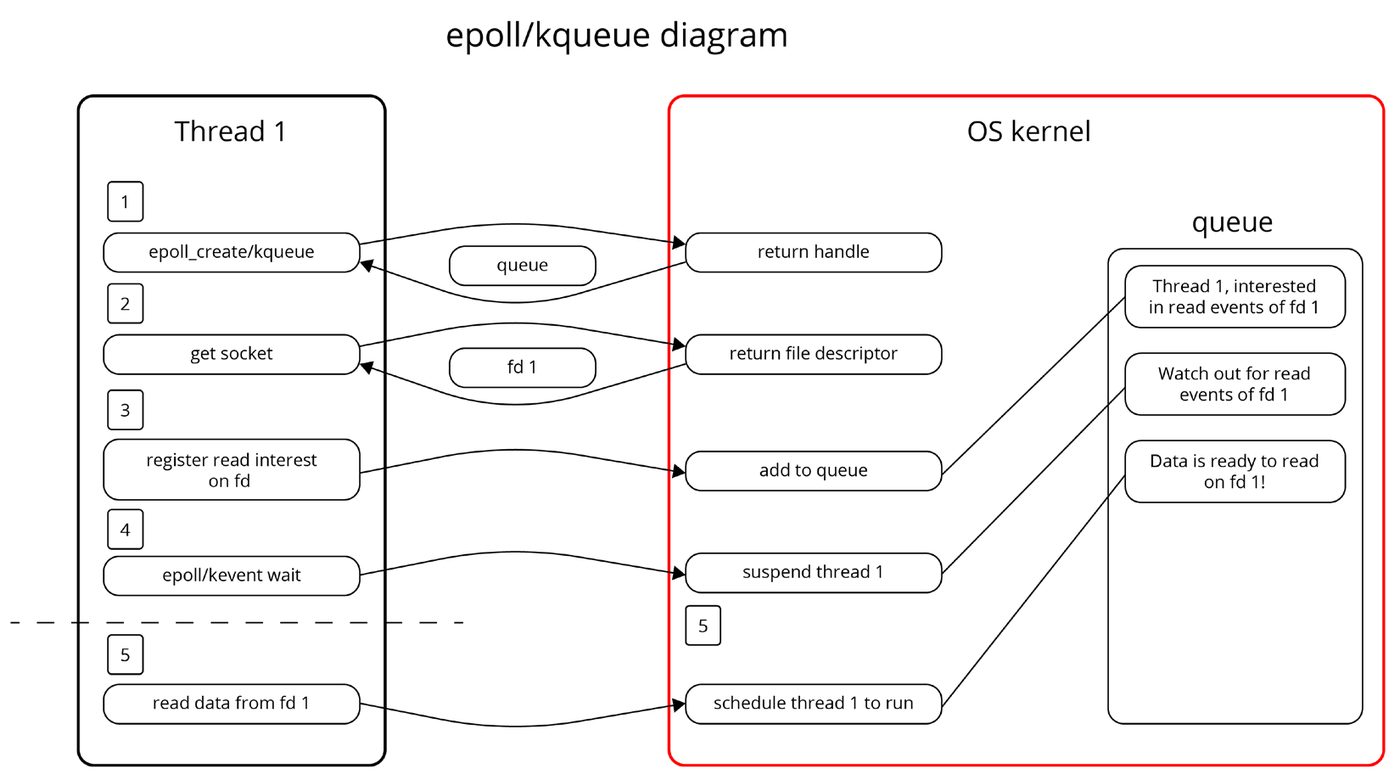
Readiness-based event queues epoll and kqueue are known as readiness-based event queues, which means they let you know when an action is ready to be performed. An example of this is a socket that is ready to be read from. To give an idea about how this works in practice, we can take a look at what happens when we read data from a socket using epoll/kqueue:
  1.   We create an event queue by calling the syscall epoll_create or kqueue.
  2.   We ask the OS for a file descriptor representing a network socket.
  3.   Through another syscall, we register an interest in Read events on this socket. It’s important
       that we also inform the OS that we’ll be expecting to receive a notification when the event is
       ready in the event queue we created in step 1.
  4.   Next, we call epoll_wait or kevent to wait for an event. This will block (suspend) the
       thread it’s called on.
  5.   When the event is ready, our thread is unblocked (resumed) and we return from our wait
       call with data about the event that occurred.
48 Understanding OS-Backed Event Queues, System Calls, and Cross-Platform Abstractions
6. We call read on the socket we created in step 2.
Figure 3.1 – A simplified view of the epoll and kqueue flow
     Completion-based event queues
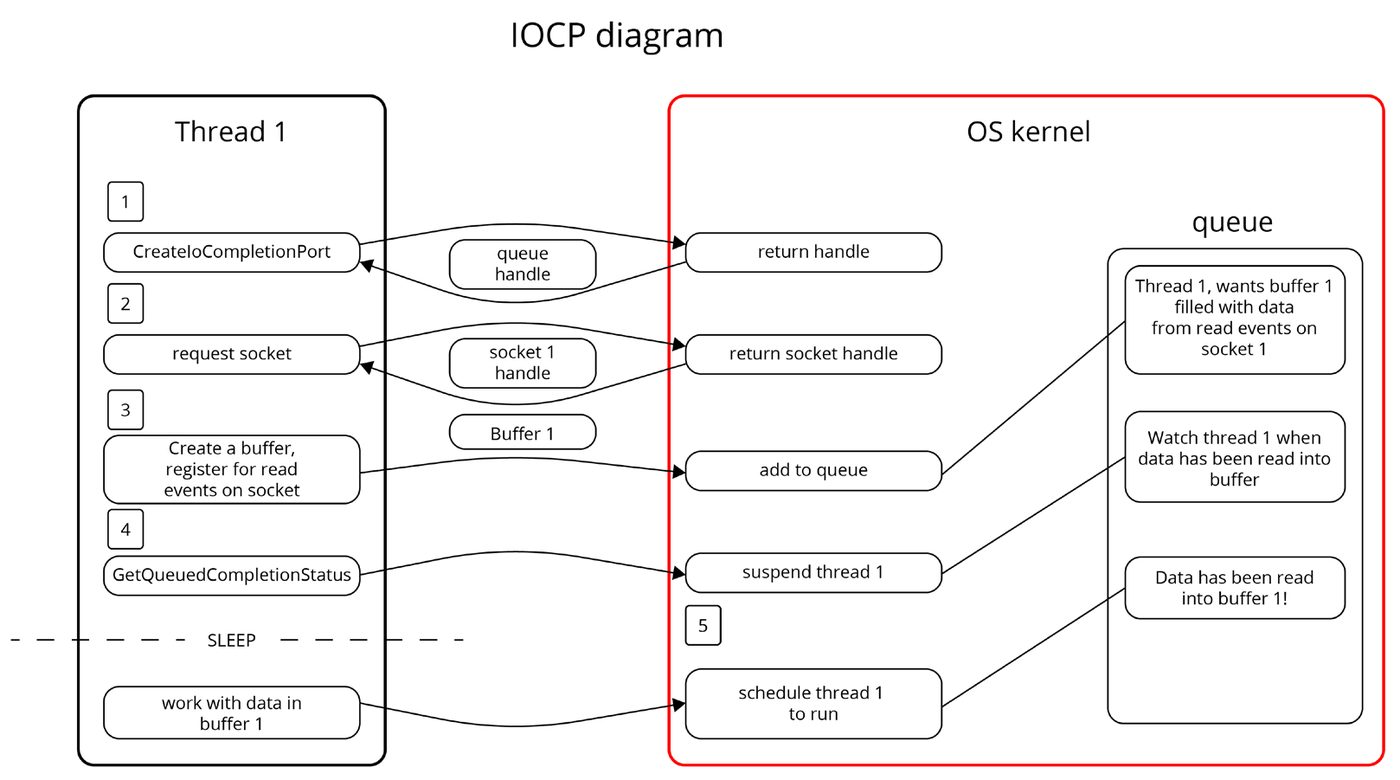
     IOCP stands for input/output completion port. This is a completion-based event queue. This type
     of queue notifies you when events are completed. An example of this is when data has been read into
     a buffer.
     The following is a basic breakdown of what happens in this type of event queue:
       1.   We create an event queue by calling the syscall CreateIoCompletionPort.
       2.   We create a buffer and ask the OS to give us a handle to a socket.
       3.   We register an interest in Read events on this socket with another syscall, but this time we
            also pass in the buffer we created in (step 2) , which the data will be read to.
       4.   Next, we call GetQueuedCompletionStatusEx, which will block until an event has
            been completed.
epoll, kqueue, and IOCP 49
5. Our thread is unblocked and our buffer is now filled with the data we’re interested in.
Figure 3.2 – A simplified view of the IOCP flow
epoll, kqueue, and IOCP epoll is the Linux way of implementing an event queue. In terms of functionality, it has a lot in common with kqueue. The advantage of using epoll over other similar methods on Linux, such as select or poll, is that epoll was designed to work very efficiently with a large number of events. kqueue is the macOS way of implementing an event queue (which originated from BSD) in operating systems such as FreeBSD and OpenBSD. In terms of high-level functionality, it’s similar to epoll in concept but different in actual use. IOCP is the way Windows handle this type of event queue. In Windows, a completion port will let you know when an event has been completed. Now, this might sound like a minor difference, but it’s not. This is especially apparent when you want to write a library since abstracting over both means you’ll either have to model IOCP as readiness-based or model epoll/kqueue as completion-based.
50 Understanding OS-Backed Event Queues, System Calls, and Cross-Platform Abstractions
     Lending out a buffer to the OS also provides some challenges since it’s very important that this buffer
     stays untouched while waiting for an operation to return.
      Windows                            Linux                             macOS
      IOCP                               epoll                             kqueue
      Completion based                   Readiness based                   Readiness based
Table 3.1 – Different platforms and event queues
     Cross-platform event queues
     When creating a cross-platform event queue, you have to deal with the fact that you have to create one
     unified API that’s the same whether it’s used on Windows (IOCP), macOS (kqueue), or Linux (epoll). The
     most obvious difference is that IOCP is completion-based while kqueue and epoll are readiness-based.
     This fundamental difference means that you have to make a choice:
        • You can create an abstraction that treats kqueue and epoll as completion-based queues, or
        • You can create an abstraction that treats IOCP as a readiness-based queue
     From my personal experience, it’s a lot easier to create an abstraction that mimics a completion-based
     queue and handle the fact that kqueue and epoll are readiness-based behind the scenes than the other
     way around. The use of wepoll, as I alluded to earlier, is one way of creating a readiness-based queue
     on Windows. It will simplify creating such an API greatly, but we’ll leave that out for now because it’s
     less well known and not an approach that’s officially documented by Microsoft.
     Since IOCP is completion-based, it needs a buffer to read data into since it returns when data is read
     into that buffer. Kqueue and epoll, on the other hand, don’t require that. They’ll only return when you
     can read data into a buffer without blocking.
     By requiring the user to supply a buffer of their preferred size to our API, we let the user control how
     they want to manage their memory. The user defines the size of the buffers, and the re-usages and
     controls all the aspects of the memory that will be passed to the OS when using IOCP.
     In the case of epoll and kqueue in such an API, you can simply call read for the user and fill the same
     buffers, making it appear to the user that the API is completion-based.
System calls, FFI, and cross-platform abstractions 51
If you wanted to present a readiness-based API instead, you have to create an illusion of having two separate operations when doing I/O on Windows. First, request a notification when the data is ready to be read on a socket, and then actually read the data. While possible to do, you’ll most likely find yourself having to create a very complex API or accept some inefficiencies on Windows platforms due to having intermediate buffers to keep the illusion of having a readiness-based API. We’ll leave the topic of event queues for when we go on to create a simple example showing how exactly they work. Before we do that, we need to become really comfortable with FFI and syscalls, and we’ll do that by writing an example of a syscall on three different platforms. We’ll also use this opportunity to talk about abstraction levels and how we can create a unified API that works on the three different platforms.
System calls, FFI, and cross-platform abstractions We’ll implement a very basic syscall for the three architectures: BSD/macOS, Linux, and Windows. We’ll also see how this is implemented in three levels of abstraction. The syscall we’ll implement is the one used when we write something to the standard output (stdout) since that is such a common operation and it’s interesting to see how it really works. We’ll start off by looking at the lowest level of abstraction we can use to make system calls and build our understanding of them from the ground up.
The lowest level of abstraction The lowest level of abstraction is to write what is often referred to as a “raw” syscall. A raw syscall is one that bypasses the OS-provided library for making syscalls and instead relies on the OS having a stable syscall ABI. A stable syscall ABI means it guarantees that if you put the right data in certain registers and call a specific CPU instruction that passes control to the OS, it will always do the same thing. To make a raw syscall, we need to write a little inline assembly, but don’t worry. Even though we introduce it abruptly here, we’ll go through it line by line, and in Chapter 5, we’ll introduce inline assembly in more detail so you become familiar with it. At this level of abstraction, we need to write different code for BSD/macOS, Linux, and Windows. We also need to write different code if the OS is running on different CPU architectures.
52 Understanding OS-Backed Event Queues, System Calls, and Cross-Platform Abstractions
Raw syscall on Linux
     On Linux and macOS, the syscall we want to invoke is called write. Both systems operate based on
     the concept of file descriptors, and stdout is already present when you start a process.
     If you don’t run Linux on your machine, you have some options to run this example. You can copy
     and paste the code into the Rust Playground or you can run it using WSL in Windows.
     As mentioned in the introduction, I’ll list what example you need to go to at the start of each example
     and you can run the example there by writing cargo run. The source code itself is always located
     in the example folder at src/main.rs.
     The first thing we do is to pull in the standard library module that gives us access to the asm! macro.
     Repository reference: ch03/a-raw-syscall
       use std::arch::asm;
The next step is to write our syscall function:
       #[inline(never)]
       fn syscall(message: String) {
           let msg_ptr = message.as_ptr();
           let len = message.len();
           unsafe {
               asm!(
                   "mov rax, 1",
                   "mov rdi, 1",
                   "syscall",
                   in("rsi") msg_ptr,
                   in("rdx") len,
                   out("rax") _,
                   out("rdi") _,
                   lateout("rsi") _,
                   lateout("rdx") _
               );
           }
       }
     We’ll go through this first one line by line. The next ones will be pretty similar, so we only need to
     cover this in great detail once.
System calls, FFI, and cross-platform abstractions 53
First, we have an attribute named #[inline(never)] that tells the compiler that we never want this function to be inlined during optimization. Inlining is when the compiler omits the function call and simply copies the body of the function instead of calling it. In this case, we don’t want that to ever happen. Next, we have our function call. The first two lines in the function simply get the raw pointer to the memory location where our text is stored and the length of the text buffer. The next line is an unsafe block since there is no way to call assembly such as this safely in Rust. The first line of assembly puts the value 1 in the rax register. When the CPU traps our call later on and passes control to the OS, the kernel knows that a value of one in rax means that we want to make a write. The second line puts the value 1 in the rdi register. This tells the kernel where we want to write to, and a value of one means that we want to write to stdout. The third line calls the syscall instruction. This instruction issues a software interrupt, and the CPU passes on control to the OS. Rust’s inline assembly syntax will look a little intimidating at first, but bear with me. We’ll cover this in detail a little later in this book so that you get comfortable with it. For now, I’ll just briefly explain what it does. The fourth line writes the address to the buffer where our text is stored in the rsi register. The fifth line writes the length (in bytes) of our text buffer to the rdx register. The next four lines are not instructions to the CPU; they’re meant to tell the compiler that it can’t store anything in these registers and assume the data is untouched when we exit the inline assembly block. We do that by telling the compiler that there will be some unspecified data (indicated by the underscore) written to these registers. Finally, it’s time to call our raw syscall:
  fn main() {
      let message = "Hello world from raw syscall!\n";
      let message = String::from(message);
      syscall(message);
  }
This function simply creates a String and calls our syscall function, passing it in as an argument.
54 Understanding OS-Backed Event Queues, System Calls, and Cross-Platform Abstractions
If you run this on Linux, you should now see the following message in your console:
Hello world from raw syscall!
Raw syscall on macOS
     Now, since we use instructions that are specific to the CPU architecture, we’ll need different functions
     depending on if you run an older Mac with an intel CPU or if you run a newer Mac with an Arm
     64-based CPU. We only present the one working for the new M series of chips using an ARM 64
     architecture, but don’t worry, if you’ve cloned the Github repository, you’ll find code that works on
     both versions of Mac there.
     Since there are only minor changes, I’ll present the whole example here and just go through the differences.
     Remember, you need to run this code on a machine with macOS and an M-series chip. You can’t try
     this in the Rust playground.
     ch03/a-raw-syscall
       use std::arch::asm;
       fn main() {
           let message = "Hello world from raw syscall!\n"
           let message = String::from(message);
           syscall(message);
       }
       #[inline(never)]
       fn syscall(message: String) {
           let ptr = message.as_ptr();
           let len = message.len();
           unsafe {
               asm!(
                   "mov x16, 4",
                   "mov x0, 1",
                   "svc 0",
                   in("x1") ptr,
                   in("x2") len,
                   out("x16") _,
                   out("x0") _,
                   lateout("x1") _,
                   lateout("x2") _
               );
           }
       }
System calls, FFI, and cross-platform abstractions 55
Aside from different register naming, there is not that much difference from the one we wrote for Linux, with the exception of the fact that a write operation has the code 4 on macOS instead of 1 as it did on Linux. Also, the CPU instruction that issues a software interrupt is svc 0 instead of syscall. Again, if you run this on macOS, you’ll get the following printed to your console:
Hello world from raw syscall!
What about raw syscalls on Windows?
This is a good opportunity to explain why writing raw syscalls, as we just did, is a bad idea if you want your program or library to work across platforms. You see, if you want your code to work far into the future, you have to worry about what guarantees the OS gives. Linux guarantees that, for example, the value 1 written to the rax register will always refer to write, but Linux works on many platforms, and not everyone uses the same CPU architecture. We have the same problem with macOS that just recently changed from using an Intel-based x86_64 architecture to an ARM 64-based architecture. Windows gives absolutely zero guarantees when it comes to low-level internals such as this. Windows has changed its internals numerous times and provides no official documentation on this matter. The only things we have are reverse-engineered tables that you can find on the internet, but these are not a robust solution since what was a write syscall can be changed to a delete syscall the next time you run Windows update. Even if that’s unlikely, you have no guarantee, which in turn makes it impossible for you to guarantee to users of your program that it’s going to work in the future. So, while raw syscalls in theory do work and are good to be familiar with, they mostly serve as an example of why we’d rather link to the libraries that the different operating systems supply for us when making syscalls. The next segment will show how we do just that.
The next level of abstraction The next level of abstraction is to use the API, which all three operating systems provide for us. We’ll soon see that this abstraction helps us remove some code. In this specific example, the syscall is the same on Linux and on macOS, so we only need to worry if we’re on Windows. We can differentiate between the platforms by using the #[cfg(target_family = "windows")] and #[cfg(target_family = "unix")] conditional compilation flags. You’ll see these used in the example in the repository. Our main function will look the same as it did before:
ch03/b-normal-syscall use std::io; fn main() {
56 Understanding OS-Backed Event Queues, System Calls, and Cross-Platform Abstractions
           let message = "Hello world from syscall!\n";
           let message = String::from(message);
           syscall(message).unwrap();
       }
The only difference is that instead of pulling in the asm module, we pull in the io module.
Using the OS-provided API in Linux and macOS
     You can run this code directly in the Rust playground since it runs on Linux, or you can run it locally
     on a Linux machine using WSL or on macOS:
     ch03/b-normal-syscall
       #[cfg(target_family = "unix")]
       #[link(name = "c")]
       extern "C" {
           fn write(fd: u32, buf: *const u8, count: usize) -> i32;
       }
       fn syscall(message: String) -> io::Result<()> {
           let msg_ptr = message.as_ptr();
           let len = message.len();
           let res = unsafe { write(1, msg_ptr, len) };
           if res == -1 {
               return Err(io::Error::last_os_error());
           }
           Ok(())
       }
     Let’s go through the different steps one by one. Knowing how to do a proper syscall will be very useful
     for us later on in this book.
#[link(name = "c")]
     Every Linux (and macOS) installation comes with a version of libc, which is a C library for
     communicating with the operating system. Having libc, with a consistent API, allows us to program
     the same way without worrying about the underlying platform architecture. Kernel developers can
     also make changes to the underlying ABI without breaking everyone’s program. This flag tells the
     compiler to link to the "c" library on the system.
     Next up is the definition of what functions in the linked library we want to call:
       extern "C" {
         fn write(fd: u32, buf: *const u8, count: usize);
       }
System calls, FFI, and cross-platform abstractions 57
extern "C" (sometimes written without the "C", since "C" is assumed if nothing is specified) means we want to use the "C" calling convention when calling the function write in the "C" library we’re linking to. This function needs to have the exact same name as the function in the library we’re linking to. The parameters don’t have to have the same name, but they must be in the same order. It’s good practice to name them the same as in the library you’re linking to. Here, we use Rusts FFI, so when you read about using FFI to call external functions, it’s exactly what we’re doing here. The write function takes a file descriptor, fd, which in this case is a handle to stdout. In addition, it expects us to provide a pointer to an array of u8, buf values and the length of that buffer, count.
Calling convention This is the first time we’ve encountered this term, so I’ll go over a brief explanation, even though we dive deeper into this topic later in the book. A calling convention defines how function calls are performed and will, amongst other things, specify: - How arguments are passed into the function - What registers the function is expected to store at the start and restore before returning - How the function returns its result - How the stack is set up (we’ll get back to this one later) So, before you call a foreign function you need to specify what calling convention to use since there is no way for the compiler to know if we don’t tell it. The C calling convention is by far the most common one to encounter.
Next, we wrap the call to our linked function in a normal Rust function.
ch03/b-normal-syscall
  #[cfg(target_family = "unix")]
  fn syscall(message: String) -> io::Result<()> {
      let msg_ptr = message.as_ptr();
      let len = message.len();
      let res = unsafe { write(1, msg_ptr, len) };
      if res == -1 {
          return Err(io::Error::last_os_error());
      }
      Ok(())
  }
58 Understanding OS-Backed Event Queues, System Calls, and Cross-Platform Abstractions
     You’ll probably be familiar with the first two lines now, as they’re the same as we wrote for our raw
     syscall example. We get the pointer to the buffer where our text is stored and the length of that buffer.
     Next is our call to the write function in libc, which needs to be wrapped in an unsafe block
     since Rust can’t guarantee safety when calling external functions.
     You might wonder how we know that the value 1 refers to the file handle of stdout.
     You’ll meet this situation a lot when writing syscalls from Rust. Usually, constants are defined in the
     C header files, so we need to manually search them up and look for these definitions. 1 is always the
     file handle to stdout on UNIX systems, so it’s easy to remember.
        Note
        Wrapping the libc functions and providing these constants is exactly what the create libc
        (https://github.com/rust-lang/libc) provides for us. Most of the time, you can
        use that instead of doing all the manual work of linking to and defining functions as we do here.
     Lastly, we have the error handling, and you’ll see this all the time when using FFI. C functions often
     use a specific integer to indicate if the function call was successful or not. In the case of this write
     call, the function will either return the number of bytes written or, if there is an error, it will return
     the value –1. You’ll find this information easily by reading the man-pages (https://man7.org/
     linux/man-pages/index.html) for Linux.
     If there is an error, we use the built-in function in Rust’s standard library to query the OS for the last
     error it reported for this process and convert that to a rust io::Error type.
     If you run this function using cargo run, you will see this output:
Hello world from syscall!
Using Windows API
     On Windows, things work a bit differently. While UNIX models almost everything as “files” you
     interact with, Windows uses other abstractions. On Windows, you get a handle that represents some
     object you can interact with in specific ways depending on exactly what kind of handle you have.
     We will use the same main function as before, but we need to link to different functions in the
     Windows API and make changes to our syscall function.
     ch03/b-normal-syscall
       #[link(name = "kernel32")]
       extern "system" {
           fn GetStdHandle(nStdHandle: i32) -> i32;
           fn WriteConsoleW(
System calls, FFI, and cross-platform abstractions 59
          hConsoleOutput: i32,
          lpBuffer: *const u16,
          numberOfCharsToWrite: u32,
          lpNumberOfCharsWritten: *mut u32,
          lpReserved: *const std::ffi::c_void,
      ) -> i32;
  }
The first thing you notice is that we no longer link to the "C" library. Instead, we link to the kernel32 library. The next change is the use of the system calling convention. This calling convention is a bit peculiar. You see, Windows uses different calling conventions depending on whether you write for a 32-bit x86 Windows version or a 64-bit x86_64 Windows version. Newer Windows versions running on x86_64 use the "C" calling convention, so if you have a newer system you can try changing that out and see that it still works. “Specifying system” lets the compiler figure out the right one to use based on the system. We link to two different syscalls in Windows:
   • GetStdHandle: This retrieves a reference to a standard device like stdout
   • WriteConsoleW: WriteConsole comes in two types. WriteConsoleW takes Unicode text
     and WriteConsoleA takes ANSI-encoded text. We’re using the one that takes Unicode text
     in our program.
Now, ANSI-encoded text works fine if you only write English text, but as soon as you write text in other languages, you might need to use special characters that are not possible to represent in ANSI but possible in Unicode. If you mix them up, your program will not work as you expect. Next is our new syscall function:
ch03/b-normal-syscall
  fn syscall(message: String) -> io::Result<()> {
      let msg: Vec<u16> = message.encode_utf16().collect();
      let msg_ptr = msg.as_ptr();
      let len = msg.len() as u32;
      let mut output: u32 = 0;
          let handle = unsafe { GetStdHandle(-11) };
          if handle  == -1 {
              return Err(io::Error::last_os_error())
          }
          let res = unsafe {
              WriteConsoleW(
                  handle,
60 Understanding OS-Backed Event Queues, System Calls, and Cross-Platform Abstractions
                       msg_ptr,
                       len,
                       &mut output,
                       std::ptr::null()
                   )};
               if res  == 0 {
                   return Err(io::Error::last_os_error());
               }
           Ok(())
       }
     The first thing we do is convert the text to utf-16-encoded text, which Windows uses. Fortunately,
     Rust has a built-in function to convert our utf-8-encoded text to utf-16 code points. encode_
     utf16 returns an iterator over u16 code points that we can collect to a Vec.
     The next two lines should be familiar by now. We get the pointer to where the text is stored and the
     length of the text in bytes.
     The next thing we do is call GetStdHandle and pass in the value –11. The values we need to pass
     in for the different standard devices are described together with the GetStdHandle documentation at
     https://learn.microsoft.com/en-us/windows/console/getstdhandle. This
     is convenient, as we don’t have to dig through C header files to find all the constant values we need.
     The return code to expect is also documented thoroughly for all functions, so we handle potential
     errors here in the same way as we did for the Linux/macOS syscalls.
     Finally, we have the call to the WriteConsoleW function. There is nothing too fancy about this,
     and you’ll notice similarities with the write syscall we used for Linux. One difference is that the
     output is not returned from the function but written to an address location we pass in in the form of
     a pointer to our output variable.
        Note
        Now that you’ve seen how we create cross-platform syscalls, you will probably also understand
        why we’re not including the code to make every example in this book cross-platform. It’s simply
        the case that the book would be extremely long if we did, and it’s not apparent that all that extra
        information will actually benefit our understanding of the key concepts.
Summary 61
The highest level of abstraction This is simple, but I wanted to add this just for completeness. Rust standard library wraps the calls to the underlying OS APIs for us, so we don’t have to care about what syscalls to invoke.
fn main() { println!("Hello world from the standard library"); }
Congratulations! You’ve now written the same syscall using three levels of abstraction. You now know what FFI looks like, you’ve seen some inline assembly (which we’ll cover in greater detail later), and you’ve made a proper syscall to print something to the console. You’ve also seen one of the things our standard library tries to solve by wrapping these calls for different platforms so we don’t have to know these syscalls to print something to the console.
Summary In this chapter, we went through what OS-backed event queues are and gave a high-level overview of how they work. We also went through the defining characteristics of epoll, kqueue, and IOCP and focused on how they differ from each other. In the last half of this chapter, we introduced some examples of syscalls. We discussed raw syscalls, and “normal” syscalls so that you know what they are and have seen examples of both. We also took the opportunity to talk about abstraction levels and the advantages of relying on good abstractions when they’re available to us. As a part of making system calls, you also got an introduction to Rusts FFI. Finally, we created a cross-platform abstraction. You also saw some of the challenges that come with creating a unifying API that works across several operating systems. The next chapter will walk you through an example using epoll to create a simple event queue, so you get to see exactly how this works in practice. In the repository, you’ll also find the same example for both Windows and macOS, so you have that available if you ever want to implement an event queue for either of those platforms.
                                                      Part 2:
                                               Event Queues
                                          and Green Threads
In this part, we’ll present two examples. The first example demonstrates the creation of an event queue using epoll. We will design the API to closely resemble the one used by mio, allowing us to grasp the fundamentals of both mio and epoll. The second example illustrates the use of fibers/green threads, similar to the approach employed by Go. This method is one of the popular alternatives to Rust’s asynchronous programming using futures and async/await. Rust also utilized green threads before reaching version 1.0, making it a part of Rust’s asynchronous history. Throughout the exploration, we will delve into fundamental programming concepts such as ISAs, ABIs, calling conventions, stacks, and touch on assembly programming. This section comprises the following chapters:
    • Chapter 4, Create Your Own Event Queue
    • Chapter 5, Creating Our Own Fibers