Ch 8 — Runtimes, Wakers, and the Reactor-Executor Pattern
Runtimes, Wakers, and the Reactor-Executor Pattern In the previous chapter, we created our own pausable tasks (coroutines) by writing them as state machines. We created a common API for these tasks by requiring them to implement the Future trait. We also showed how we can create these coroutines using some keywords and programmatically rewrite them so that we don’t have to implement these state machines by hand, and instead write our programs pretty much the same way we normally would. If we stop for a moment and take a bird’s eye view over what we got so far, it’s conceptually pretty simple: we have an interface for pausable tasks (the Future trait), and we have two keywords (coroutine/wait) to indicate code segments we want rewritten as a state machine that divides our code into segments we can pause between. However, we have no event loop, and we have no scheduler yet. In this chapter, we’ll expand on our example and add a runtime that allows us to run our program efficiently and opens up the possibility to schedule tasks concurrently much more efficiently than what we do now. This chapter will take you on a journey where we implement our runtime in two stages, gradually making it more useful, efficient, and capable. We’ll start with a brief overview of what runtimes are and why we want to understand some of their characteristics. We’ll build on what we just learned in Chapter 7, and show how we can make it much more efficient and avoid continuously polling the future to make it progress by leveraging the knowledge we gained in Chapter 4. Next, we’ll show how we can get a more flexible and loosely coupled design by dividing the runtime into two parts: an executor and a reactor. In this chapter, you will learn about basic runtime design, reactors, executors, wakers, and spawning, and we’ll build on a lot of the knowledge we’ve gained throughout the book. This will be one of the big chapters in this book, not because the topic is too complex or difficult, but because we have quite a bit of code to write. In addition to that, I try to give you a good mental model of what’s happening by providing quite a few diagrams and explaining everything very thoroughly. It’s
168 Runtimes, Wakers, and the Reactor-Executor Pattern
      not one of those chapters you typically blaze through before going to bed, though, but I do promise
      it’s absolutely worth it in the end.
      The chapter will be divided into the following segments:
         • Introduction to runtimes and why we need them
         • Improving our base example
         • Creating a proper runtime
         • Step 1 – Improving our runtime design by adding a Reactor and a Waker
         • Step 2 – Implementing a proper Executor
         • Step 3 – Implementing a proper Reactor
         • Experimenting with our new runtime
So, let’s dive right in!
      Technical requirements
      The examples in this chapter will build on the code from our last chapter, so the requirements are the
      same. The examples will all be cross-platform and work on all platforms that Rust (https://doc.
      rust-lang.org/beta/rustc/platform-support.html#tier-1-with-host-
      tools) and mio (https://github.com/tokio-rs/mio#platforms) supports. The only
      thing you need is Rust installed and the repository that belongs to the book downloaded locally. All
      the code in this chapter will be found in the ch08 folder.
      To follow the examples step by step, you’ll also need corofy installed on your machine. If you didn’t
      install it in Chapter 7, install it now by going into the ch08/corofy folder in the repository and
      running this command:
        cargo install --force --path .
      Alternatively, you can just copy the relevant files in the repository when we come to the points where
      we use corofy to rewrite our coroutine/wait syntax. Both versions will be available to you
      there as well.
      We’ll also use delayserver in this example, so you need to open a separate terminal, enter the
      delayserver folder at the root of the repository, and write cargo run so that it’s ready and
      available for the examples going forward.
      Remember to change the ports in the code if you for some reason have to change the port delayserver
      listens on.
Introduction to runtimes and why we need them 169
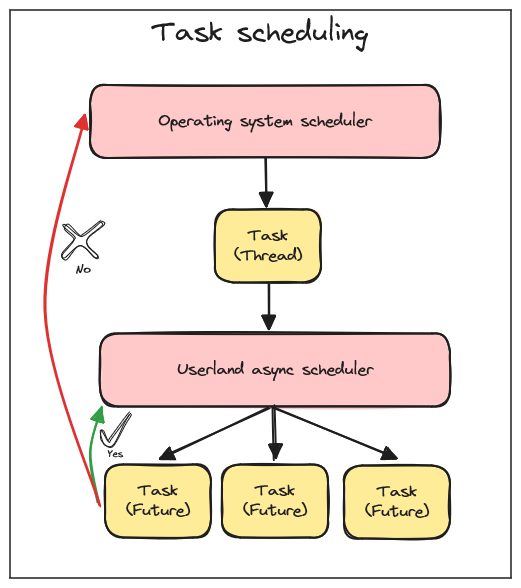
Introduction to runtimes and why we need them As you know by now, you need to bring your own runtime for driving and scheduling asynchronous tasks in Rust. Runtimes come in many flavors, from the popular Embassy embedded runtime (https://github. com/embassy-rs/embassy), which centers more on general multitasking and can replace the need for a real-time operating system (RTOS) on many platforms, to Tokio (https://github. com/tokio-rs/tokio), which centers on non-blocking I/O on popular server and desktop operating systems. All runtimes in Rust need to do at least two things: schedule and drive objects implementing Rust’s Future trait to completion. Going forward in this chapter, we’ll mostly focus on runtimes for doing non-blocking I/O on popular desktop and server operating systems such as Windows, Linux, and macOS. This is also by far the most common type of runtime most programmers will encounter in Rust. Taking control over how tasks are scheduled is very invasive, and it’s pretty much a one-way street. If you rely on a userland scheduler to run your tasks, you cannot, at the same time, use the OS scheduler (without jumping through several hoops), since mixing them in your code will wreak havoc and might end up defeating the whole purpose of writing an asynchronous program. The following diagram illustrates the different schedulers:
Figure 8.1 – Task scheduling in a single-threaded asynchronous system
170 Runtimes, Wakers, and the Reactor-Executor Pattern
      An example of yielding to the OS scheduler is making a blocking call using the default std::net
      ::TcpStream or std::thread::sleep methods. Even potentially blocking calls using
      primitives such as Mutex provided by the standard library might yield to the OS scheduler.
      That’s why you’ll often find that asynchronous programming tends to color everything it touches, and
      it’s tough to only run a part of your program using async/await.
      The consequence is that runtimes must use a non-blocking version of the standard library. In theory,
      you could make one non-blocking version of the standard library that all runtimes use, and that was
      one of the goals of the async_std initiative (https://book.async.rs/introduction).
      However, having the community agree upon one way to solve this task was a tall order and one that
      hasn’t really come to fruition yet.
      Before we start implementing our examples, we’ll discuss the overall design of a typical async runtime
      in Rust. Most runtimes such as Tokio, Smol, or async-std will divide their runtime into two parts.
      The part that tracks events we’re waiting on and makes sure to wait on notifications from the OS in
      an efficient manner is often called the reactor or driver.
      The part that schedules tasks and polls them to completion is called the executor.
      Let’s take a high-level look at this design so that we know what we’ll be implementing in our example.
      Reactors and executors
      Dividing the runtime into two distinct parts makes a lot of sense when we take a look at how Rust
      models asynchronous tasks. If you read the documentation for Future (https://doc.rust-
      lang.org/std/future/trait.Future.html) and Waker (https://doc.rust-lang.
      org/std/task/struct.Waker.html), you’ll see that Rust doesn’t only define a Future trait
      and a Waker type but also comes with important information on how they’re supposed to be used.
      One example of this is that Future traits are inert, as we covered in Chapter 6. Another example is that
      a call to Waker::wake will guarantee at least one call to Future::poll on the corresponding task.
      So, already by reading the documentation, you will see that there is at least some thought put into
      how runtimes should behave.
      The reason for learning this pattern is that it’s almost a glove-to-hand fit for Rust’s asynchronous model.
      Since many readers, including me, will not have English as a first language, I’ll explain the names here
      at the start since, well, they seem to be easy to misunderstand.
      If the name reactor gives you associations with nuclear reactors, and you start thinking of reactors as
      something that powers, or drives, a runtime, drop that thought right now. A reactor is simply something
      that reacts to a whole set of incoming events and dispatches them one by one to a handler. It’s an event
      loop, and in our case, it dispatches events to an executor. Events that are handled by a reactor could
Improving our base example 171
be anything from a timer that expires, an interrupt if you write programs for embedded systems, or an I/O event such as a READABLE event on TcpStream. You could have several kinds of reactors running in the same runtime. If the name executor gives you associations to executioners (the medieval times kind) or executables, drop that thought as well. If you look up what an executor is, it’s a person, often a lawyer, who administers a person’s will. Most often, since that person is dead. Which is also the point where whatever mental model the naming suggests to you falls apart since nothing, and no one, needs to come in harm’s way for the executor to have work to do in an asynchronous runtime, but I digress. The important point is that an executor simply decides who gets time on the CPU to progress and when they get it. The executor must also call Future::poll and advance the state machines to their next state. It’s a type of scheduler. It can be frustrating to get the wrong idea from the start since the subject matter is already complex enough without thinking about how on earth nuclear reactors and executioners fit in the whole picture. Since reactors will respond to events, they need some integration with the source of the event. If we continue using TcpStream as an example, something will call read or write on it, and at that point, the reactor needs to know that it should track certain events on that source. For this reason, non-blocking I/O primitives and reactors need tight integration, and depending on how you look at it, the I/O primitives will either have to bring their own reactor or you’ll have a reactor that provides I/O primitives such as sockets, ports, and streams. Now that we’ve covered some of the overarching design, we can start writing some code. Runtimes tend to get complex pretty quickly, so to keep this as simple as possible, we’ll avoid any error handling in our code and use unwrap or expect for everything. We’ll also choose simplicity over cleverness and readability over efficiency to the best of our abilities. Our first task will be to take the first example we wrote in Chapter 7 and improve it by avoiding having to actively poll it to make progress. Instead, we lean on what we learned about non-blocking I/O and epoll in the earlier chapters.
Improving our base example We’ll create a version of the first example in Chapter 7 since it’s the simplest one to start with. Our only focus is showing how to schedule and drive the runtimes more efficiently. We start with the following steps:
  1.   Create a new project and name it a-runtime (alternatively, navigate to ch08/a-runtime
       in the book’s repository).
172 Runtimes, Wakers, and the Reactor-Executor Pattern
        2.   Copy the future.rs and http.rs files in the src folder from the first project we created
             in Chapter 7, named a-coroutine (alternatively, copy the files from ch07/a-coroutine
             in the book’s repository) to the src folder in our new project.
        3.   Make sure to add mio as a dependency by adding the following to Cargo.toml:
                [dependencies]
                mio = { version = "0.8", features = ["net", "os-poll"] }
4. Create a new file in the src folder called runtime.rs.
      We’ll use corofy to change the following coroutine/wait program into its state machine
      representation that we can run.
      In src/main.rs, add the following code:
      ch08/a-runtime/src/main.rs
        mod future;
        mod http;
        mod runtime;
        use future::{Future, PollState};
        use runtime::Runtime;
        fn main() {
            let future = async_main();
            let mut runtime = Runtime::new();
            runtime.block_on(future);
        coroutine fn async_main() {
            println!("Program starting");
            let txt = http::Http::get("/600/HelloAsyncAwait").wait;
            println!("{txt}");
            let txt = http::Http::get("/400/HelloAsyncAwait").wait;
            println!("{txt}");
Improving our base example 173
This program is basically the same one we created in Chapter 7, only this time, we create it from our coroutine/wait syntax instead of writing the state machine by hand. Next, we need to transform this into code by using corofy since the compiler doesn’t recognize our own coroutine/wait syntax.
1. If you’re in the root folder of a-runtime, run corofy ./src/main.rs. 2. You should now have a file that’s called main_corofied.rs. 3. Delete the code in main.rs and copy the contents of main_corofied.rs into main.rs. 4. You can now delete main_corofied.rs since we won’t need it going forward.
If everything is done right, the project structure should now look like this: src |-- future.rs |-- http.rs |-- main.rs |-- runtime.rs
Tip You can always refer to the book’s repository to make sure everything is correct. The correct example is located in the ch08/a-runtime folder. In the repository, you’ll also find a file called main_orig.rs in the root folder that contains the coroutine/wait program if you want to rerun it or have problems getting everything working correctly.
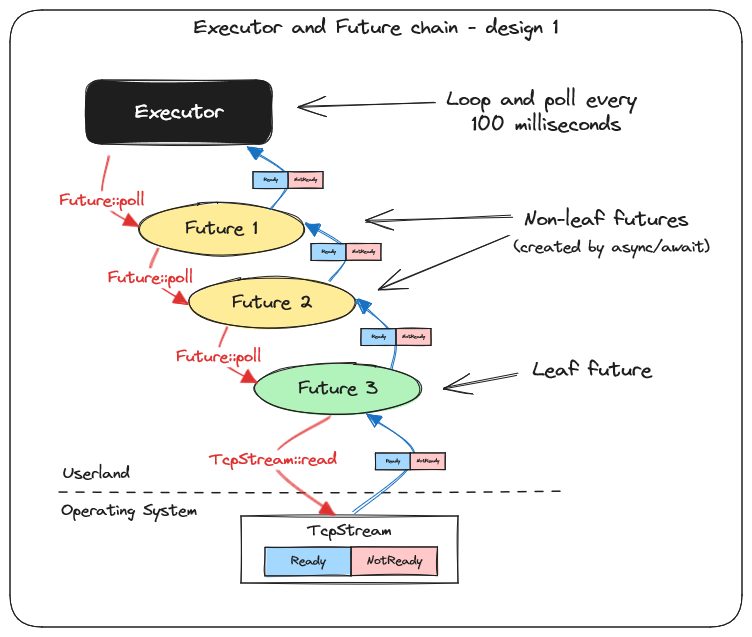
Design Before we go any further, let’s visualize how our system is currently working if we consider it with two futures created by coroutine/wait and two calls to Http::get. The loop that polls our Future trait to completion in the main function takes the role of the executor in our visualization, and as you see, we have a chain of futures consisting of:
1. Non-leaf futures created by async/await (or coroutine/wait in our example) that simply call poll on the next future until it reaches a leaf future 2. Leaf futures that poll an actual source that’s either Ready or NotReady
174 Runtimes, Wakers, and the Reactor-Executor Pattern
The following diagram shows a simplified overview of our current design:
Figure 8.2 – Executor and Future chain: current design
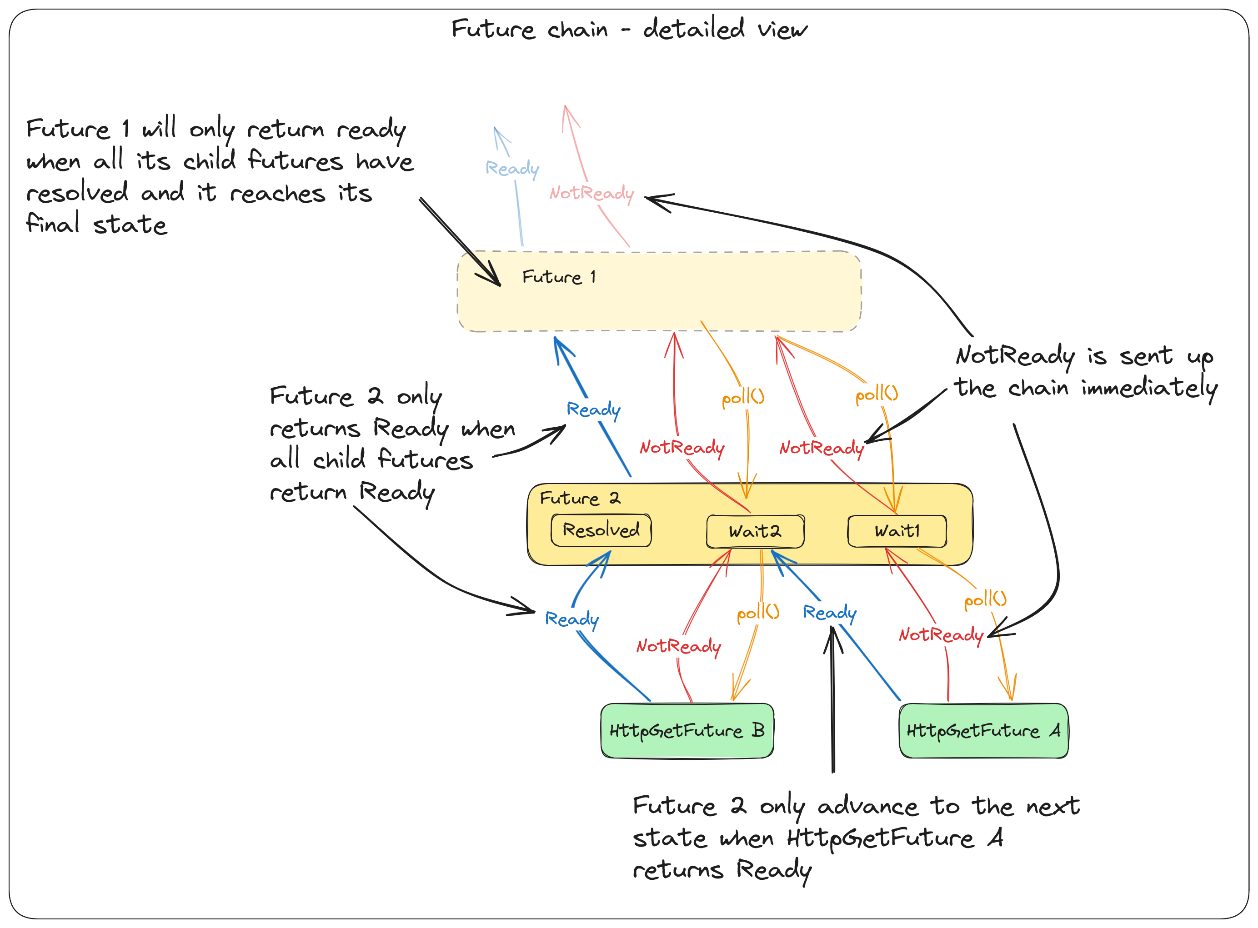
      If we take a closer look at the future chain, we can see that when a future is polled, it polls all its child
      futures until it reaches a leaf future that represents something we’re actually waiting on. If that future
      returns NotReady, it will propagate that up the chain immediately. However, if it returns Ready, the
      state machine will advance all the way until the next time a future returns NotReady. The top-level
      future will not resolve until all child futures have returned Ready.
Improving our base example 175
The next diagram takes a closer look at the future chain and gives a simplified overview of how it works:
Figure 8.3 – Future chain: a detailed view
The first improvement we’ll make is to avoid the need for continuous polling of our top-level future to drive it forward.
176 Runtimes, Wakers, and the Reactor-Executor Pattern
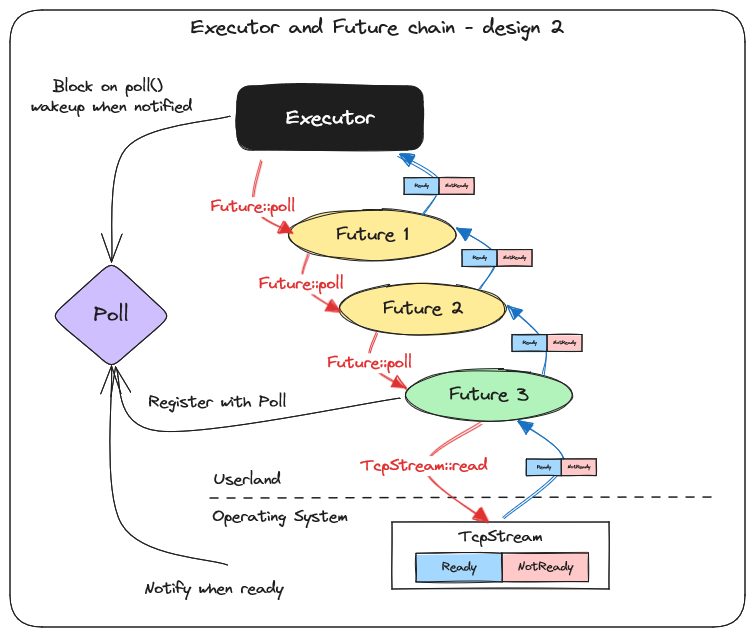
We’ll change our design so that it looks more like this:
Figure 8.4 – Executor and Future chain: design 2
      In this design, we use the knowledge we gained in Chapter 4, but instead of simply relying on epoll,
      we’ll use mio’s cross-platform abstraction instead. The way it works should be well known to us by
      now since we already implemented a simplified version of it earlier.
      Instead of continuously looping and polling our top-level future, we’ll register interest with the Poll
      instance, and when we get a NotReady result returned, we wait on Poll. This will put the thread
      to sleep, and no work will be done until the OS wakes us up again to notify us that an event we’re
      waiting on is ready.
      This design will be much more efficient and scalable.
Improving our base example 177
Changing the current implementation Now that we have an overview of our design and know what to do, we can go on and make the necessary changes to our program, so let’s go through each file we need to change. We’ll start with main.rs.
main.rs
We already made some changes to main.rs when we ran corofy on our updated coroutine/ wait example. I’ll just point out the change here so that you don’t miss it since there is really nothing more we need to change here. Instead of polling the future in the main function, we created a new Runtime struct and passed the future as an argument to the Runtime::block_on method. There are no more changes that we need to in this file. Our main function changed to this:
ch08/a-runtime/src/main.rs
   fn main() {
      let future = async_main();
      let mut runtime = Runtime::new();
      runtime.block_on(future);
The logic we had in the main function has now moved into the runtime module, and that’s also where we need to change the code that polls the future to completion from what we had earlier. The next step will, therefore, be to open runtime.rs.
runtime.rs
The first thing we do in runtime.rs is pull in the dependencies we need:
ch08/a-runtime/src/runtime.rs use crate::future::{Future, PollState}; use mio::{Events, Poll, Registry}; use std::sync::OnceLock;
178 Runtimes, Wakers, and the Reactor-Executor Pattern
      The next step is to create a static variable called REGISTRY. If you remember, Registry is the
      way we register interest in events with our Poll instance. We want to register interest in events on
      our TcpStream when making the actual HTTP GET request. We could have Http::get accept
      a Registry struct that it stored for later use, but we want to keep the API clean, and instead, we
      want to access Registry inside HttpGetFuture without having to pass it around as a reference:
      ch08/a-runtime/src/runtime.rs
        static REGISTRY: OnceLock<Registry> = OnceLock::new();
        pub fn registry() -> &'static Registry {
            REGISTRY.get().expect("Called outside a runtime context")
      We use std::sync::OnceLock so that we can initialize REGISTRY when the runtime starts,
      thereby preventing anyone (including ourselves) from calling Http::get without having a
      Runtime instance running. If we did call Http::get without having our runtime initialized, it
      would panic since the only public way to access it outside the runtime module is through the pub
      fn registry(){…} function, and that call would fail.
         Note
         We might as well have used a thread-local static variable using the thread_local! macro
         from the standard library, but we’ll need to access this from multiple threads when we expand
         the example later in this chapter, so we start the design with this in mind.
The next thing we add is a Runtime struct:
      ch08/a-runtime/src/runtime.rs
        pub struct Runtime {
            poll: Poll,
      For now, our runtime will only store a Poll instance. The interesting part is in the implementation
      of Runtime. Since it’s not too long, I’ll present the whole implementation here and explain it next:
      ch08/a-runtime/src/runtime.rs
        impl Runtime {
            pub fn new() -> Self {
                let poll = Poll::new().unwrap();
                let registry = poll.registry().try_clone().unwrap();
                REGISTRY.set(registry).unwrap();
Improving our base example 179
Self { poll }
      pub fn block_on<F>(&mut self, future: F)
      where
          F: Future<Output = String>,
      {
          let mut future = future;
          loop {
              match future.poll() {
                  PollState::NotReady => {
                      println!("Schedule other tasks\n");
                      let mut events = Events::with_capacity(100);
                      self.poll.poll(&mut events, None).unwrap();
PollState::Ready(_) => break,
The first thing we do is create a new function. This will initialize our runtime and set everything we need up. We create a new Poll instance, and from the Poll instance, we get an owned version of Registry. If you remember from Chapter 4, this is one of the methods we mentioned but didn’t implement in our example. However, here, we take advantage of the ability to split the two pieces up. We store Registry in the REGISTRY global variable so that we can access it from the http module later on without having a reference to the runtime itself. The next function is the block_on function. I’ll go through it step by step:
  1.   First of all, this function takes a generic argument and will block on anything that implements
       our Future trait with an Output type of String (remember that this is currently the only
       kind of Future trait we support, so we’ll just return an empty string if there is no data to return).
  2.   Instead of having to take mut future as an argument, we define a variable that we declare
       as mut in the function body. It’s just to keep the API slightly cleaner and avoid us having to
       make minor changes later on.
  3.   Next, we create a loop. We’ll loop until the top-level future we received returns Ready.
       If the future returns NotReady, we write out a message letting us know that at this point we
       could do other things, such as processing something unrelated to the future or, more likely,
       polling another top-level future if our runtime supported multiple top-level futures (don’t
       worry – it will be explained later on).
180 Runtimes, Wakers, and the Reactor-Executor Pattern
             Note that we need to pass in an Events collection to mio’s Poll::poll method, but since
             there is only one top-level future to run, we don’t really care which event happened; we only
             care that something happened and that it most likely means that data is ready (remember – we
             always have to account for false wakeups anyway).
      That’s all the changes we need to make to the runtime module for now.
      The last thing we need to do is register interest for read events after we’ve written the request to the
      server in our http module.
      Let’s open http.rs and make some changes.
http.rs
First of all, let’s adjust our dependencies so that we pull in everything we need:
      ch08/a-runtime/src/http.rs
        use crate::{future::PollState, runtime, Future};
        use mio::{Interest, Token};
        use std::io::{ErrorKind, Read, Write};
      We need to add a dependency on our runtime module as well as a few types from mio.
      We only need to make one more change in this file, and that’s in our Future::poll implementation,
      so let’s go ahead and locate that:
      We made one important change here that I’ve highlighted for you. The implementation is exactly the
      same, with one important difference:
      ch08/a-runtime/src/http.rs
        impl Future for HttpGetFuture {
          type Output = String;
          fn poll(&mut self) -> PollState<Self::Output> {
            if self.stream.is_none() {
              println!("FIRST POLL - START OPERATION");
              self.write_request();
              runtime::registry()
                .register(self.stream.as_mut().unwrap(), Token(0), Interest::READABLE)
Improving our base example 181
.unwrap();
          let mut buff = vec![0u8; 4096];
          loop {
              match self.stream.as_mut().unwrap().read(&mut buff) {
                  Ok(0) => {
                      let s = String::from_utf8_lossy(&self.buffer);
                      break PollState::Ready(s.to_string());
                  Ok(n) => {
                      self.buffer.extend(&buff[0..n]);
                      continue;
                  Err(e) if e.kind() == ErrorKind::WouldBlock => {
                      break PollState::NotReady;
Err(e) => panic!("{e:?}"),
On the first poll, after we’ve written the request, we register interest in READABLE events on this TcpStream. We also removed the line: return PollState::NotReady;
By removing his line, we’ll poll TcpStream immediately, which makes sense since we don’t really want to return control to our scheduler if we get the response immediately. You wouldn’t go wrong either way here since we registered our TcpStream as an event source with our reactor and would get a wakeup in any case. These changes were the last piece we needed to get our example back up and running. If you remember the version from Chapter 7, we got the following output: Program starting FIRST POLL - START OPERATION Schedule other tasks Schedule other tasks Schedule other tasks Schedule other tasks Schedule other tasks Schedule other tasks
182 Runtimes, Wakers, and the Reactor-Executor Pattern
        Schedule other tasks
        HTTP/1.1 200 OK
        content-length: 11
        connection: close
        content-type: text/plain; charset=utf-8
        date: Thu, 16 Nov xxxx xx:xx:xx GMT
        HelloWorld1
        FIRST POLL - START OPERATION
        Schedule other tasks
        Schedule other tasks
        Schedule other tasks
        Schedule other tasks
        Schedule other tasks
        HTTP/1.1 200 OK
        content-length: 11
        connection: close
        content-type: text/plain; charset=utf-8
        date: Thu, 16 Nov xxxx xx:xx:xx GMT
HelloWorld2
      In our new and improved version, we get the following output if we run it with cargo run:
        Program starting
        FIRST POLL - START OPERATION
        Schedule other tasks
        HTTP/1.1 200 OK
        content-length: 11
        connection: close
        content-type: text/plain; charset=utf-8
        date: Thu, 16 Nov xxxx xx:xx:xx GMT
        HelloAsyncAwait
        FIRST POLL - START OPERATION
        Schedule other tasks
        HTTP/1.1 200 OK
        content-length: 11
        connection: close
        content-type: text/plain; charset=utf-8
        date: Thu, 16 Nov xxxx xx:xx:xx GMT
Improving our base example 183
HelloAsyncAwait
Note If you run the example on Windows, you’ll see that you get two Schedule other tasks messages after each other. The reason for that is that Windows emits an extra event when the TcpStream is dropped on the server end. This doesn’t happen on Linux. Filtering out these events is quite simple, but we won’t focus on doing that in our example since it’s more of an optimization that we don’t really need for our example to work.
The thing to make a note of here is how many times we printed Schedule other tasks. We print this message every time we poll and get NotReady. In the first version, we printed this every 100 ms, but that’s just because we had to delay on each sleep to not get overwhelmed with printouts. Without it, our CPU would work 100% on polling the future. If we add a delay, we also add latency even if we make the delay much shorter than 100 ms since we won’t be able to respond to events immediately. Our new design makes sure that we respond to events as soon as they’re ready, and we do no unnecessary work. So, by making these minor changes, we have already created a much better and more scalable version than we had before. This version is fully single-threaded, which keeps things simple and avoids the complexity and overhead synchronization. When you use Tokio’s current-thread scheduler, you get a scheduler that is based on the same idea as we showed here. However, there are also some drawbacks to our current implementation, and the most noticeable one is that it requires a very tight integration between the reactor part and the executor part of the runtime centered on Poll. We want to yield to the OS scheduler when there is no work to do and have the OS wake us up when an event has happened so that we can progress. In our current design, this is done through blocking on Poll::poll. Consequently, both the executor (scheduler) and the reactor must know about Poll. The downside is, then, that if you’ve created an executor that suits a specific use case perfectly and want to allow users to use a different reactor that doesn’t rely on Poll, you can’t. More importantly, you might want to run multiple different reactors that wake up the executor for different reasons. You might find that there is something that mio doesn’t support, so you create a different reactor for those tasks. How are they supposed to wake up the executor when it’s blocking on mio::Poll::poll(...)?
184 Runtimes, Wakers, and the Reactor-Executor Pattern
      To give you a few examples, you could use a separate reactor for handling timers (for example, when
      you want a task to sleep for a given time), or you might want to implement a thread pool for handling
      CPU-intensive or blocking tasks as a reactor that wakes up the corresponding future when the task
      is ready.
      To solve these problems, we need a loose coupling between the reactor and executor part of the runtime
      by having a way to wake up the executor that’s not tightly coupled to a single reactor implementation.
      Let’s look at how we can solve this problem by creating a better runtime design.
      Creating a proper runtime
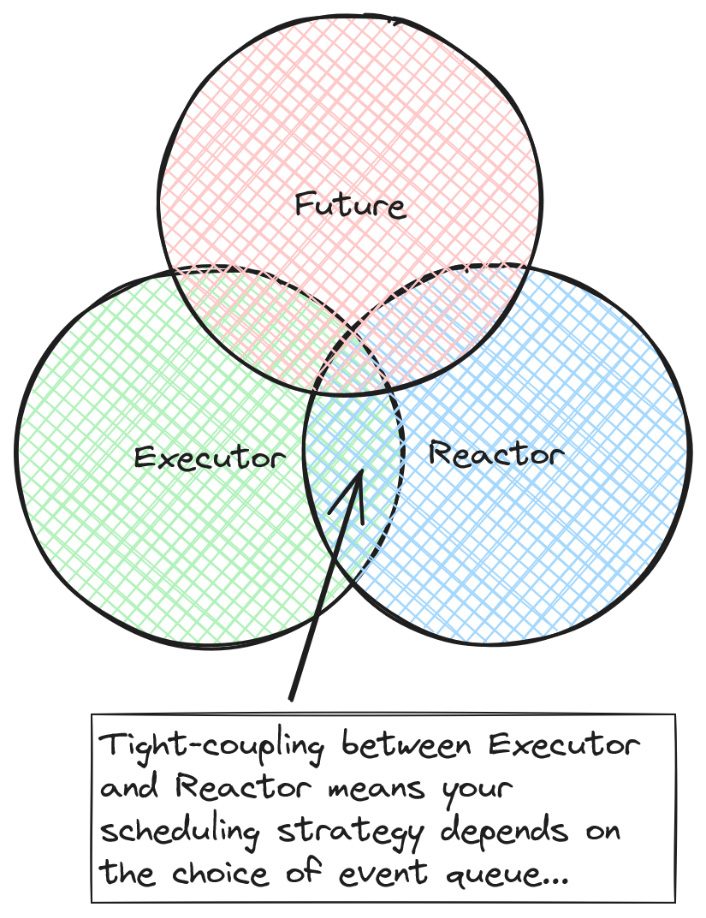
      So, if we visualize the degree of dependency between the different parts of our runtime, our current
      design could be described this way:
Figure 8.5 – Tight coupling between reactor and executor
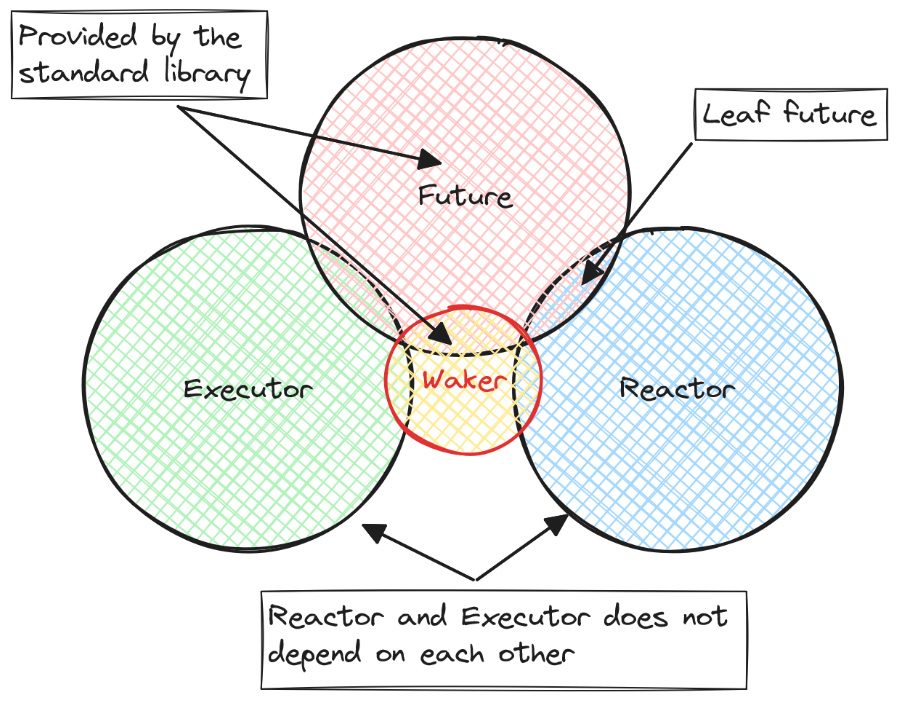
      If we want a loose coupling between the reactor and executor, we need an interface provided to signal
      the executor that it should wake up when an event that allows a future to progress has occurred. It’s no
      coincidence that this type is called Waker (https://doc.rust-lang.org/stable/std/
      task/struct.Waker.html) in Rust’s standard library. If we change our visualization to reflect
      this, it will look something like this:
Creating a proper runtime 185
Figure 8.6 – A loosely coupled reactor and executor
It’s no coincidence that we land on the same design as what we have in Rust today. It’s a minimal design from Rust’s point of view, but it allows for a wide variety of runtime designs without laying too many restrictions for the future.
Note Even though the design is pretty minimal today from a language perspective, there are plans to stabilize more async-related traits and interfaces in the future. Rust has a working group tasked with including widely used traits and interfaces in the standard library, which you can find more information about here: https://rust-lang.github. io/wg-async/welcome.html. You can also get an overview of items they work on and track their progress here: https://github.com/orgs/rust-lang/projects/28/ views/1. Maybe you even want to get involved (https://rust-lang.github.io/wg-async/ welcome.html#-getting-involved) in making async Rust better for everyone after reading this book?
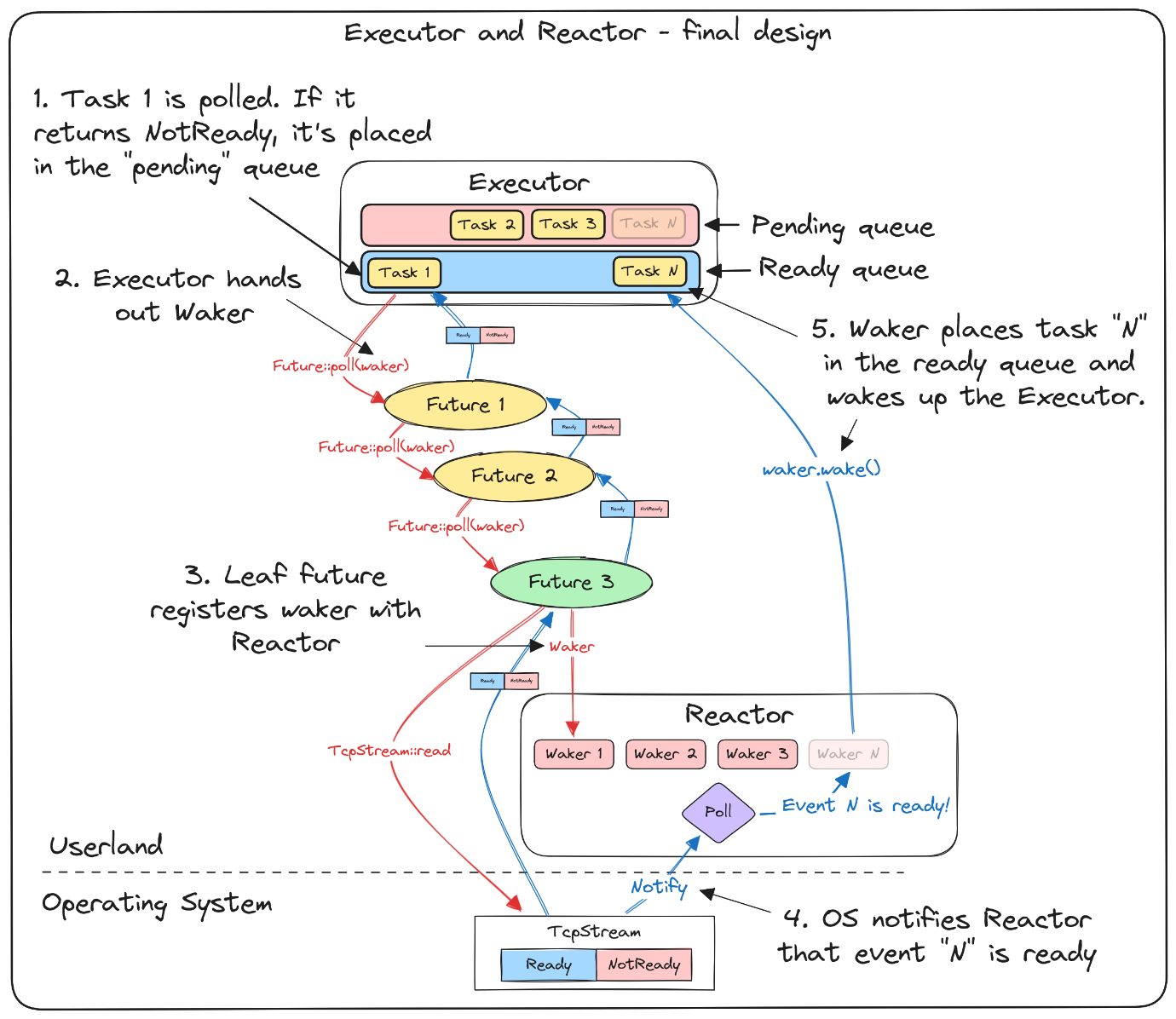
If we change our system diagram to reflect the changes we need to make to our runtime going forward, it will look like this:
186 Runtimes, Wakers, and the Reactor-Executor Pattern
Figure 8.7 – Executor and reactor: final design
      We have two parts that have no direct dependency on each other. We have an Executor that schedules
      tasks and passes on a Waker when polling a future that eventually will be caught and stored by the
      Reactor. When the Reactor receives a notification that an event is ready, it locates the Waker
      associated with that task and calls Wake::wake on it.
      This enables us to:
         • Run several OS threads that each have their own executor, but share the same reactor
         • Have multiple reactors that handle different kinds of leaf futures and make sure to wake up the
           correct executor when it can progress
So, now that we have an idea of what to do, it’s time to start writing it in code.
Step 1 – Improving our runtime design by adding a Reactor and a Waker 187
Step 1 – Improving our runtime design by adding a Reactor and a Waker In this step, we’ll make the following changes:
  1.   Change the project structure so that it reflects our new design.
  2.   Find a way for the executor to sleep and wake up that does not rely directly on Poll and
       create a Waker based on this that allows us to wake up the executor and identify which task
       is ready to progress.
  3.   Change the trait definition for Future so that poll takes a &Waker as an argument.
   Tip
   You’ll find this example in the ch08/b-reactor-executor folder. If you follow along by
   writing the examples from the book, I suggest that you create a new project called b-reactor-
   executor for this example by following these steps:
       1. Create a new folder called b-reactor-executor.
       2. Enter the newly created folder and write cargo init.
      3. Copy everything in the src folder in the previous example, a-runtime, into the src
   folder of a new project.
       4. Copy the dependencies section of the Cargo.toml file into the Cargo.toml
   file in the new project.
Let’s start by making some changes to our project structure to set it up so that we can build on it going forward. The first thing we do is divide our runtime module into two submodules, reactor and executor:
  1.   Create a new subfolder in the src folder called runtime.
  2.   Create two new files in the runtime folder called reactor.rs and executor.rs.
  3.   Just below the imports in runtime.rs, declare the two new modules by adding these lines:
          mod executor;
          mod reactor;
You should now have a folder structure that looks like this: src |-- runtime |-- executor.rs |-- reactor.rs |-- future.rs
188 Runtimes, Wakers, and the Reactor-Executor Pattern
         |-- http.rs
         |-- main.rs
         |-- runtime.rs
      To set everything up, we start by deleting everything in runtime.rs and replacing it with the
      following lines of code:
      ch08/b-reactor-executor/src/runtime.rs
        pub use executor::{spawn, Executor, Waker};
        pub use reactor::reactor;
        mod executor;
        mod reactor;
        pub fn init() -> Executor {
            reactor::start();
            Executor::new()
      The new content of runtime.rs first declares two submodules called executor and reactor.
      We then declare one function called init that starts our Reactor and creates a new Executor
      that it returns to the caller.
      The next point on our list is to find a way for our Executor to sleep and wake up when needed
      without relying on Poll.
      Creating a Waker
      So, we need to find a different way for our executor to sleep and get woken up that doesn’t rely directly
      on Poll.
      It turns out that this is quite easy. The standard library gives us what we need to get something working.
      By calling std::thread::current(), we can get a Thread object. This object is a handle to
      the current thread, and it gives us access to a few methods, one of which is unpark.
      The standard library also gives us a method called std::thread::park(), which simply asks
      the OS scheduler to park our thread until we ask for it to get unparked later on.
      It turns out that if we combine these, we have a way to both park and unpark the executor, which is
      exactly what we need.
      Let’s create a Waker type based on this. In our example, we’ll define the Waker inside the executor
      module since that’s where we create this exact type of Waker, but you could argue that it belongs to
      the future module since it’s a part of the Future trait.
Step 1 – Improving our runtime design by adding a Reactor and a Waker 189
Important note Our Waker relies on calling park/unpark on the Thread type from the standard library. This is OK for our example since it’s easy to understand, but given that any part of the code (including any libraries you use) can get a handle to the same thread by calling std::thread::current() and call park/unpark on it, it’s not a robust solution. If unrelated parts of the code call park/unpark on the same thread, we can miss wakeups or end up in deadlocks. Most production libraries create their own Parker type or rely on something such as crossbeam::sync::Parker (https://docs.rs/crossbeam/ latest/crossbeam/sync/struct.Parker.html) instead.
We won’t implement Waker as a trait since passing trait objects around will significantly increase the complexity of our example, and it’s not in line with the current design of Future and Waker in Rust either. Open the executor.rs file located inside the runtime folder, and let’s add all the imports we’re going to need right from the start:
ch08/b-reactor-executor/src/runtime/executor.rs
  use crate::future::{Future, PollState};
  use std::{
      cell::{Cell, RefCell},
      collections::HashMap,
      sync::{Arc, Mutex},
      thread::{self, Thread},
  };
The next thing we add is our Waker:
ch08/b-reactor-executor/src/runtime/executor.rs
  #[derive(Clone)]
  pub struct Waker {
      thread: Thread,
      id: usize,
      ready_queue: Arc<Mutex<Vec<usize>>>,
The Waker will hold three things for us:
• thread – A handle to the Thread object we mentioned earlier. • id – An usize that identifies which task this Waker is associated with.
190 Runtimes, Wakers, and the Reactor-Executor Pattern
         • ready_queue – This is a reference that can be shared between threads to a Vec<usize>,
           where usize represents the ID of a task that’s in the ready queue. We share this object with
           the executor so that we can push the task ID associated with the Waker onto that queue when
           it’s ready.
The implementation of our Waker will be quite simple:
      ch08/b-reactor-executor/src/runtime/executor.rs
        impl Waker {
            pub fn wake(&self) {
                self.ready_queue
                    .lock()
                    .map(|mut q| q.push(self.id))
                    .unwrap();
                self.thread.unpark();
      When Waker::wake is called, we first take a lock on the Mutex that protects the ready queue
      we share with the executor. We then push the id value that identifies the task that this Waker is
      associated with onto the ready queue.
      After that’s done, we call unpark on the executor thread and wake it up. It will now find the task
      associated with this Waker in the ready queue and call poll on it.
      It’s worth mentioning that many designs take a shared reference (for example, an Arc<…>) to the future/
      task itself, and push that onto the queue. By doing so, they skip a level of indirection that we get here
      by representing the task as a usize instead of passing in a reference to it.
      However, I personally think this way of doing it is easier to understand and reason about, and the
      end result will be the same.
         How does this Waker compare to the one in the standard library?
         The Waker we create here will take the same role as the Waker type from the standard library.
         The biggest difference is that the std::task::Waker method is wrapped in a Context struct
         and requires us to jump through a few hoops when we create it ourselves. Don’t worry – we’ll do
         all this at the end of this book, but neither of these differences is important for understanding the
         role it plays, so that’s why we stick to our own simplified version of asynchronous Rust for now.
      The last thing we need to do is to change the definition of the Future trait so that it takes &Waker
      as an argument.
Step 1 – Improving our runtime design by adding a Reactor and a Waker 191
Changing the Future definition Since our Future definition is in the future.rs file, we start by opening that file. The first thing we need to change is to pull in the Waker so that we can use it. At the top of the file, add the following code:
ch08/b-reactor-executor/src/future.rs use crate::runtime::Waker;
The next thing we do is to change our Future trait so that it takes &Waker as an argument:
ch08/b-reactor-executor/src/future.rs pub trait Future { type Output;
fn poll(&mut self, waker: &Waker) -> PollState<Self::Output>;
At this point, you have a choice. We won’t be using the join_all function or the JoinAll<F: Future> struct going forward. If you don’t want to keep them, you can just delete everything related to join_all, and that’s all you need to do in future.rs. If you want to keep them for further experimentation, you need to change the Future implementation for JoinAll so that it accepts a waker: &Waker argument, and remember to pass the Waker when polling the joined futures in match fut.poll(waker). The remaining things to do in step 1 are to make some minor changes where we implement the Future trait. Let’s start in http.rs. The first thing we do is adjust our dependencies a little to reflect the changes we made to our runtime module, and we add a dependency on our new Waker. Replace the dependencies section at the top of the file with this:
ch08/b-reactor-executor/src/http.rs use crate::{future::PollState, runtime::{self, reactor, Waker}, Future}; use mio::Interest; use std::io::{ErrorKind, Read, Write};
192 Runtimes, Wakers, and the Reactor-Executor Pattern
      The compiler will complain about not finding the reactor yet, but we’ll get to that shortly.
      Next, we have to navigate to the impl Future for HttpGetFuture block, where we need to
      change the poll method so that it accepts a &Waker argument:
      ch08/b-reactor-executor/src/http.rs
        impl Future for HttpGetFuture {
            type Output = String;
            fn poll(&mut self, waker: &Waker) -> PollState<Self::Output> {
        …
      The last file we need to change is main.rs. Since corofy doesn’t know about Waker types, we
      need to change a few lines in the coroutines it generated for us in main.rs.
      First of all, we have to add a dependency on our new Waker, so add this at the start of the file:
      ch08/b-reactor-executor/src/main.rs
        use runtime::Waker;
      In the impl Future for Coroutineblock, change the following three lines of code that
      I’ve highlighted:
      ch08/b-reactor-executor/src/main.rs
        fn poll(&mut self, waker: &Waker)
        match f1.poll(waker)
        match f2.poll(waker)
      And that’s all we need to do in step 1. We’ll get back to fixing the errors in this file as the last step we
      do; for now, we just focus on everything concerning the Waker.
      The next step will be to create a proper Executor.
      Step 2 – Implementing a proper Executor
      In this step, we’ll create an executor that will:
         • Hold many top-level futures and switch between them
         • Enable us to spawn new top-level futures from anywhere in our asynchronous program
Step 2 – Implementing a proper Executor 193
• Hand out Waker types so that they can sleep when there is nothing to do and wake up when one of the top-level futures can progress • Enable us to run several executors by having each run on its dedicated OS thread
Note It’s worth mentioning that our executor won’t be fully multithreaded in the sense that tasks/ futures can’t be sent from one thread to another, and the different Executor instances will not know of each other. Therefore, executors can’t steal work from each other (no work-stealing), and we can’t rely on executors picking tasks from a global task queue. The reason is that the Executor design will be much more complex if we go down that route, not only because of the added logic but also because we have to add constraints, such as requiring everything to be Send + Sync. Some of the complexity in asynchronous Rust today can be attributed to the fact that many runtimes in Rust are multithreaded by default, which makes asynchronous Rust deviate more from “normal” Rust than it actually needs to. It’s worth mentioning that since most production runtimes in Rust are multithreaded by default, most of them also have a work-stealing executor. This will be similar to the last version of our bartender example in Chapter 1, where we achieved a slightly increased efficiency by letting the bartenders “steal” tasks that are in progress from each other. However, this example should still give you an idea of how we can leverage all the cores on a machine to run asynchronous tasks, giving us both concurrency and parallelism, even though it will have limited capabilities.
Let’s start by opening up executor.rs located in the runtime subfolder. This file should already contain our Waker and the dependencies we need, so let’s start by adding the following lines of code just below our dependencies:
ch08/b-reactor-executor/src/runtime/executor.rs type Task = Box<dyn Future<Output = String>>;
  thread_local! {
      static CURRENT_EXEC: ExecutorCore = ExecutorCore::default();
The first line is a type alias; it simply lets us create an alias called Task that refers to the type: Box<dyn Future<Output = String>>. This will help keep our code a little bit cleaner. The next line might be new to some readers. We define a thread-local static variable by using the thread_local! macro.
194 Runtimes, Wakers, and the Reactor-Executor Pattern
      The thread_local! macro lets us define a static variable that’s unique to the thread it’s first called
      from. This means that all threads we create will have their own instance, and it’s impossible for one
      thread to access another thread’s CURRENT_EXEC variable.
      We call the variable CURRENT_EXEC since it holds the Executor that’s currently running on
      this thread.
      The next lines we add to this file is the definition of ExecutorCore:
      ch08/b-reactor-executor/src/runtime/executor.rs
        #[derive(Default)]
        struct ExecutorCore {
            tasks: RefCell<HashMap<usize, Task>>,
            ready_queue: Arc<Mutex<Vec<usize>>>,
            next_id: Cell<usize>,
ExecutorCore holds all the state for our Executor:
         • tasks – This is a HashMap with a usize as the key and a Task (remember the alias we
           created previously) as data. This will hold all the top-level futures associated with the executor
           on this thread and allow us to give each an id property to identify them. We can’t simply mutate
           a static variable, so we need internal mutability here. Since this will only be callable from one
           thread, a RefCell will do so since there is no need for synchronization.
         • ready_queue – This is a simple Vec<usize> that stores the IDs of tasks that should be
           polled by the executor. If we refer back to Figure 8.7, you’ll see how this fits into the design
           we outlined there. As mentioned earlier, we could store something such as an Arc<dyn
           Future<…>> here instead, but that adds quite a bit of complexity to our example. The only
           downside with the current design is that instead of getting a reference to the task directly, we
           have to look it up in our tasks collection, which takes time. An Arc<…> (shared reference)
           to this collection will be given to each Waker that this executor creates. Since the Waker can
           (and will) be sent to a different thread and signal that a specific task is ready by adding the
           task’s ID to ready_queue, we need to wrap it in an Arc<Mutex<…>>.
         • next_id – This is a counter that gives out the next available I, which means that it should
           never hand out the same ID twice for this executor instance. We’ll use this to give each top-level
           future a unique ID. Since the executor instance will only be accessible on the same thread it
           was created, a simple Cell will suffice in giving us the internal mutability we need.
      ExecutorCore derives the Default trait since there is no special initial state we need here, and
      it keeps the code short and concise.
Step 2 – Implementing a proper Executor 195
The next function is an important one. The spawn function allows us to register new top-level futures with our executor from anywhere in our program:
ch08/b-reactor-executor/src/runtime/executor.rs
  pub fn spawn<F>(future: F)
  where
      F: Future<Output = String> + 'static,
  {
      CURRENT_EXEC.with(|e| {
          let id = e.next_id.get();
          e.tasks.borrow_mut().insert(id, Box::new(future));
          e.ready_queue.lock().map(|mut q| q.push(id)).unwrap();
          e.next_id.set(id + 1);
      });
The spawn function does a few things:
• It gets the next available ID. • It assigns the ID to the future it receives and stores it in a HashMap. • It adds the ID that represents this task to ready_queue so that it’s polled at least once (remember that Future traits in Rust don’t do anything unless they’re polled at least once). • It increases the ID counter by one.
The unfamiliar syntax accessing CURRENT_EXEC by calling with and passing in a closure is just a consequence of how thread local statics is implemented in Rust. You’ll also notice that we must use a few special methods because we use RefCell and Cell for internal mutability for tasks and next_id, but there is really nothing inherently complex about this except being a bit unfamiliar.
A quick note about static lifetimes When a 'static lifetime is used as a trait bound as we do here, it doesn’t actually mean that the lifetime of the Future trait we pass in must be static (meaning it will have to live until the end of the program). It means that it must be able to last until the end of the program, or, put another way, the lifetime can’t be constrained in any way. Most often, when you encounter something that requires a 'static bound, it simply means that you’ll have to give ownership over the thing you pass in. If you pass in any references, they need to have a 'static lifetime. It’s less difficult to satisfy this constraint than you might expect.
The final part of step 2 will be to define and implement the Executor struct itself.
196 Runtimes, Wakers, and the Reactor-Executor Pattern
The Executor struct is very simple, and there is only one line of code to add:
      ch08/b-reactor-executor/src/runtime/executor.rs
        pub struct Executor;
      Since all the state we need for our example is held in ExecutorCore, which is a static thread-local
      variable, our Executor struct doesn’t need any state. This also means that we don’t strictly need a
      struct at all, but to keep the API somewhat familiar, we do it anyway.
      Most of the executor implementation is a handful of simple helper methods that end up in a block_on
      function, which is where the interesting parts really happen.
      Since these helper methods are short and easy to understand, I’ll present them all here and just briefly
      go over what they do:
         Note
         We open the impl Executor block here but will not close it until we’ve finished implementing
         the block_on function.
      ch08/b-reactor-executor/src/runtime/executor.rs
        impl Executor {
            pub fn new() -> Self {
                Self {}
            fn pop_ready(&self) -> Option<usize> {
                CURRENT_EXEC.with(|q| q.ready_queue.lock().map(|mut q| q.pop()).unwrap())
            fn get_future(&self, id: usize) -> Option<Task> {
                CURRENT_EXEC.with(|q| q.tasks.borrow_mut().remove(&id))
            fn get_waker(&self, id: usize) -> Waker {
                Waker {
                    id,
                    thread: thread::current(),
                    ready_queue: CURRENT_EXEC.with(|q| q.ready_queue.clone()),
Step 2 – Implementing a proper Executor 197
      fn insert_task(&self, id: usize, task: Task) {
          CURRENT_EXEC.with(|q| q.tasks.borrow_mut().insert(id, task));
      fn task_count(&self) -> usize {
          CURRENT_EXEC.with(|q| q.tasks.borrow().len())
So, we have six methods here:
   • new – Creates a new Executor instance. For simplicity, we have no initialization here, and
     everything is done lazily by design in the thread_local! macro.
   • pop_ready – This function takes a lock on read_queue and pops off an ID that’s ready
     from the back of Vec. Calling pop here means that we also remove the item from the collection.
     As a side note, since Waker pushes its ID to the back of ready_queue and we pop off from
     the back as well, we essentially get a Last In First Out (LIFO) queue. Using something such as
     VecDeque from the standard library would easily allow us to choose the order in which we
     remove items from the queue if we wish to change that behavior.
   • get_future – This function takes the ID of a top-level future as an argument, removes the
     future from the tasks collection, and returns it (if the task is found). This means that if the
     task returns NotReady (signaling that we’re not done with it), we need to remember to add
     it back to the collection again.
   • get_waker – This function creates a new Waker instance.
   • insert_task – This function takes an id property and a Task property and inserts them
     into our tasks collection.
   • task_count – This function simply returns a count of how many tasks we have in the queue.
The final and last part of the Executor implementation is the block_on function. This is also where we close the impl Executor block:
ch08/b-reactor-executor/src/runtime/executor.rs
  pub fn block_on<F>(&mut self, future: F)
    where
        F: Future<Output = String> + 'static,
    {
        spawn(future);
        loop {
            while let Some(id) = self.pop_ready() {
198 Runtimes, Wakers, and the Reactor-Executor Pattern
                let mut future = match self.get_future(id) {
                  Some(f) => f,
                  // guard against false wakeups
                  None => continue,
                };
                let waker = self.get_waker(id);
                match future.poll(&waker) {
                  PollState::NotReady => self.insert_task(id, future),
                  PollState::Ready(_) => continue,
              let task_count = self.task_count();
              let name = thread::current().name().unwrap_or_default().to_string();
              if task_count > 0 {
                println!("{name}: {task_count} pending tasks. Sleep until notified.");
                thread::park();
              } else {
                println!("{name}: All tasks are finished");
                break;
      block_on will be the entry point to our Executor. Often, you will pass in one top-level future
      first, and when the top-level future progresses, it will spawn new top-level futures onto our executor.
      Each new future can, of course, spawn new futures onto the Executor too, and that’s how an
      asynchronous program basically works.
      In many ways, you can view this first top-level future in the same way you view the main function in a
      normal Rust program. spawn is similar to thread::spawn, with the exception that the tasks stay
      on the same OS thread in this example. This means the tasks won’t be able to run in parallel, which in
      turn allows us to avoid any need for synchronization between tasks to avoid data races.
      Let’s go through the function step by step:
        1.   The first thing we do is spawn the future we received onto ourselves. There are many ways this
             could be implemented, but this is the easiest way to do it.
        2.   Then, we have a loop that will run as long as our asynchronous program is running.
Step 3 – Implementing a proper Reactor 199
  3.   Every time we loop, we create an inner while let Some(…) loop that runs as long as
       there are tasks in ready_queue.
  4.   If there is a task in ready_queue, we take ownership of the Future object by removing
       it from the collection. We guard against false wakeups by just continuing if there is no future
       there anymore (meaning that we’re done with it but still get a wakeup). This will, for example,
       happen on Windows since we get a READABLE event when the connection closes, but even
       though we could filter those events out, mio doesn’t guarantee that false wakeups won’t happen,
       so we have to handle that possibility anyway.
  5.   Next, we create a new Waker instance that we can pass into Future::poll(). Remember
       that this Waker instance now holds the id property that identifies this specific Future trait
       and a handle to the thread we’re currently running on.
  6.   The next step is to call Future::poll.
  7.   If we get NotReady in return, we insert the task back into our tasks collection. I want to
       emphasize that when a Future trait returns NotReady, we know it will arrange it so that
       Waker::wake is called at a later point in time. It’s not the executor’s responsibility to track
       the readiness of this future.
  8.   If the Future trait returns Ready, we simply continue to the next item in the ready queue.
       Since we took ownership over the Future trait, this will drop the object before we enter the
       next iteration of the while let loop.
  9.   Now that we’ve polled all the tasks in our ready queue, the first thing we do is get a task count
       to see how many tasks we have left.
  10. We also get the name of the current thread for future logging purposes (it has nothing to do
      with how our executor works).
  11. If the task count is larger than 0, we print a message to the terminal and call thread::park().
      Parking the thread will yield control to the OS scheduler, and our Executor does nothing
      until it’s woken up again.
  12. If the task count is 0, we’re done with our asynchronous program and exit the main loop.
That’s pretty much all there is to it. By this point, we’ve covered all our goals for step 2, so we can continue to the last and final step and implement a Reactor for our runtime that will wake up our executor when something happens.
Step 3 – Implementing a proper Reactor The final part of our example is the Reactor. Our Reactor will:
• Efficiently wait and handle events that our runtime is interested in • Store a collection of Waker types and make sure to wake the correct Waker when it gets a notification on a source it’s tracking
200 Runtimes, Wakers, and the Reactor-Executor Pattern
         • Provide the necessary mechanisms for leaf futures such as HttpGetFuture, to register and
           deregister interests in events
         • Provide a way for leaf futures to store the last received Waker
      When we’re done with this step, we should have everything we need for our runtime, so let’s get to it.
      Start by opening the reactor.rs file.
      The first thing we do is add the dependencies we need:
      ch08/b-reactor-executor/src/runtime/reactor.rs
        use crate::runtime::Waker;
        use mio::{net::TcpStream, Events, Interest, Poll, Registry, Token};
        use std::{
            collections::HashMap,
            sync::{
                atomic::{AtomicUsize, Ordering},
                Arc, Mutex, OnceLock,
            },
            thread,
        };
      After we’ve added our dependencies, we create a type alias called Wakers that aliases the type for
      our wakers collection:
      ch08/b-reactor-executor/src/runtime/reactor.rs
        type Wakers = Arc<Mutex<HashMap<usize, Waker>>>;
The next line will declare a static variable called REACTOR:
      ch08/b-reactor-executor/src/runtime/reactor.rs
        static REACTOR: OnceLock<Reactor> = OnceLock::new();
      This variable will hold a OnceLock<Reactor>. In contrast to our CURRENT_EXEC static variable,
      this will be possible to access from different threads. OnceLock allows us to define a static variable
      that we can write to once so that we can initialize it when we start our Reactor. By doing so, we
      also make sure that there can only be a single instance of this specific reactor running in our program.
      The variable will be private to this module, so we create a public function allowing other parts of our
      program to access it:
Step 3 – Implementing a proper Reactor 201
ch08/b-reactor-executor/src/runtime/reactor.rs pub fn reactor() -> &'static Reactor { REACTOR.get().expect("Called outside an runtime context")
The next thing we do is define our Reactor struct:
ch08/b-reactor-executor/src/runtime/reactor.rs
  pub struct Reactor {
      wakers: Wakers,
      registry: Registry,
      next_id: AtomicUsize,
This will be all the state our Reactor struct needs to hold:
• wakers – A HashMap of Waker objects, each identified by an integer • registry – Holds a Registry instance so that we can interact with the event queue in mio • next_id – Stores the next available ID so that we can track which event occurred and which Waker should be woken
The implementation of Reactor is actually quite simple. It’s only four short methods for interacting with the Reactor instance, so I’ll present them all here and give a brief explanation next:
ch08/b-reactor-executor/src/runtime/reactor.rs
  impl Reactor {
      pub fn register(&self, stream: &mut TcpStream, interest: Interest, id:
  usize) {
          self.registry.register(stream, Token(id), interest).unwrap();
      pub fn set_waker(&self, waker: &Waker, id: usize) {
          let _ = self
              .wakers
              .lock()
              .map(|mut w| w.insert(id, waker.clone()).is_none())
              .unwrap();
      pub fn deregister(&self, stream: &mut TcpStream, id: usize) {
          self.wakers.lock().map(|mut w| w.remove(&id)).unwrap();
202 Runtimes, Wakers, and the Reactor-Executor Pattern
self.registry.deregister(stream).unwrap();
            pub fn next_id(&self) -> usize {
                self.next_id.fetch_add(1, Ordering::Relaxed)
Let’s briefly explain what these four methods do:
         • register – This method is a thin wrapper around Registry::register, which we
           know from Chapter 4. The one thing to make a note of here is that we pass in an id property
           so that we can identify which event has occurred when we receive a notification later on.
         • set_waker – This method adds a Waker to our HashMap using the provided id property
           as a key to identify it. If there is a Waker there already, we replace it and drop the old one. An
           important point to remember is that we should always store the most recent Waker so that
           this function can be called multiple times, even though there is already a Waker associated
           with the TcpStream.
         • deregister – This function does two things. First, it removes the Waker from our wakers
           collection. Then, it deregisters the TcpStream from our Poll instance.
         • I want to remind you at this point that while we only work with TcpStream in our examples,
           this could, in theory, be done with anything that implements mio’s Source trait, so the same
           thought process is valid in a much broader context than what we deal with here.
         • next_id – This simply gets the current next_id value and increments the counter atomically.
           We don’t care about any happens before/after relationships happening here; we only care about
           not handing out the same value twice, so Ordering::Relaxed will suffice here. Memory
           ordering in atomic operations is a complex topic that we won’t be able to dive into in this book,
           but if you want to know more about the different memory orderings in Rust and what they
           mean, the official documentation is the right place to start: https://doc.rust-lang.
           org/stable/std/sync/atomic/enum.Ordering.html.
      Now that our Reactor is set up, we only have two short functions left. The first one is event_loop,
      which will hold the logic for our event loop that waits and reacts to new events:
      ch08/b-reactor-executor/src/runtime/reactor.rs
        fn event_loop(mut poll: Poll, wakers: Wakers) {
            let mut events = Events::with_capacity(100);
            loop {
                poll.poll(&mut events, None).unwrap();
                for e in events.iter() {
Step 3 – Implementing a proper Reactor 203
              let Token(id) = e.token();
              let wakers = wakers.lock().unwrap();
              if let Some(waker) = wakers.get(&id) {
                  waker.wake();
This function takes a Poll instance and a Wakers collection as arguments. Let’s go through it step by step:
   • The first thing we do is create an events collection. This should be familiar since we did the
     exact same thing in Chapter 4.
   • The next thing we do is create a loop that in our case will continue to loop for eternity. This
     makes our example short and simple, but it has the downside that we have no way of shutting
     our event loop down once it’s started. Fixing that is not especially difficult, but since it won’t
     be necessary for our example, we don’t cover this here.
   • Inside the loop, we call Poll::poll with a timeout of None, which means it will never time
     out and block until it receives an event notification.
   • When the call returns, we loop through every event we receive.
   • If we receive an event, it means that something we registered interest in happened, so we get
     the id we passed in when we first registered an interest in events on this TcpStream.
   • Lastly, we try to get the associated Waker and call Waker::wake on it. We guard ourselves
     from the fact that the Waker may have been removed from our collection already, in which
     case we do nothing.
It’s worth noting that we can filter events if we want to here. Tokio provides some methods on the Event object to check several things about the event it reported. For our use in this example, we don’t need to filter events. Finally, the last function is the second public function in this module and the one that initializes and starts the runtime:
ch08/b-reactor-executor/src/runtime/runtime.rs pub fn start() { use thread::spawn;
let wakers = Arc::new(Mutex::new(HashMap::new()));
204 Runtimes, Wakers, and the Reactor-Executor Pattern
            let poll = Poll::new().unwrap();
            let registry = poll.registry().try_clone().unwrap();
            let next_id = AtomicUsize::new(1);
            let reactor = Reactor {
                wakers: wakers.clone(),
                registry,
                next_id,
            };
            REACTOR.set(reactor).ok().expect("Reactor already running");
            spawn(move || event_loop(poll, wakers));
      The start method should be fairly easy to understand. The first thing we do is create our Wakers
      collection and our Poll instance. From the Poll instance, we get an owned version of Registry.
      We initialize next_id to 1 (for debugging purposes, I wanted to initialize it to a different start value
      than our Executor) and create our Reactor object.
      Then, we set the static variable we named REACTOR by giving it our Reactor instance.
      The last thing is probably the most important one to pay attention to. We spawn a new OS thread and
      start our event_loop function on that one. This also means that we pass on our Poll instance to
      the event loop thread for good.
      Now, the best practice would be to store the JoinHandle returned from spawn so that we can join
      the thread later on, but our thread has no way to shut down the event loop anyway, so joining it later
      makes little sense, and we simply discard the handle.
      I don’t know if you agree with me, but the logic here is not that complex when we break it down into
      smaller pieces. Since we know how epoll and mio work already, the rest is pretty easy to understand.
      Now, we’re not done yet. We still have some small changes to make to our HttpGetFuture leaf
      future since it doesn’t register with the reactor at the moment. Let’s fix that.
      Start by opening the http.rs file.
      Since we already added the correct imports when we opened the file to adapt everything to the new
      Future interface, there are only a few places we need to change that so this leaf future integrates
      nicely with our reactor.
      The first thing we do is give HttpGetFuture an identity. It’s the source of events we want to track
      with our Reactor, so we want it to have the same ID until we’re done with it:
      ch08/b-reactor-executor/src/http.rs
        struct HttpGetFuture {
            stream: Option<mio::net::TcpStream>,
Step 3 – Implementing a proper Reactor 205
      buffer: Vec<u8>,
      path: String,
      id: usize,
We also need to retrieve a new ID from the reactor when the future is created:
ch08/b-reactor-executor/src/http.rs
  impl HttpGetFuture {
      fn new(path: String) -> Self {
          let id = reactor().next_id();
          Self {
              stream: None,
              buffer: vec![],
              path,
              id,
Next, we have to locate the poll implementation for HttpGetFuture. The first thing we need to do is make sure that we register interest with our Poll instance and register the Waker we receive with the Reactor the first time the future gets polled. Since we don’t register directly with Registry anymore, we remove that line of code and add these new lines instead:
ch08/b-reactor-executor/src/http.rs
  if self.stream.is_none() {
              println!("FIRST POLL - START OPERATION");
              self.write_request();
              let stream = self.stream.as_mut().unwrap();
              runtime::reactor().register(stream, Interest::READABLE, self.id);
              runtime::reactor().set_waker(waker, self.id);
Lastly, we need to make some minor changes to how we handle the different conditions when reading from TcpStream:
ch08/b-reactor-executor/src/http.rs match self.stream.as_mut().unwrap().read(&mut buff) { Ok(0) => {
206 Runtimes, Wakers, and the Reactor-Executor Pattern
                            let s = String::from_utf8_lossy(&self.buffer);
                            runtime::reactor().deregister(self.stream.as_mut().
        unwrap(), self.id);
                            break PollState::Ready(s.to_string());
                        Ok(n) => {
                            self.buffer.extend(&buff[0..n]);
                            continue;
                        Err(e) if e.kind() == ErrorKind::WouldBlock => {
                            runtime::reactor().set_waker(waker, self.id);
                            break PollState::NotReady;
Err(e) => panic!("{e:?}"),
      The first change is to deregister the stream from our Poll instance when we’re done.
      The second change is a little more subtle. If you read the documentation for Future::poll
      in Rust (https://doc.rust-lang.org/stable/std/future/trait.Future.
      html#tymethod.poll) carefully, you’ll see that it’s expected that the Waker from the most recent
      call should be scheduled to wake up. That means that every time we get a WouldBlock error, we
      need to make sure we store the most recent Waker.
      The reason is that the future could have moved to a different executor in between calls, and we need
      to wake up the correct one (it won’t be possible to move futures like those in our example, but let’s
      play by the same rules).
      And that’s it!
      Congratulations! You’ve now created a fully working runtime based on the reactor-executor pattern.
      Well done!
      Now, it’s time to test it and run a few experiments with it.
      Let’s go back to main.rs and change the main function so that we get our program running correctly
      with our new runtime.
      First of all, let’s remove the dependency on the Runtime struct and make sure our imports look like this:
      ch08/b-reactor-executor/src/main.rs
        mod future;
        mod http;
        mod runtime;
Step 3 – Implementing a proper Reactor 207
use future::{Future, PollState}; use runtime::Waker;
Next, we need to make sure that we initialize our runtime and pass in our future to executor. block_on. Our main function should look like this:
ch08/b-reactor-executor/src/main.rs
  fn main() {
      let mut executor = runtime::init();
      executor.block_on(async_main());
And finally, let’s try it out by running it: cargo run.
You should get the following output: Program starting FIRST POLL - START OPERATION main: 1 pending tasks. Sleep until notified. HTTP/1.1 200 OK content-length: 15 connection: close content-type: text/plain; charset=utf-8 date: Thu, xx xxx xxxx 15:38:08 GMT
HelloAsyncAwait FIRST POLL - START OPERATION main: 1 pending tasks. Sleep until notified. HTTP/1.1 200 OK content-length: 15 connection: close content-type: text/plain; charset=utf-8 date: Thu, xx xxx xxxx 15:38:08 GMT
HelloAsyncAwait main: All tasks are finished
Great – it’s working just as expected!!! However, we’re not really using any of the new capabilities of our runtime yet so before we leave this chapter, let’s have some fun and see what it can do.
208 Runtimes, Wakers, and the Reactor-Executor Pattern
      Experimenting with our new runtime
      If you remember from Chapter 7, we implemented a join_all method to get our futures running
      concurrently. In libraries such as Tokio, you’ll find a join_all function too, and the slightly more
      versatile FuturesUnordered API that allows you to join a set of predefined futures and run
      them concurrently.
      These are convenient methods to have, but it does force you to know which futures you want to run
      concurrently in advance. If the futures you run using join_all want to spawn new futures that run
      concurrently with their “parent” future, there is no way to do that using only these methods.
      However, our newly created spawn functionality does exactly this. Let’s put it to the test!
An example using concurrency
         Note
         The exact same version of this program can be found in the ch08/c-runtime-executor folder.
      Let’s try a new program that looks like this:
        fn main() {
            let mut executor = runtime::init();
            executor.block_on(async_main());
        coro fn request(i: usize) {
            let path = format!("/{}/HelloWorld{i}", i * 1000);
            let txt = Http::get(&path).wait;
            println!("{txt}");
        coro fn async_main() {
            println!("Program starting");
            for i in 0..5 {
                let future = request(i);
                runtime::spawn(future);
      This is pretty much the same example we used to show how join_all works in Chapter 7, only this
      time, we spawn them as top-level futures instead.
Experimenting with our new runtime 209
To run this example, follow these steps:
1. Replace everything below the imports in main.rs with the preceding code. 2. Run corofy ./src/main.rs. 3. Copy everything from main_corofied.rs to main.rs and delete main_corofied.rs. 4. Fix the fact that corofy doesn’t know we changed our futures to take waker: &Waker as an argument. The easiest way is to simply run cargo check and let the compiler guide you to the places we need to change.
Now, you can run the example and see that the tasks run concurrently, just as they did using join_all in Chapter 7. If you measured the time it takes to run the tasks, you’d find that it all takes around 4 seconds, which makes sense if you consider that you just spawned 5 futures, and ran them concurrently. The longest wait time for a single future was 4 seconds. Now, let’s finish off this chapter with another interesting example.
Running multiple futures concurrently and in parallel This time, we spawn multiple threads and give each thread its own Executor so that we can run the previous example simultaneously in parallel using the same Reactor for all Executor instances. We’ll also make a small adjustment to the printout so that we don’t get overwhelmed with data. Our new program will look like this: mod future; mod http; mod runtime; use crate::http::Http; use future::{Future, PollState}; use runtime::{Executor, Waker}; use std::thread::Builder;
  fn main() {
      let mut executor = runtime::init();
      let mut handles = vec![];
      for i in 1..12 {
          let name = format!("exec-{i}");
          let h = Builder::new().name(name).spawn(move || {
              let mut executor = Executor::new();
              executor.block_on(async_main());
          }).unwrap();
          handles.push(h);
210 Runtimes, Wakers, and the Reactor-Executor Pattern
            executor.block_on(async_main());
            handles.into_iter().for_each(|h| h.join().unwrap());
        coroutine fn request(i: usize) {
            let path = format!("/{}/HelloWorld{i}", i * 1000);
            let txt = Http::get(&path).wait;
            let txt = txt.lines().last().unwrap_or_default();
            println!(«{txt}»);
        coroutine fn async_main() {
            println!("Program starting");
            for i in 0..5 {
                let future = request(i);
                runtime::spawn(future);
      The machine I’m currently running has 12 cores, so when I create 11 new threads to run the same
      asynchronous tasks, I’ll use all the cores on my machine. As you’ll notice, we also give each thread a
      unique name that we’ll use when logging so that it’s easier to track what happens behind the scenes.
         Note
         While I use 12 cores, you should use the number of cores on your machine. If we increase this
         number too much, our OS will not be able to give us more cores to run our program in parallel
         on and instead start pausing/resuming the threads we create, which adds no value to us since
         we handle the concurrency aspect ourselves in an a^tsync runtime.
You’ll have to do the same steps as we did in the last example:
        1.   Replace the code that’s currently in main.rs with the preceding code.
        2.   Run corofy ./src/main.rs.
        3.   Copy everything from main_corofied.rs to main.rs and delete main_corofied.rs.
        4.   Fix the fact that corofy doesn’t know we changed our futures to take waker: &Waker as
             an argument. The easiest way is to simply run cargo check and let the compiler guide you
             to the places we need to change.
Summary 211
Now, if you run the program, you’ll see that it still only takes around 4 seconds to run, but this time we made 60 GET requests instead of 5. This time, we ran our futures both concurrently and in parallel. At this point, you can continue experimenting with shorter delays or more requests and see how many concurrent tasks you can have before the system breaks down. Pretty quickly, printouts to stdout will be a bottleneck, but you can disable those. Create a blocking version using OS threads and see how many threads you can run concurrently before the system breaks down compared to this version. Only imagination sets the limit, but do take the time to have some fun with what you’ve created before we continue with the next chapter. The only thing to be careful about is testing the concurrency limit of your system by sending these kinds of requests to a random server you don’t control yourself since you can potentially overwhelm it and cause problems for others.
Summary So, what a ride! As I said in the introduction for this chapter, this is one of the biggest ones in this book, but even though you might not realize it, you’ve already got a better grasp of how asynchronous Rust works than most people do. Great work! In this chapter, you learned a lot about runtimes and why Rust designed the Future trait and the Waker the way it did. You also learned about reactors and executors, Waker types, Futures traits, and different ways of achieving concurrency through the join_all function and spawning new top-level futures on the executor. By now, you also have an idea of how we can achieve both concurrency and parallelism by combining our own runtime with OS threads. Now, we’ve created our own async universe consisting of coro/wait, our own Future trait, our own Waker definition, and our own runtime. I’ve made sure that we don’t stray away from the core ideas behind asynchronous programming in Rust so that everything is directly applicable to async/ await, Future traits, Waker types, and runtimes in day-to-day programming. By now, we’re in the final stretch of this book. The last chapter will finally convert our example to use the real Future trait, Waker, async/await, and so on instead of our own versions of it. In that chapter, we’ll also reserve some space to talk about the state of asynchronous Rust today, including some of the most popular runtimes, but before we get that far, there is one more topic I want to cover: pinning. One of the topics that seems hardest to understand and most different from all other languages is the concept of pinning. When writing asynchronous Rust, you will at some point have to deal with the fact that Future traits in Rust must be pinned before they’re polled.
212 Runtimes, Wakers, and the Reactor-Executor Pattern
      So, the next chapter will explain pinning in Rust in a practical way so that you understand why we
      need it, what it does, and how to do it.
      However, you absolutely deserve a break after this chapter, so take some fresh air, sleep, clear your
      mind, and grab some coffee before we enter the last parts of this book.