Ch 9 — Coroutines, Self-Referential Structs, and Pinning
Coroutines, Self-Referential Structs, and Pinning In this chapter, we’ll start by improving our coroutines by adding the ability to store variables across state changes. We’ll see how this leads to our coroutines needing to take references to themselves and the issues that arise as a result of that. The reason for dedicating a whole chapter to this topic is that it’s an integral part of getting async/await to work in Rust, and also a topic that is somewhat difficult to get a good understanding of. The reason for this is that the whole concept of pinning is foreign to many developers and just like the Rust ownership system, it takes some time to get a good and working mental model of it. Fortunately, the concept of pinning is not that difficult to understand, but how it’s implemented in the language and how it interacts with Rust’s type system is abstract and hard to grasp. While we won’t cover absolutely everything about pinning in this chapter, we’ll try to get a good and sound understanding of it. The major goal here is to feel confident with the topic and understand why we need it and how to use it. As mentioned previously, this chapter is not only about pinning in Rust, so the first thing we’ll do is make some important improvements where we left off by improving the final example in Chapter 8. Then, we’ll explain what self-referential structs are and how they’re connected to futures before we explain how pinning can solve our problems. This chapter will cover the following main topics
• Improving our example 1 – variables • Improving our example 2 – references • Improving our example 3 – this is… not… good… • Discovering self-referential structs
214 Coroutines, Self-Referential Structs, and Pinning
         • Pinning in Rust
         • Improving our example 4 – pinning to the rescue
      Technical requirements
      The examples in this chapter will build on the code from the previous chapter, so the requirements are
      the same. The examples will all be cross-platform and work on all platforms that Rust (https://
      doc.rust-lang.org/stable/rustc/platform-support.html) and mio (https://
      github.com/tokio-rs/mio#platforms) support. The only thing you need is Rust installed
      and this book’s GitHub repository downloaded locally. All the code in this chapter can be found in
      the ch09 folder.
      To follow the examples step by step, you’ll also need corofy installed on your machine. If you didn’t
      install it in Chapter 7, install it now by going into the ch07/corofy folder in the repository and
      running the following:
cargo install --force --path .
      We’ll also use delayserver in this example, so you need to open a separate terminal, enter the
      delayserver folder at the root of the repository, and write cargo run so that it’s ready and
      available for the examples going forward.
      Remember to change the port number in the code if you have to change what port delayserver
      listens on.
      Improving our example 1 – variables
      So, let’s recap what we have at this point by continuing where we left off in the previous chapter. We
      have the following:
         • A Future trait
         • A coroutine implementation using coroutine/await syntax and a preprocessor
         • A reactor based on mio::Poll
         • An executor that allows us to spawn as many top-level tasks as we want and schedules the ones
           that are ready to run
         • An HTTP client that only makes HTTP GET requests to our local delayserver instance
      It’s not that bad – we might argue that our HTTP client is a little bit limited, but that’s not the focus of
      this book, so we can live with that. Our coroutine implementation, however, is severely limited. Let’s
      take a look at how we can make our coroutines slightly more useful.
      The biggest downside with our current implementation is that nothing – and I mean nothing – can
      live across wait points. It makes sense to tackle this problem first.
Improving our example 1 – variables 215
Let’s start by setting up our example. We’ll use the “library” code from d-multiple-threads example in Chapter 8 (our last version of the example), but we’ll change the main.rs file by adding a shorter and simpler example. Let’s set up the base example that we’ll iterate on and improve in this chapter.
Setting up the base example
Note You can find this example in this book’s GitHub repository under ch09/a-coroutinesvariables.
Perform the following steps:
1. Create a folder called a-coroutines-variables. 2. Enter the folder and run cargo init. 3. Delete the default main.rs file and copy everything from the ch08/d-multiplethreads/src folder into the ch10/a-coroutines-variables/src folder. 4. Open Cargo.toml and add the dependency on mio to the dependencies section: mio = {version = "0.8", features = ["net", "os-poll"]}
You should now have a folder structure that looks like this:
  src
    |-- runtime
         |-- executor.rs
         |-- reactor.rs
    |-- future.rs
    |-- http.rs
    |-- main.rs
    |-- runtime.rs
We’ll use corofy one last time to generate our boilerplate state machine for us. Copy the following into main.rs:
ch09/a-coroutines-variables/src/main.rs mod future; mod http; mod runtime; use crate::http::Http;
216 Coroutines, Self-Referential Structs, and Pinning
        use future::{Future, PollState};
        use runtime::Waker;
        fn main() {
            let mut executor = runtime::init();
            executor.block_on(async_main());
        coroutine fn async_main() {
            println!("Program starting");
            let txt = Http::get("/600/HelloAsyncAwait").wait;
            println!("{txt}");
            let txt = Http::get("/400/HelloAsyncAwait").wait;
            println!("{txt}");
      This time, let’s take a shortcut and write our corofied file directly back to main.rs since we’ve compared
      the files side by side enough times at this point. Assuming you’re in the base folder, a-coroutine-
      variables, write the following:
corofy ./src/main.rs ./src/main.rs
      The last step is to fix the fact that corofy doesn’t know about Waker. You can let the compiler guide
      you to where you need to make changes by writing cargo check, but to help you along the way,
      there are three minor changes to make (note that the line number is the one reported by re-writing
      the same code that we wrote previously):
        64: fn poll(&mut self, waker: &Waker)
        82: match f1.poll(waker)
        102: match f2.poll(waker)
      Now, check that everything is working as expected by writing cargo run.
      You should see the following output (the output has been abbreviated to save a little bit of space):
        Program starting
        FIRST POLL - START OPERATION
        main: 1 pending tasks. Sleep until notified.
        HTTP/1.1 200 OK
[==== ABBREVIATED ====]
        HelloAsyncAwait
        main: All tasks are finished
Improving our example 1 – variables 217
Note Remember that we need delayserver running in a terminal window so that we get a response to our HTTP GET requests. See the Technical requirements section for more information.
Now that we’ve got the boilerplate out of the way, it’s time to start making the improvements we talked about.
Improving our base example We want to see how we can improve our state machine so that it allows us to hold variables across wait points. To do that, we need to store them somewhere and restore the variables that are needed when we enter each state in our state machine.
Tip Pretend that these rewrites are done by corofy (or the compiler). Even though corofy can’t do these rewrites, it’s possible to automate this process as well.
Or coroutine/wait program looks like this:
  coroutine fn async_main() {
      println!("Program starting");
      let txt = Http::get("/600/HelloAsyncAwait").wait;
      println!("{txt}");
      let txt = Http::get("/400/HelloAsyncAwait").wait;
      println!("{txt}");
We want to change it so that it looks like this:
  coroutine fn async_main() {
      let mut counter = 0;
      println!("Program starting");
      let txt = http::Http::get("/600/HelloAsyncAwait").wait;
      println!("{txt}");
      counter += 1;
      let txt = http::Http::get("/400/HelloAsyncAwait").wait;
      println!("{txt}");
      counter += 1;
println!("Received {} responses.", counter);
218 Coroutines, Self-Referential Structs, and Pinning
      In this version, we simply create a counter variable at the top of our async_main function and
      increase the counter for each response we receive from the server. At the end, we print out how many
      responses we received.
         Note
         For brevity, I won’t present the entire code base going forward; instead, I will only present the
         relevant additions and changes. Remember that you can always refer to the same example in
         this book’s GitHub repository.
The way we implement this is to add a new field called stack to our Coroutine0 struct:
      ch09/a-coroutines-variables/src/main.rs
        struct Coroutine0 {
            stack: Stack0,
            state: State0,
The stack fields hold a Stack0 struct that we also need to define:
      ch09/a-coroutines-variables/src/main.rs
        #[derive(Default)]
        struct Stack0 {
            counter: Option<usize>,
      This struct will only hold one field since we only have one variable. The field will be of the
      Option<usize> type. We also derive the Default trait for this struct so that we can initialize
      it easily.
Improving our example 1 – variables 219
Note Futures created by async/await in Rust store this data in a slightly more efficient manner. In our example, we store every variable in a separate struct since I think it’s easier to reason about, but it also means that the more variables we need to store, the more space our coroutine will need. It will grow linearly with the number of different variables that need to be stored/restored between state changes. This could be a lot of data. For example, if we have 100 state changes that each need one distinct i64-sized variable to be stored to the next state, that would require a struct that takes up 100 * 8b = 800 bytes in memory. Rust optimizes this by implementing coroutines as enums, where each state only holds the data it needs to restore in the next state. This way, the size of a coroutine is not dependent on the total number of variables; it’s only dependent on the size of the largest state that needs to be saved/restored. In the preceding example, the size would be reduced to 8 bytes since the largest space any single state change needed is enough to hold one i64-sized variable. The same space will be reused over and over. The fact that this design allows for this optimization is significant and it’s an advantage that stackless coroutines have over stackful coroutines when it comes to memory efficiency.
The next thing we need to change is the new method on Coroutine0:
ch09/a-coroutines-variables/src/main.rs
  impl Coroutine0 {
      fn new() -> Self {
          Self {
              state: State0::Start,
              stack: Stack0::default(),
The default value for stack is not relevant to us since we’ll overwrite it anyway. The next few steps are the ones of most interest to us. In the Future implementation for Coroutine0, we’ll pretend that corofy added the following code to initialize, store, and restore the stack variables for us. Let’s take a look at what happens on the first call to poll now:
ch09/a-coroutines-variables/src/main.rs
  State0::Start => {
                      // initialize stack (hoist variables)
                      self.stack.counter = Some(0);
                      // ---- Code you actually wrote ----
                      println!("Program starting");
220 Coroutines, Self-Referential Structs, and Pinning
                            // ---------------------------------
                            let fut1 = Box::new( http::Http::get("/600/
        HelloAsyncAwait"));
                            self.state = State0::Wait1(fut1);
// save stack
Okay, so there are some important changes here that I’ve highlighted. Let’s go through them:
         • The first thing we do when we’re in the Start state is add a segment at the top where we
           initialize our stack. One of the things we do is hoist all variable declarations for the relevant
           code section (in this case, before the first wait point) to the top of the function.
         • In our example, we also initialize the variables to their initial value, which in this case is 0.
         • We also added a comment stating that we should save the stack, but since all that happens before
           the first wait point is the initialization of counter, there is nothing to store here.
Let’s take a look at what happens after the first wait point:
      ch09/a-coroutines-variables/src/main.rs
        State0::Wait1(ref mut f1) => {
                            match f1.poll(waker) {
                                PollState::Ready(txt) => {
                                    // Restore stack
                                    let mut counter = self.stack.counter.
        take().unwrap();
                                    // ---- Code you actually wrote ----
                                    println!("{txt}");
                                    counter += 1;
                                    // ---------------------------------
                                    let fut2 = Box::new(
        http::Http::get("/400/HelloAsyncAwait"));
                                    self.state = State0::Wait2(fut2);
                                    // save stack
                                    self.stack.counter = Some(counter);
                                PollState::NotReady => break
        PollState::NotReady,
Improving our example 1 – variables 221
Hmm, this is interesting. I’ve highlighted the changes we need to make. The first thing we do is to restore the stack by taking ownership over the counter (take()replaces the value currently stored in self.stack.counter with None in this case) and writing it to a variable with the same name that we used in the code segment (counter). Taking ownership and placing the value back in later is not an issue in this case and it mimics the code we wrote in our coroutine/wait example. The next change is simply the segment that takes all the code after the first wait point and pastes it in. In this case, the only change is that the counter variable is increased by 1. Lastly, we save the stack state back so that we hold onto its updated state between the wait points.
Note In Chapter 5, we saw how we needed to store/restore the register state in our fibers. Since Chapter 5 showed an example of a stackful coroutine implementation, we didn’t have to care about stack state at all since all the needed state was stored in the stacks we created. Since our coroutines are stackless, we don’t store the entire call stack for each coroutine, but we do need to store/restore the parts of the stack that will be used across wait points. Stackless coroutines still need to save some information from the stack, as we’ve done here.
When we enter the State0::Wait2 state, we start the same way:
ch09/a-coroutines-variables/src/main.rs
  State0::Wait2(ref mut f2) => {
                      match f2.poll(waker) {
                          PollState::Ready(txt) => {
                              // Restore stack
                              let mut counter = self.stack.counter.
  take().unwrap();
                              // ---- Code you actually wrote ----
                              println!("{txt}");
                              counter += 1;
                              println!(«Received {} responses.»,
  counter);
                              // ---------------------------------
                              self.state = State0::Resolved;
                              // Save stack (all variables set to None
  already)
break PollState::Ready(String::new());
222 Coroutines, Self-Referential Structs, and Pinning
                                PollState::NotReady => break
        PollState::NotReady,
      Since there are no more wait points in our program, the rest of the code goes into this segment and
      since we’re done with counter at this point, we can simply drop it by letting it go out of scope. If
      our variable held onto any resources, they would be released here as well.
      With that, we’ve given our coroutines the power of saving variables across wait points. Let’s try to run
      it by writing cargo run.
      You should see the following output (I’ve removed the parts of the output that remain unchanged):
        …
        HelloAsyncAwait
        Received 2 responses.
        main: All tasks are finished
      Okay, so our program works and does what’s expected. Great!
      Now, let’s take a look at an example that needs to store references across wait points since that’s an
      important aspect of having our coroutine/wait functions behave like “normal” functions.
      Improving our example 2 – references
      Let’s set everything up for our next version of this example:
         • Create a new folder called b-coroutines-references and copy everything from
           a-coroutines-variables over to it
         • You can change the name of the project so that it corresponds with the folder by changing the
           name attribute in the package section in Cargo.toml, but it’s not something you need
           to do for the example to work
         Note
         You can find this example in this book’s GitHub repository in the ch10/b-coroutines-
         references folder.
      This time, we’ll learn how to store references to variables in our coroutines by using the following
      coroutine/wait example program:
        use std::fmt::Write;
        coroutine fn async_main() {
Improving our example 2 – references 223
      let mut buffer = String::from("\nBUFFER:\n----\n");
      let writer = &mut buffer;
      println!("Program starting");
      let txt = http::Http::get("/600/HelloAsyncAwait").wait;
      writeln!(writer, "{txt}").unwrap();
      let txt = http::Http::get("/400/HelloAsyncAwait").wait;
      writeln!(writer, "{txt}").unwrap();
println!("{}", buffer);
So, in this example, we create a buffer variable of the String type that we initialize with some text, and we take a &mut reference to that and store it in a writer variable. Every time we receive a response, we write the response to the buffer through the &mut reference we hold in writer before we print the buffer to the terminal at the end of the program. Let’s take a look at what we need to do to get this working. The first thing we do is pull in the fmt::Write trait so that we can write to our buffer using the writeln! macro. Add this to the top of main.rs:
ch09/b-coroutines-references/src/main.rs use std::fmt::Write;
Next, we need to change our Stack0 struct so that it represents what we must store across wait points in our updated example:
 ch09/b-coroutines-references/src/main.rs
  #[derive(Default)]
  struct Stack0 {
      buffer: Option<String>,
      writer: Option<*mut String>,
An important thing to note here is that writer can’t be Option<&mut String> since we know it will be referencing the buffer field in the same struct. A struct where a field takes a reference on &self is called a self-referential struct and there is no way to represent that in Rust since the lifetime of the self-reference is impossible to express. The solution is to cast the &mut self-reference to a pointer instead and ensure that we manage the lifetimes correctly ourselves.
224 Coroutines, Self-Referential Structs, and Pinning
The only other thing we need to change is the Future::poll implementation:
      ch09/b-coroutines-references/src/main.rs
        State0::Start => {
                            // initialize stack (hoist variables)
                            self.stack.buffer = Some(String::from("\nBUFFER:\
        n----\n"));
                            self.stack.writer = Some(self.stack.buffer.as_
        mut().unwrap());
                            // ---- Code you actually wrote ----
                            println!("Program starting");
                            // ---------------------------------
                            let fut1 = Box::new(http::Http::get("/600/
        HelloAsyncAwait"));
                            self.state = State0::Wait1(fut1);
// save stack
      Okay, so this looks a bit odd. The first line we change is pretty straightforward. We initialize our
      buffer variable to a new String type, just like we did at the top of our coroutine/wait program.
      The next line, however, looks a bit dangerous.
      We cast the &mut reference to our buffer to a *mut pointer.
         Important
         Yes, I know we could have chosen another way of doing this since we can take a reference to
         buffer everywhere we need to instead of storing it in its variable, but that’s only because our
         example is very simple. Imagine that we use a library that needs to borrow data that’s local to
         the async function and we somehow have to manage the lifetimes manually like we do here
         but in a much more complex scenario.
      The self.stack.buffer.as_mut().unwrap() line returns a &mut reference to the buffer
      field. Since self.stack.writer is of the Option<*mut String> type, the reference will
      be coerced to a pointer (meaning that Rust does this cast implicitly by inferring it from the context).
         Note
         We take *mut String here since we deliberately don’t want a string slice (&str), which is
         often what we get (and want) when using a reference to a String type in Rust.
Improving our example 2 – references 225
Let’s take a look at what happens after the first wait point:
ch09/b-coroutines-references/src/main.rs
  State0::Wait1(ref mut f1) => {
                      match f1.poll(waker) {
                          PollState::Ready(txt) => {
                              // Restore stack
                              let writer = unsafe { &mut *self.stack.
  writer.take().unwrap() };
                              // ---- Code you actually wrote ----
                              writeln!(writer, «{txt}»).unwrap();
                              // ---------------------------------
                              let fut2 = Box::new(http::Http::get("/400/
  HelloAsyncAwait"));
                              self.state = State0::Wait2(fut2);
                              // save stack
                              self.stack.writer = Some(writer);
                          PollState::NotReady => break
  PollState::NotReady,
The first change we make is regarding how we restore our stack. We need to restore our writer variable so that it holds a &mut String type that points to our buffer. To do this, we have to write some unsafe code that dereferences our pointer and lets us take a &mut reference to our buffer.
Note Casting a reference to a pointer is safe. The unsafe part is dereferencing the pointer.
Next, we add the line of code that writes the response. We can keep this the same as how we wrote it in our coroutine/wait function. Lastly, we save the stack state back since we need both variables to live across the wait point.
Note We don’t have to take ownership over the pointer stored in the writer field to use it since we can simply copy it, but to be somewhat consistent, we take ownership over it, just like we did in the first example. It also makes sense since if there is no need to store the pointer for the next await point, we can simply let it go out of scope by not storing it back.
226 Coroutines, Self-Referential Structs, and Pinning
The last part is when we’ve reached Wait2 and our future returns PollState::Ready:
        State0::Wait2(ref mut f2) => {
                            match f2.poll(waker) {
                                PollState::Ready(txt) => {
                                    // Restore stack
                                    let buffer = self.stack.buffer.as_ref().
        take().unwrap();
                                    let writer = unsafe { &mut *self.stack.
        writer.take().unwrap() };
                                    // ---- Code you actually wrote ----
                                    writeln!(writer, «{txt}»).unwrap();
                                    println!("{}", buffer);
                                    // ---------------------------------
                                    self.state = State0::Resolved;
                          // Save stack / free resources
                          let _ = self.stack.buffer.take();
                                    break PollState::Ready(String::new());
                                PollState::NotReady => break
        PollState::NotReady,
      In this segment, we restore both variables since we write the last response through our writer variable,
      and then print everything that’s stored in our buffer to the terminal.
      I want to point out that the println!("{}", buffer); line takes a reference in the original
      coroutine/wait example, even though it might look like we pass in an owned String. Therefore, it
      makes sense that we restore the buffer to a &String type, and not the owned version. Transferring
      ownership would also invalidate the pointer in our writer variable.
      The last thing we do is drop the data we don’t need anymore. Our self.stack.writer field is
      already set to None since we took ownership over it when we restored the stack at the start, but we
      need to take ownership over the String type that self.stack.buffer holds as well so that it
      gets dropped at the end of this scope too. If we didn’t do that, we would hold on to the memory that’s
      been allocated to our String until the entire coroutine is dropped (which could be much later).
      Now, we’ve made all our changes. If the rewrites we did previously were implemented in corofy,
      our coroutine/wait implementation could, in theory, support much more complex use cases.
Improving our example 3 – this is… not… good… 227
Let’s take a look at what happens when we run our program by writing cargo run:
Program starting FIRST POLL - START OPERATION main: 1 pending tasks. Sleep until notified. FIRST POLL - START OPERATION main: 1 pending tasks. Sleep until notified.
BUFFER: HTTP/1.1 200 OK content-length: 15 connection: close content-type: text/plain; charset=utf-8 date: Thu, 30 Nov 2023 22:48:11 GMT
HelloAsyncAwait HTTP/1.1 200 OK content-length: 15 connection: close content-type: text/plain; charset=utf-8 date: Thu, 30 Nov 2023 22:48:11 GMT
HelloAsyncAwait
main: All tasks are finished
Puh, great. All that dangerous unsafe turned out to work just fine, didn’t it? Good job. Let’s make one small improvement before we finish.
Improving our example 3 – this is… not… good… Pretend you haven’t read this section title and enjoy the fact that our previous example compiled and showed the correct result. I think our coroutine implementation is so good now that we can look at some optimizations instead. There is one optimization in our executor in particular that I want to do immediately. Before we get ahead of ourselves, let’s set everything up:
   • Create a new folder called c-coroutines-problem and copy everything from
     b-coroutines-references over to it
   • You can change the name of the project so that it corresponds with the folder by changing the
     name attribute in the package section in Cargo.toml, but it’s not something you need
     to do for the example to work
228 Coroutines, Self-Referential Structs, and Pinning
         Tip
         This example is located in this book’s GitHub repository in the ch09/c-coroutines-
         problem folder.
      With that, everything has been set up.
      Back to the optimization. You see, new insights into the workload our runtime will handle in real life
      indicate that most futures will return Ready on the first poll. So, in theory, we can just poll the future
      we receive in block_on once and it will resolve immediately most of the time.
      Let’s navigate to src/runtime/executor.rs and take a look at how we can take advantage of
      this by adding a few lines of code.
      If you navigate to our Executor::block_on function, you’ll see that the first thing we do is
      spawn the future before we poll it. Spawning the future means that we allocate space for it in the
      heap and store the pointer to its location in a HashMap variable.
      Since the future will most likely return Ready on the first poll, this is unnecessary work that could
      be avoided. Let’s add this little optimization at the start of the block_on function to take advantage
      of this:
        pub fn block_on<F>(&mut self, future: F)
            where
                F: Future<Output = String> + 'static,
            {
                // ===== OPTIMIZATION, ASSUME READY
                let waker = self.get_waker(usize::MAX);
                let mut future = future;
                match future.poll(&waker) {
                    PollState::NotReady => (),
                    PollState::Ready(_) => return,
                // ===== END
spawn(future);
                loop {
                    …
      Now, we simply poll the future immediately, and if the future resolves on the first poll, we return since
      we’re all done. This way, we only spawn the future if it’s something we need to wait on.
      Yes, this assumes we never reach usize::MAX for our IDs, but let’s pretend this is only a proof of
      concept. Our Waker will be discarded and replaced by a new one if the future is spawned and polled
      again anyway, so that shouldn’t be a problem.
Discovering self-referential structs 229
Let’s try to run our program and see what we get:
Program starting FIRST POLL - START OPERATION main: 1 pending tasks. Sleep until notified. FIRST POLL - START OPERATION main: 1 pending tasks. Sleep until notified. /400/HelloAsyn free(): double free detected in tcache 2 Aborted
Wait, what?!? That doesn’t sound good! Okay, that’s probably a kernel bug in Linux, so let’s try it on Windows instead:
… error: process didn't exit successfully: `target\release\c-coroutinesproblem.exe` (exit code: 0xc0000374, STATUS_HEAP_CORRUPTION)
That sounds even worse!! What happened here? Let’s take a closer look at exactly what happened with our async system when we made our small optimization.
Discovering self-referential structs What happened is that we created a self-referential struct, initialized it so that it took a pointer to itself, and then moved it. Let’s take a closer look:
  1.   First, we received a future object as an argument to block_on. This is not a problem since the
       future isn’t self-referential yet, so we can move it around wherever we want to without issues
       (this is also why moving futures before they’re polled is perfectly fine using proper async/await).
  2.   Then, we polled the future once. The optimization we did made one essential change. The
       future was located on the stack (inside the stack frame of our block_on function) when we
       polled it the first time.
  3.   When we polled the future the first time, we initialized the variables to their initial state. Our
       writer variable took a pointer to our buffer variable (stored as a part of our coroutine)
       and made it self-referential at this point.
  4.   The first time we polled the future, it returned NotReady
  5.   Since it returned NotReady, we spawned the future, which moves it into the tasks collection
       with the HashMap<usize, Box<dyn Future<Output = String>>> type in our
       Executor. The future is now placed in Box, which moves it to the heap.
230 Coroutines, Self-Referential Structs, and Pinning
        6.   The next time we poll the future, we restore the stack by dereferencing the pointer we hold for
             our writer variable. However, there’s a big problem: the pointer is now pointing to the old
             location on the stack where the future was located at the first poll.
        7.   That can’t end well, and it doesn’t in our case.
      You’ve now seen firsthand the problem with self-referential structs, how this applies to futures, and
      why we need something that prevents this from happening.
      A self-referential struct is a struct that takes a reference to self and stores it in a field. Now, the term
      reference here is a little bit unprecise since there is no way to take a reference to self in Rust and store
      that reference in self. To do this in safe Rust, you have to cast the reference to a pointer (remember
      that references are just pointers with a special meaning in the programming language).
         Note
         When we create visualizations in this chapter, we’ll disregard padding, even though we know
         structs will likely have some padding between fields, as we discussed in Chapter 4.
      When this value is moved to another location in memory, the pointer is not updated and points to
      the “old” location.
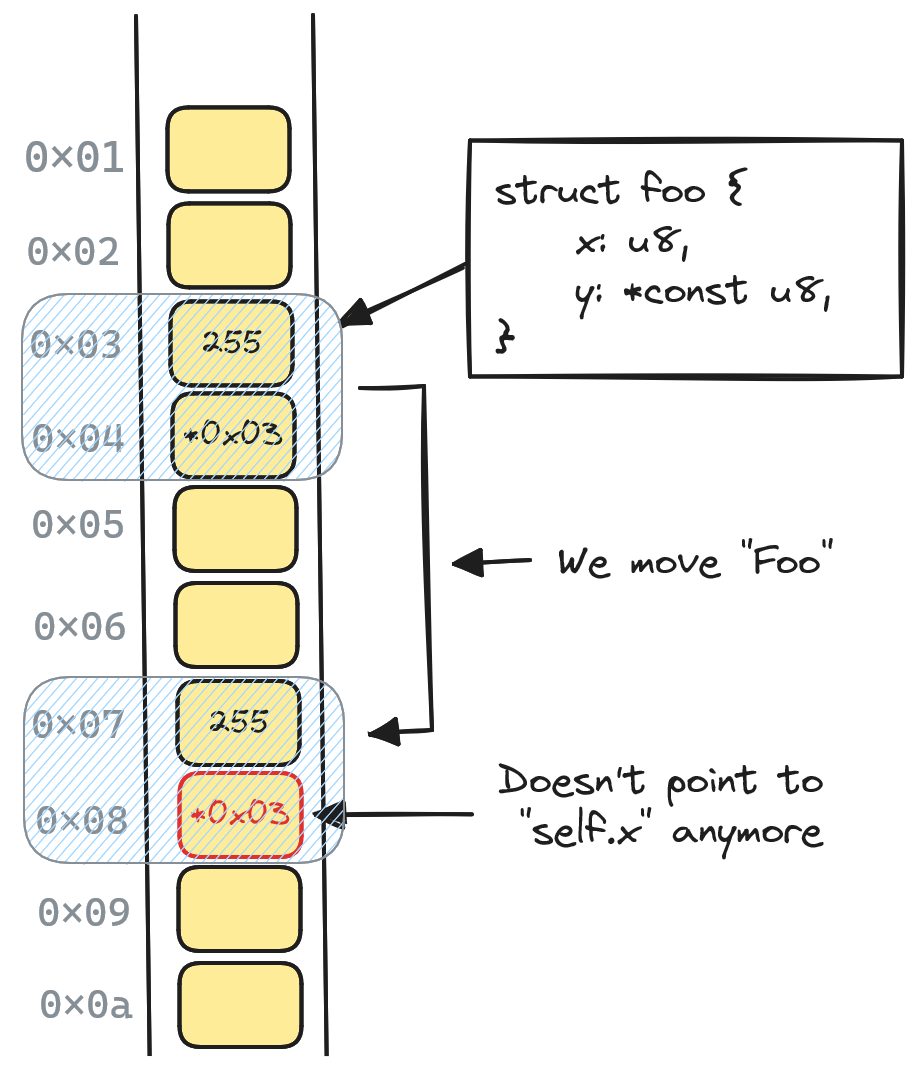
      If we take a look at a move from one location on the stack to another one, it looks something like this:
Figure 9.1 – Moving a self-referential struct
      In the preceding figure, we can see the memory addresses to the left with a representation of the stack
      next to it. Since the pointer was not updated when the value was moved, it now points to the old
      location, which can cause serious problems.
Discovering self-referential structs 231
Note It can be very hard to detect these issues, and creating simple examples where a move like this causes serious issues is surprisingly difficult. The reason for this is that even though we move everything, the old values are not zeroed or overwritten immediately. Often, they’re still there, so dereferencing the preceding pointer would probably produce the correct value. The problem only arises when you change the value of x in the new location, and expect y to point to it. Dereferencing y still produces a valid value in this case, but it’s the wrong value. Optimized builds often optimize away needless moves, which can make bugs even harder to detect since most of the program will seem to work just fine, even though it contains a serious bug.
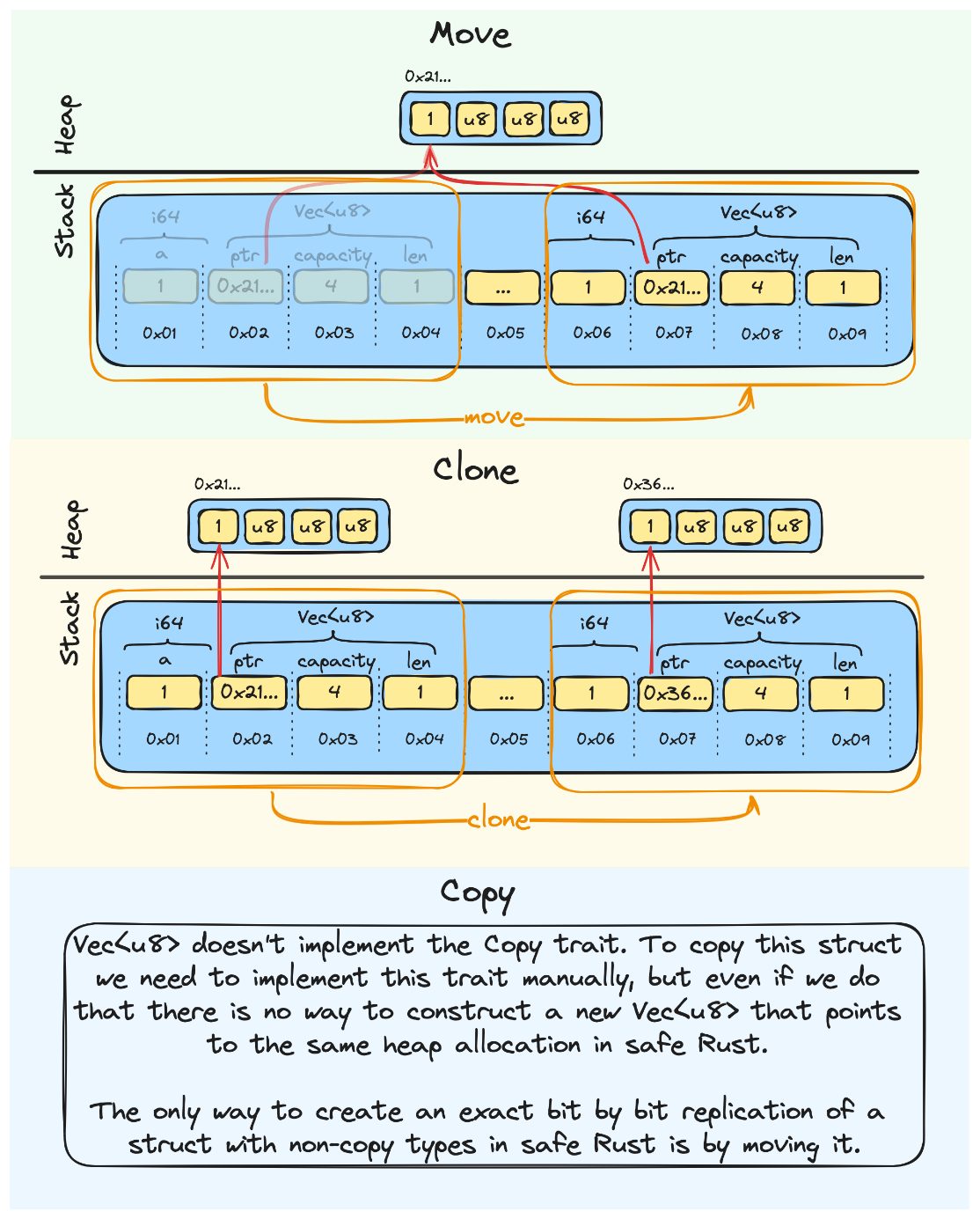
What is a move? A move in Rust is one of those concepts that’s unfamiliar to many programmers coming from C#, Javascript, and similar garbage-collected languages, and different from what you’re used to for C and C++ programmers. The definition of move in Rust is closely related to its ownership system. Moving means transferring ownership. In Rust, a move is the default way of passing values around and it happens every time you change ownership over an object. If the object you move only consists of copy types (types that implement the Copy trait), this is as simple as copying the data over to a new location on the stack. For non-copy types, a move will copy all copy types that it contains over just like in the first example, but now, it will also copy pointers to resources such as heap allocations. The moved-from object is left inaccessible to us (for example, if you try to use the moved-from object, the compilation will fail and let you know that the object has moved), so there is only one owner over the allocation at any point in time. In contrast to cloning, it does not recreate any resources and make a clone of them. One more important thing is that the compiler makes sure that drop is never called on the movedfrom object so that the only thing that can free the resources is the new object that took ownership over everything. Figure 9.2 provides a simplified visual overview of the difference between move, clone, and copy (we’ve excluded any internal padding of the struct in this visualization). Here, we assume that we have a struct that holds two fields – a copy type, a, which is an i64 type, and a non-copy type, b, which is a Vec<u8> type:
232 Coroutines, Self-Referential Structs, and Pinning
Figure 9.2 – Move, clone, and copy
      A move will in many ways be like a deep copy of everything in our struct that’s located on the stack.
      This is problematic when you have a pointer that points to self, like we have with self-referential
      structs, since self will start at a new memory address after the move but the pointer to self won’t
      be adjusted to reflect that change.
      Most of the time, when programming Rust, you probably won’t think a lot about moves since it’s part
      of the language you never explicitly use, but it’s important to know what it is and what it does.
      Now that we’ve got a good understanding of what the problem is, let’s take a closer look at how Rust
      solves this by using its type system to prevent us from moving structs that rely on a stable place in
      memory to function correctly.
Pinning in Rust 233
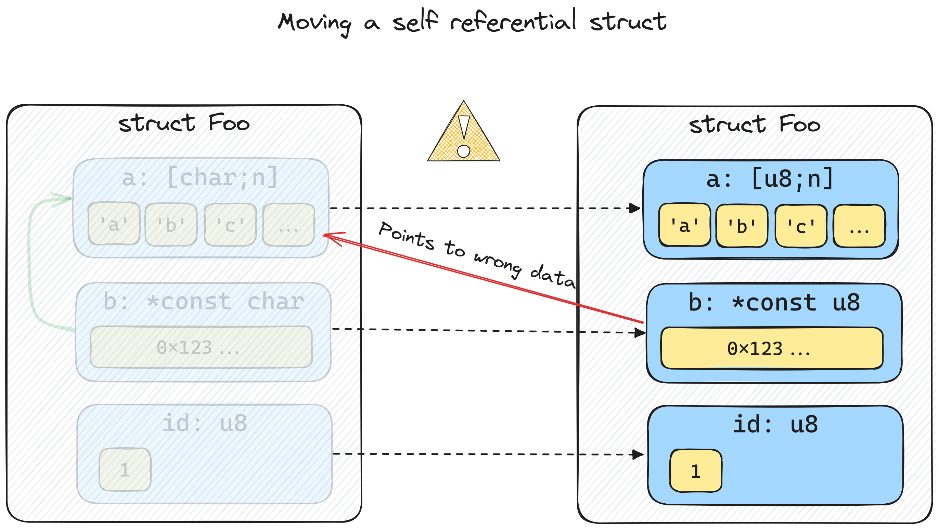
Pinning in Rust The following diagram shows a slightly more complex self-referential struct so that we have something visual to help us understand:
Figure 9.3 – Moving a self-referential struct with three fields
At a very high level, pinning makes it possible to rely on data that has a stable memory address by disallowing any operation that might move it:
Figure 9.4 – Moving a pinned struct
The concept of pinning is pretty simple. The complex part is how it’s implemented in the language and how it’s used.
234 Coroutines, Self-Referential Structs, and Pinning
      Pinning in theory
      Pinning is a part of Rust’s standard library and consists of two parts: the type, Pin, and the marker-
      trait, Unpin. Pinning is only a language construct. There is no special kind of location or memory
      that you move values to so they get pinned. There is no syscall to ask the operating system to ensure
      a value stays the same place in memory. It’s only a part of the type system that’s designed to prevent
      us from being able to move a value.
      Pin does not remove the need for unsafe – it just gives the user of unsafe a guarantee that the
      value has a stable location in memory, so long as the user that pinned the value only uses safe Rust.
      This allows us to write self-referential types that are safe. It makes sure that all operations that can
      lead to problems must use unsafe.
      Back to our coroutine example, if we were to move the struct, we’d have to write unsafe Rust. That
      is how Rust upholds its safety guarantee. If you somehow know that the future you created never
      takes a self-reference, you could choose to move it using unsafe, but the blame now falls on you if
      you get it wrong.
      Before we dive a bit deeper into pinning, we need to define several terms that we’ll need going forward.
      Definitions
      Here are the definitions we must understand:
         • Pin<T> is the type it’s all about. You’ll find this as a part of Rust’s standard library under the
           std::pin module. Pin wrap types that implement the Deref trait, which in practical terms
           means that it wraps references and smart pointers.
         • Unpin is a marker trait. If a type implements Unpin, pinning will have no effect on that type.
           You read that right – no effect. The type will still be wrapped in Pin but you can simply take
           it out again.
             The impressive thing is that almost everything implements Unpin by default, and if you manually
             want to mark a type as !Unpin, you have to add a marker trait called PhantomPinned
             to your type. Having a type, T, implement !Unpin is the only way for something such as
             Pin<&mut T> to have any effect.
         • Pinning a type that’s !Unpin will guarantee that the value remains at the same location in
           memory until it gets dropped, so long as you stay in safe Rust.
         • Pin projections are helper methods on a type that’s pinned. The syntax often gets a little weird
           since they’re only valid on pinned instances of self. For example, they often look like fn
           foo(self: Pin<&mut self>).
Pinning in Rust 235
   • Structural pinning is connected to pin projections in the sense that, if you have Pin<&mut
     T> where T has one field, a, that can be moved freely and one that can’t be moved, b, you can
     do the following:
Write a pin projection for a with the fn a(self: Pin<&mut self>) -> &A signature.
In this case, we say that pinning is not structural.
Write a projection for b that looks like fn b(self: Pin<&mut self>) -> Pin<&mut
B>, in which case we say that pinning is structural for b since it’s pinned when the struct,
T, is pinned.
With the most important definitions out of the way, let’s look at the two ways we can pin a value.
Pinning to the heap
Note The small code snippets we’ll present here can be found in this book’s GitHub repository in the ch09/d-pin folder. The different examples are implemented as different methods that you comment/uncomment in the main function.
Let’s write a small example to illustrate the different ways of pinning a value:
ch09/d-pin/src/main.rs use std::{marker::PhantomPinned, pin::Pin};
  #[derive(Default)]
  struct MaybeSelfRef {
      a: usize,
      b: Option<*const usize>,
      _pin: PhantomPinned,
So, we want to be able to create an instance using MaybeSelfRef::default() that we can move around as we wish, but then at some point initialize it to a state where it references itself; moving it would cause problems.
236 Coroutines, Self-Referential Structs, and Pinning
      This is very much like futures that are not self-referential until they’re polled, as we saw in our previous
      example. Let's write the impl block for MaybeSelfRef and take a look at the code::
      ch09/d-pin/src/main.rs
        impl MaybeSelfRef {
            fn init(self: Pin<&mut Self>) {
                unsafe {
                    let Self { a, b, .. } = self.get_unchecked_mut();
                    *b = Some(a);
            fn b(self: Pin<&mut Self>) -> Option<&mut usize> {
                unsafe { self.get_unchecked_mut().b.map(|b| &mut *b) }
      As you can see, MaybeStelfRef will only be self-referential after we call init on it.
      We also define one more method that casts the pointer stored in b to Option<&mut usize>,
      which is a mutable reference to a.
      One thing to note is that both our functions require unsafe. Without Pin, the only method requiring
      unsafe would be b since we dereference a pointer there. Acquiring a mutable reference to a pinned
      value always require unsafe, since there is nothing preventing us from moving the pinned value
      at that point.
      Pinning to the heap is usually done by pinning a Box. There is even a convenient method on Box
      that allows us to get Pin<Box<...>>. Let’s look at a short example:
      ch09/d-pin/src/main.rs
        fn main() {
            let mut x = Box::pin(MaybeSelfRef::default());
            x.as_mut().init();
            println!("{}", x.as_ref().a);
            *x.as_mut().b().unwrap() = 2;
            println!("{}", x.as_ref().a);
Pinning in Rust 237
Here, we pin MaybeSelfRef to the heap and initialize it. We print out the value of a and then mutate the data through the self-reference in b, and set its value to 2. If we look at the output, we’ll see that everything looks as expected:
      Finished dev [unoptimized + debuginfo] target(s) in 0.56s
       Running `target\debug\x-pin-experiments.exe`
The pinned value can never move and as users of MaybeSelfRef, we didn’t have to write any unsafe code. Rust can guarantee that we never (in safe Rust) get a mutable reference to MaybeSelfRef since Box took ownership of it. Heap pinning being safe is not so surprising since, in contrast to the stack, a heap allocation will be stable throughout the program, regardless of where we create it.
Important This is the preferred way to pin values in Rust. Stack pinning is for those cases where you don’t have a heap to work with or can’t accept the cost of that extra allocation.
Let’s take a look at stack pinning while we’re at it.
Pinning to the stack Pinning to the stack can be somewhat difficult. In Chapter 5, we saw how the stack worked and we know that it grows and shrinks as values are popped and pushed to the stack. So, if we’re going to pin to the stack, we have to pin it somewhere “high” on the stack. This means that if we pin a value to the stack inside a function call, we can’t return from that function, and expect the value to still be pinned there. That would be impossible. Pinning to the stack is hard since we pin by taking &mut T, and we have to guarantee that we won’t move T until it’s dropped. If we’re not careful, this is easy to get wrong. Rust can’t help us here, so it’s up to us to uphold that guarantee. This is why stack pinning is unsafe. Let’s look at the same example using stack pinning:
ch09/d-pin/src/main.rs
  fn stack_pinning_manual() {
      let mut x = MaybeSelfRef::default();
      let mut x = unsafe { Pin::new_unchecked(&mut x) };
      x.as_mut().init();
      println!("{}", x.as_ref().a);
238 Coroutines, Self-Referential Structs, and Pinning
            *x.as_mut().b().unwrap() = 2;
            println!("{}", x.as_ref().a);
      The noticeable difference here is that it’s unsafe to pin to the stack, so now, we need unsafe both
      as users of MaybeSelfRef and as implementors.
      If we run the example with cargo run, the output will be the same as in our first example:
            Finished dev [unoptimized + debuginfo] target(s) in 0.58s
             Running `target\debug\x-pin-experiments.exe`
      The reason stack pinning requires unsafe is that it’s rather easy to accidentally break the guarantees
      that Pin is supposed to provide. Let’s take a look at this example:
      ch09/d-pin/src/main.rs
        use std::mem::swap;
        fn stack_pinning_manual_problem() {
            let mut x = MaybeSelfRef::default();
            let mut y = MaybeSelfRef::default();
            {
                let mut x = unsafe { Pin::new_unchecked(&mut x) };
                x.as_mut().init();
                *x.as_mut().b().unwrap() = 2;
            swap(&mut x, &mut y);
            println!("
             x: {{
          +----->a: {:p},
          |      b: {:?},
          |  }}
          |  y: {{
          |      a: {:p},
          +-----|b: {:?},
             }}",
                &x.a,
                x.b,
                &y.a,
                y.b,
Pinning in Rust 239
);
In this example, we create two instances of MaybeSelfRef called x and y. Then, we create a scope where we pin x and set the value of x.a to 2 by dereferencing the self-reference in b, as we did previously. Now, when we exit the scope, x isn’t pinned anymore, which means we can take a mutable reference to it without needing unsafe. Since this is safe Rust and we should be able to do what we want, we swap x and y. The output prints out the pointer address of the a field of both structs and the value of the pointer stored in b. When we look at the output, we should see the problem immediately:
  Finished dev [unoptimized + debuginfo] target(s) in 0.58s
       Running `target\debug\x-pin-experiments.exe`
       x: {
    +----->a: 0xe45fcff558,
    |      b: None,
    |  }
    |  y: {
    |      a: 0xe45fcff570,
    +-----|b: Some(0xe45fcff558),
Although the pointer values will differ from run to run, it’s pretty evident that y doesn’t hold a pointer to self anymore. Right now, it points somewhere in x. This is very bad and will cause the exact memory safety issues Rust is supposed to prevent.
Note For this reason, the standard library has a pin! macro that helps us with safe stack pinning. The macro uses unsafe under the hood but makes it impossible for us to reach the pinned value again.
Now that we’ve seen all the pitfalls of stack pinning, my clear recommendation is to avoid it unless you need to use it. If you have to use it, then use the pin! macro so that you avoid the issues we’ve described here.
240 Coroutines, Self-Referential Structs, and Pinning
         Tip
         In this book’s GitHub repository, you’ll find a function called stack_pinning_macro()
         in the ch09/d-pin/src/main.rs file. This function shows the preceding example but
         using Rust’s pin! macro.
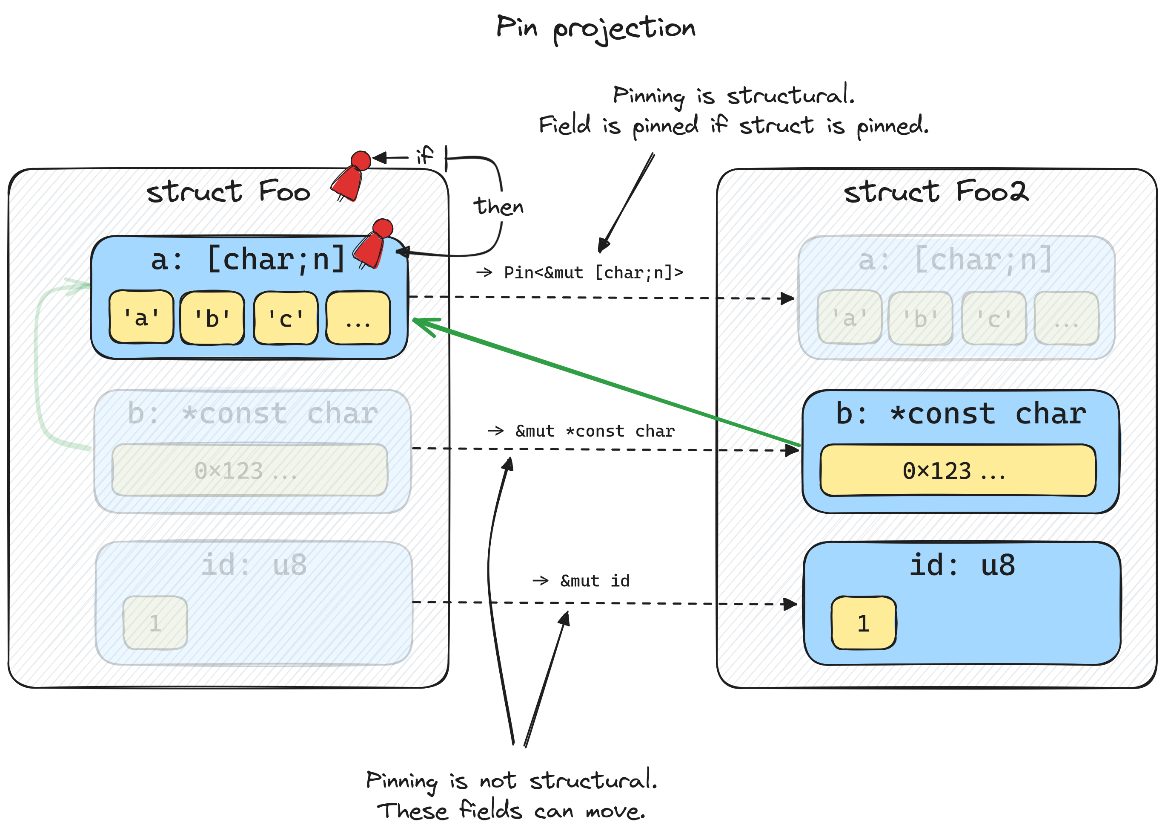
      Pin projections and structural pinning
      Before we leave the topic of pinning, we’ll quickly explain what pin projections and structural pinning
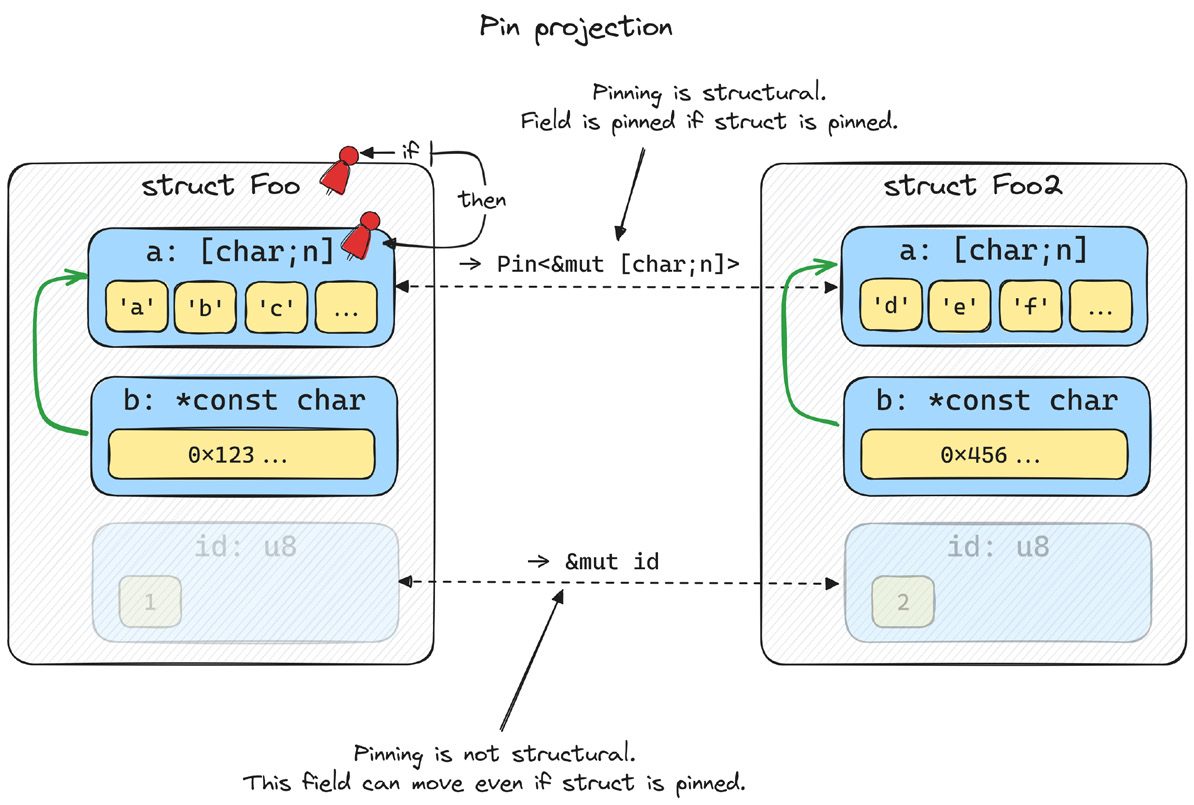
      are. Both sound complex, but they are very simple in practice. The following diagram shows how
      these terms are connected:
Figure 9.5 – Pin projection and structural pinning
      Structural pinning means that if a struct is pinned, so is the field. We expose this through pin projections,
      as we’ll see in the following code example.
      If we continue with our example and create a struct called Foo that holds both MaybeSelfRef
      (field a) and a String type (field b), we could write two projections that return a pinned version of
      a and a regular mutable reference to b:
      ch09/d-pin/src/main.rs
            #[derive(Default)]
            struct Foo {
                a: MaybeSelfRef,
                b: String,
Improving our example 4 – pinning to the rescue 241
      impl Foo {
          fn a(self: Pin<&mut Self>) -> Pin<&mut MaybeSelfRef> {
              unsafe {
                  self.map_unchecked_mut(|s| &mut s.a)
          fn b(self: Pin<&mut Self>) -> &mut String {
              unsafe {
                  &mut self.get_unchecked_mut().b
Note that these methods will only be callable when Foo is pinned. You won’t be able to call either of these methods on a regular instance of Foo. Pin projections do have a few subtleties that you should be aware of, but they’re explained in quite some detail in the official documentation (https://doc.rust-lang.org/stable/std/ pin/index.html), so I’ll refer you there for more information about the precautions you must take when writing projections.
Note Since pin projections can be a bit error-prone to create yourself, there is a popular create for making pin projections called pin_project (https://docs.rs/pin-project/latest/ pin_project/). If you ever end up having to make pin projections, it’s worth checking out.
With that, we’ve pretty much covered all the advanced topics in async Rust. However, before we go on to our last chapter, let’s see how pinning will prevent us from making the big mistake we made in the last iteration of our coroutine example.
Improving our example 4 – pinning to the rescue Fortunately, the changes we need to make are small, but before we continue and make the changes, let’s create a new folder and copy everything we had in our previous example over to that folder:
• Copy the entire c-coroutines-problem folder and name the new copy e-coroutinespin • Open Cargo.toml and rename the name of the package e-coroutines-pin
242 Coroutines, Self-Referential Structs, and Pinning
         Tip
         You’ll find the example code we’ll go through here in this book’s GitHub repository under the
         ch09/e-coroutines-pin folder.
      Now that we have a new folder set up, let’s start making the necessary changes. The logical place to
      start is our Future definition in future.rs.
      future.rs
      The first thing we’ll do is pull in Pin from the standard library at the very top:
      ch09/e-coroutines-pin/src/future.rs
        use std::pin::Pin;
The only other change we need to make is in the definition of poll in our Future trait:
        fn poll(self: Pin<&mut Self>, waker: &Waker) ->
        PollState<Self::Output>;
      That’s pretty much it.
      However, the implications of this change are noticeable pretty much everywhere poll is called, so we
      need to fix that as well.
      Let’s start with http.rs.
      http.rs
      The first thing we need to do is pull in Pin from the standard library. The start of the file should
      look like this:
      ch09/e-coroutines-pin/src/http.rs
        use crate::{future::PollState, runtime::{self, reactor, Waker},
        Future};
        use mio::Interest;
        use std::{io::{ErrorKind, Read, Write}, pin::Pin};
      The only other place we need to make some changes is in the Future implementation for
      HttpGetFuture, so let’s locate that. We’ll start by changing the arguments in poll:
      ch09/e-coroutines-pin/src/http.rs
        fn poll(mut self: Pin<&mut Self>, waker: &Waker) ->
        PollState<Self::Output>
Improving our example 4 – pinning to the rescue 243
Since self is now Pin<&mut Self>, there are several small changes we need to make so that the borrow checker stays happy. Let’s start from the top:
ch09/e-coroutines-pin/src/http.rs
  let id = self.id;
          if self.stream.is_none() {
              println!("FIRST POLL - START OPERATION");
              self.write_request();
              let stream = (&mut self).stream.as_mut().unwrap();
              runtime::reactor().register(stream, Interest::READABLE,
  id);
              runtime::reactor().set_waker(waker, self.id);
The reason for assigning id to a variable at the top is that the borrow checker gives us some minor trouble when trying to pass in both &mut self and &self as arguments to the register/deregister functions, so we just assign id to a variable at the top and everyone is happy. There are only two more lines to change, and that is where we create a String type from our internal buffer and deregister interest with the reactor:
ch09/e-coroutines-pin/src/http.rs let s = String::from_utf8_lossy(&self.buffer).to_string(); runtime::reactor().deregister(self.stream.as_mut().unwrap(), id); break PollState::Ready(s);
Important Notice that this future is Unpin. There is nothing that makes it unsafe to move HttpGetFuture around, and this is indeed the case for most futures like this. Only the ones created by async/await are self-referential by design. That means there is no need for any unsafe here.
Next, let’s move on to main.rs since there are some important changes we need to make there.
244 Coroutines, Self-Referential Structs, and Pinning
      Main.rs
      Let’s start from the top and make sure we have the correct imports:
      ch09/e-coroutines-pin/src/main.rs
        mod future;
        mod http;
        mod runtime;
        use future::{Future, PollState};
        use runtime::Waker;
        use std::{fmt::Write, marker::PhantomPinned, pin::Pin};
      This time, we need both the PhantomPinned marker and Pin.
      The next thing we need to change is in our State0 enum. The futures we hold between states are
      now pinned:
      ch09/e-coroutines-pin/src/main.rs
         Wait1(Pin<Box<dyn Future<Output = String>>>),
         Wait2(Pin<Box<dyn Future<Output = String>>>),
      Next up is an important change. We need to make our coroutines !Unpin so that they can’t be moved
      once they have been pinned. We can do this by adding a marker trait to our Coroutine0 struct:
      ch09/e-coroutines-pin/src/main.rs
        struct Coroutine0 {
            stack: Stack0,
            state: State0,
            _pin: PhantomPinned,
We also need to add the PhantomPinned marker to our new function:
      ch09/e-coroutines-pin/src/main.rs
        impl Coroutine0 {
            fn new() -> Self {
                Self {
                    state: State0::Start,
                    stack: Stack0::default(),
                    _pin: PhantomPinned,
Improving our example 4 – pinning to the rescue 245
The last thing we need to change is the poll method. Let’s start with the function signature:
ch09/e-coroutines-pin/src/main.rs fn poll(self: Pin<&mut Self>, waker: &Waker) -> PollState<Self::Output>
The easiest way I found to change our code was to simply define a new variable at the very top of the function called this, which replaces self everywhere in the function body. I won’t go through every line since the change is so trivial, but after the first line, it’s a simple search and replace everywhere self was used earlier, and change it to this:
ch09/e-coroutines-pin/src/main.rs
  let this = unsafe { self.get_unchecked_mut() };
          loop {
              match this.state {
                  State0::Start => {
                      // initialize stack (hoist declarations - no stack
  yet)
                      this.stack.buffer = Some(String::from("\nBUFFER:\
  n----\n"));
                      this.stack.writer = Some(this.stack.buffer.as_
  mut().unwrap());
                      // ---- Code you actually wrote ----
                      println!("Program starting");
The important line here was let this = unsafe { self.get_unchecked_mut() };. Here, we had to use unsafe since the pinned value is !Unpin because of the marker trait we added. Getting to the pinned value is unsafe since there is no way for Rust to guarantee that we won’t move the pinned value. The nice thing about this is that if we encounter any such problems later, we know we can search for the places where we used unsafe and that the problem must be there.
246 Coroutines, Self-Referential Structs, and Pinning
      The next thing we need to change is to have the futures we store in our wait states pinned. We can do
      this by calling Box::pin instead of Box::new:
      ch09/e-coroutines-pin/src/main.rs
        let fut1 = Box::pin(http::Http::get("/600/HelloAsyncAwait"));
        let fut2 = Box::pin(http::Http::get("/400/HelloAsyncAwait"));
      The last place in main.rs where we need to make changes is in the locations where we poll our child
      futures since we now have to go through the Pin type to get a mutable reference:
      ch09/e-coroutines-pin/src/main.rs
        match f1.as_mut().poll(waker)
        match f2.as_mut().poll(waker)
      Note that we don’t need unsafe here since these futures are !Unpin.
      The last place we need to change a few lines of code is in executor.rs, so let’s head over there as
      our last stop.
      executor.rs
      The first thing we must do is make sure our dependencies are correct. The only change we’re making
      here is adding Pin from the standard library:
      ch09/e-coroutines-pin/src/runtime/executor.rs
            thread::{self, Thread}, pin::Pin,
        };
The next line we’ll change is our Task type alias so that it now refers to Pin<Box<…>>:
type Task = Pin<Box<dyn Future<Output = String>>>;
The last line we’ll change for now is in our spawn function. We have to pin the futures to the heap:
e.tasks.borrow_mut().insert(id, Box::pin(future));
If we try to run our example now, it won’t even compile and give us the following error:
        error[E0599]: no method named `poll` found for struct `Pin<Box<dyn
        future::Future<Output = String>>>` in the current scope
          --> src\runtime\executor.rs:89:30
Improving our example 4 – pinning to the rescue 247
It won’t even let us poll the future anymore without us pinning it first since poll is only callable for Pin<&mut Self> types and not &mut self anymore. So, we have to decide whether we pin the value to the stack or the heap before we even try to poll it. In our case, our whole executor works by heap allocating futures, so that’s the only thing that makes sense to do. Let’s remove our optimization entirely and change one line of code to make our executor work again:
ch09/e-coroutines-pin/src/runtime/executor.rs match future.as_mut().poll(&waker) {
If you try to run the program again by writing cargo run, you should get the expected output back and not have to worry about the coroutine/wait generated futures being moved again (the output has been abbreviated slightly):
Finished dev [unoptimized + debuginfo] target(s) in 0.02s Running `target\debug\e-coroutines-pin.exe` Program starting FIRST POLL - START OPERATION main: 1 pending tasks. Sleep until notified. FIRST POLL - START OPERATION main: 1 pending tasks. Sleep until notified.
BUFFER: HTTP/1.1 200 OK content-length: 15 [=== ABBREVIATED ===] date: Sun, 03 Dec 2023 23:18:12 GMT
HelloAsyncAwait
main: All tasks are finished
You now have self-referential coroutines that can safely store both data and references across wait points. Congratulations! Even though making these changes took up quite a few pages, the changes themselves were part pretty trivial for the most part. Most of the changes were due to Pin having a different API than what we had when using references before. The good thing is that this sets us up nicely for migrating our whole runtime over to futures created by async/await instead of our own futures created by coroutine/wait with very few changes.
248 Coroutines, Self-Referential Structs, and Pinning
      Summary
      What a ride, huh? If you’ve got to the end of this chapter, you’ve done a fantastic job, and I have good
      news for you: you pretty much know everything about how Rust’s futures work and what makes them
      special already. All the complicated topics are covered.
      In the next, and last, chapter, we’ll switch over from our hand-made coroutines to proper async/await.
      This will seem like a breeze compared to what you’ve gone through so far.
      Before we continue, let’s stop for a moment and take a look at what we’ve learned in this chapter.
      First, we expanded our coroutine implementation so that we could store variables across wait points.
      This is pretty important if our coroutine/wait syntax is going to rival regular synchronous code in
      readability and ergonomics.
      After that, we learned how we could store and restore variables that held references, which is just as
      important as being able to store data.
      Next, we saw firsthand something that we’ll never see in Rust unless we implement an asynchronous
      system, as we did in this chapter (which is quite the task just to prove a single point). We saw how
      moving coroutines that hold self-references caused serious memory safety issues, and exactly why
      we need something to prevent them.
      That brought us to pinning and self-referential structs, and if you didn’t know about these things
      already, you do now. In addition to that, you should at least know what a pin projection is and what
      we mean by structural pinning.
      Then, we looked at the differences between pinning a value to the stack and pinning a value to the
      heap. You even saw how easy it was to break the Pin guarantee when pinning something to the stack
      and why you should be very careful when doing just that.
      You also know about some tools that are widely used to tackle both pin projections and stack pinning
      and make both much safer and easier to use.
      Next, we got firsthand experience with how we could use pinning to prevent the issues we had with
      our coroutine implementation.
      If we take a look at what we’ve built so far, that’s pretty impressive as well. We have the following:
         • A coroutine implementation we’ve created ourselves
         • Coroutine/wait syntax and a preprocessor that helps us with the boilerplate for our coroutines
         • Coroutines that can safely store both data and references across wait points
         • An efficient runtime that stores, schedules, and polls the tasks to completion
Summary 249
   • The ability to spawn new tasks onto the runtime so that one task can spawn hundreds of new
     tasks that will run concurrently
   • A reactor that uses epoll/kqueue/IOCP under the hood to efficiently wait for and respond
     to new events reported by the operating system
I think this is pretty cool. We’re not quite done with this book yet. In the next chapter, you’ll see how we can have our runtime run futures created by async/await instead of our own coroutine implementation with just a few changes. This enables us to leverage all the advantages of async Rust. We’ll also take some time to discuss the state of async Rust today, the different runtimes you’ll encounter, and what we might expect in the future. All the heavy lifting is done now. Well done!