Ch 11 — Inter-Kernel Pipelining, Synchronization, and CUDA Stream-Ordered Memory Allocations
                                                                       CHAPTER 11
     Inter-Kernel Pipelining, Synchronization,
                    and CUDA Stream-Ordered
                           Memory Allocations
So far, we have focused on the intra-kernel tools—cuda::pipeline double-buffering, warp specialization (loader/compute/storer warps), persistent kernels, and threadblock clusters with DSMEM/TMA—to keep the SMs busy for a single kernel. In this chapter we keep those kernels and show how to pipeline across kernels and batches with CUDA streams, events, and the stream-ordered memory allocator. In short, Chapter 10 focused on hiding latency within a kernel. This chapter shows how to hide latency between kernels and between the GPU and the host. This kind of inter-kernel concurrency is essential for keeping all of the GPU’s engines busy in real-world workloads. To achieve peak GPU utilization with modern GPUs, we need to keep the GPU’s compute engines and direct memory access (DMA) engines busy and running in parallel. CUDA streams provide the foundation for this inter-kernel concurrency. By combin‐ ing asynchronous memory operations, fine-grained synchronization, and CUDA Graphs (briefly introduced in this chapter and covered in more detail in the next chapter), you can construct highly efficient pipelines that avoid host-side stalls.
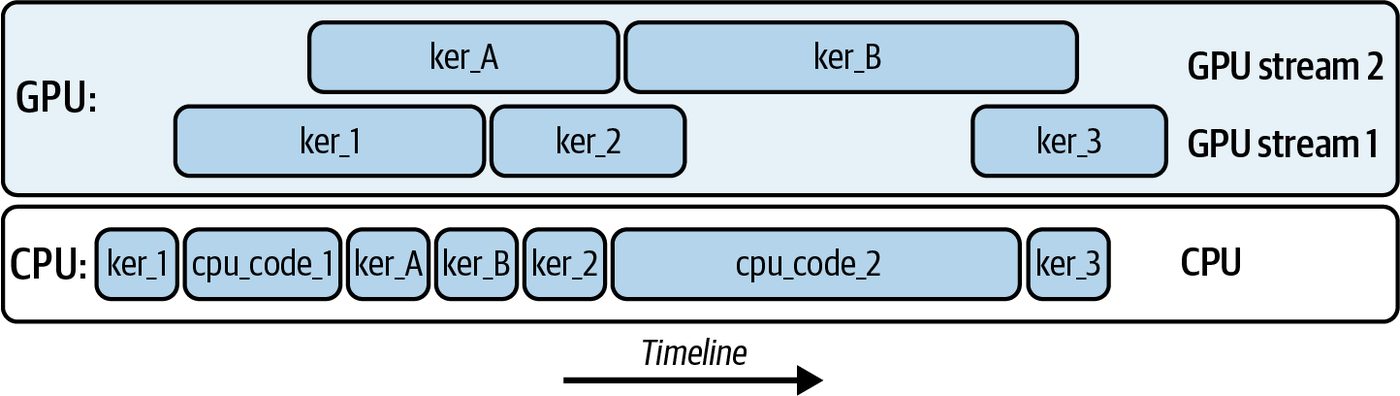
Overlapping Kernel Execution with CUDA Streams A CUDA stream is a sequence of operations—kernel launches, memory copies, and memory allocations—that execute in the order they are issued. Consider launching 5 kernels from the CPU onto the GPU using 2 streams, as shown in Figure 11-1.
Figure 11-1. Launching five kernels from the CPU onto the two streams running on the GPU
Here, we see ker_A and ker_B are running on stream 2, while ker_1, ker_2, and ker_3 are running on stream 1. All kernels may overlap with one another—and across CUDA streams—as long as hardware resources permit. The CPU is able to continue performing work (cpu_code_1 and cpu_code_2) while the streams perform the kernel operations asynchronously. The code to launch these five kernels on the two CUDA streams is shown here: #include <cstdio> #include <cuda_runtime.h>
      __global__ void ker_A() { /* ... do some work ... */ }
      __global__ void ker_B() { /* ... do some work ... */ }
      __global__ void ker_1() { /* ... do some work ... */ }
      __global__ void ker_2() { /* ... do some work ... */ }
      __global__ void ker_3() { /* ... do some work ... */ }
      int main() {
          // 1) Create two CUDA streams
          cudaStream_t stream1, stream2;
          cudaStreamCreateWithFlags(&stream1, cudaStreamNonBlocking);
          cudaStreamCreateWithFlags(&stream2, cudaStreamNonBlocking);
           // 2) Define your grid/block sizes
           dim3 grid(128);
           dim3 block(256);
           // 3) Launch ker_1 on stream1
           ker_1<<<grid, block, 0, stream1>>>();
           // 4) CPU code 1 runs immediately (asynchronously wrt GPU)
           printf("CPU code 1 executing\n");
           // ... do some host-side work here ...
           cpu_code_1();
430 | Chapter 11: Inter-Kernel Pipelining, Synchronization, and CUDA Stream-Ordered Memory Allocations
       // 5) Launch ker_A on stream2
       ker_A<<<grid, block, 0, stream2>>>();
       // 6) Launch ker_B on stream1
       ker_B<<<grid, block, 0, stream1>>>();
       // 7) Launch ker_2 on stream2
       ker_2<<<grid, block, 0, stream2>>>();
       // 8) CPU code 2 runs immediately
       printf("CPU code 2 executing\n");
       // ... do some other host-side work here ...
       cpu_code_2();
       // 9) Launch ker_3 on stream1
       ker_3<<<grid, block, 0, stream1>>>();
       // 10) Wait for work on each stream to finish
       cudaStreamSynchronize(stream1);
       cudaStreamSynchronize(stream2);
       // 11) Clean up
       cudaStreamDestroy(stream1);
       cudaStreamDestroy(stream2);
       return 0;
   }
ker_1 is enqueued on stream1, then control returns immediately to the CPU. cpu_code_1() runs on the host while ker_1 executes on the GPU. Meanwhile, we enqueue ker_A on stream2 and ker_B on stream1. We then enqueue ker_2 on stream2, interleave cpu_code_2, and enqueue ker_3 on stream1. Finally, we syn‐ chronize on each stream to wait for all of the work to complete and then destroy the streams to clean up the resources. This example highlights five different kernel executions overlapping across two dif‐ ferent streams. Increasing the complexity a bit, and building upon Chapter 10, fol‐ lowing is the same warp specialization pipeline example but using CUDA streams: // Run the warp-specialized kernel in multiple CUDA streams.
#include <cuda_runtime.h> #include <cuda/pipeline> #include <cooperative_groups.h> namespace cg = cooperative_groups;
#define TILE_SIZE 128 #define TILE_ELEMS (TILE_SIZE * TILE_SIZE)
// re-using from Chapter 10
Overlapping Kernel Execution with CUDA Streams | 431
      __global__ void warp_specialized_pipeline(const float* __restrict__ A_global,
                                                const float* __restrict__ B_global,
                                                float*       __restrict__ C_global,
                                                int numTiles);
      int main() {
          const int NUM_STREAMS = 2;                   // keep it small; tune as needed
          const int batches     = 8;                   // in-flight batches
          const size_t elems    = TILE_ELEMS;          // elements per batch
          const size_t bytes    = elems * sizeof(float);
           // Create streams that do NOT synchronize with the legacy default stream
           cudaStream_t s[NUM_STREAMS];
           for (int i = 0; i < NUM_STREAMS; ++i)
               cudaStreamCreateWithFlags(&s[i], cudaStreamNonBlocking);
           // Allocate pinned host buffers so H2D/D2H can truly overlap
           float *hA = nullptr, *hB = nullptr, *hC = nullptr;
           cudaMallocHost(&hA, batches * bytes);
           cudaMallocHost(&hB, batches * bytes);
           cudaMallocHost(&hC, batches * bytes);
// ... initialize hA/hB ...
           for (int b = 0; b < batches; ++b) {
               const int sid = b % NUM_STREAMS;
                float *dA = nullptr, *dB = nullptr, *dC = nullptr;
                cudaMallocAsync(&dA, bytes, s[sid]);
                cudaMallocAsync(&dB, bytes, s[sid]);
                cudaMallocAsync(&dC, bytes, s[sid]);
                cudaMemcpyAsync(dA, hA + b * elems, bytes,
                                cudaMemcpyHostToDevice, s[sid]);
                cudaMemcpyAsync(dB, hB + b * elems, bytes,
                                cudaMemcpyHostToDevice, s[sid]);
                const dim3 block(96);    // three warps: loader(0), compute(1), storer(2)
                const dim3 grid(1);
                const size_t shmem = 3 * elems * sizeof(float); // [A|B|C] per tile
                // Reuse the Chapter 10 kernel exactly as-is
                warp_specialized_pipeline<<<grid, block, shmem, s[sid]>>>(dA, dB, dC,
                                                                        /*numTiles=*/1);
cudaMemcpyAsync(hC+b*elems, dC, bytes, cudaMemcpyDeviceToHost, s[sid]);
                cudaFreeAsync(dA, s[sid]);
                cudaFreeAsync(dB, s[sid]);
                cudaFreeAsync(dC, s[sid]);
           }
432 | Chapter 11: Inter-Kernel Pipelining, Synchronization, and CUDA Stream-Ordered Memory Allocations
        for (int i = 0; i < NUM_STREAMS; ++i) {
            cudaStreamSynchronize(s[i]);
            cudaStreamDestroy(s[i]);
        }
cudaFreeHost(hA); cudaFreeHost(hB); cudaFreeHost(hC); return 0; } Here, we are re-using the warp-specialized pipeline and showing how streams add a second layer of overlap such that while stream 1 computes on batch n, stream 2 is performing DMA-loads on batch b+1. At the same time, it can copy back batch b−1. The kernel’s internal cuda::pipeline overlap remains unchanged. We’ll continue to build out the complexity later in the chapter by layering in thread block clusters, but let’s first dive into how streams help to overlap compute with data transfers. This will help solidify the fundamentals of CUDA streams and their role in GPU-based performance engineering.
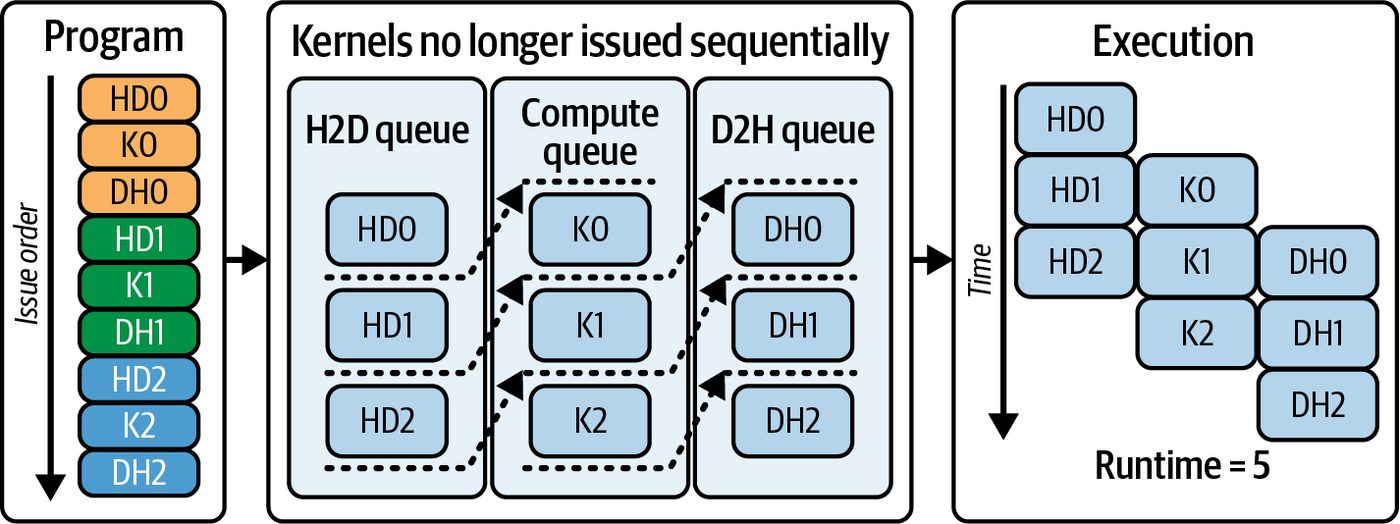
Using Streams to Overlap Compute with Data Transfers For instance, you can enqueue each kernel launch and memory copy into its own stream. This allows the SMs to execute kernels while the two dedicated DMA engines (one for Host → Device transfers and one for Device → Host transfers) move data concurrently. Since the SM compute pipeline runs independently of the two DMA engines, you can fully overlap the kernel’s computation with the two data transfers using CUDA streams. However, if the compute is fully maxed out by a kernel using all SM throughput—or a copy pipeline is saturating the memory bandwidth with excessive, additional overlapping—it will not improve performance. When compute and memory throughput are saturated, you’ll start seeing two con‐ current operations each running at 50%, for instance, since they are both contending for the same resource. You can profile GPU utilization to identify these saturation thresholds. For example, consider an AI model training or inference workload that breaks work into batches. Here, you would launch a kernel on batch 0 in stream 0 at the same time that stream 1 invokes cudaMemcpyAsync() to copy batch 1 from the host to device, as shown in Figure 11-2.
Using Streams to Overlap Compute with Data Transfers | 433
Figure 11-2. Timeline of three-way overlap
On modern GPUs with at least two copy engines (deviceProp.asyncEngine Count()), you can extend this to a three-way overlap such that stream 0 runs the ker‐ nel for batch 0, stream 1 copies batch 1 host to device, and stream 2 writes the results of the previous batch back to the host. This extends to additional streams. This pat‐ tern hides data‐transfer latency behind computation, and vice versa, keeping all of the GPU’s engines busy and minimizing idle time. In practice, your kernel must meet several requirements to achieve this concurrent behavior. First, any host pointer used in an asynchronous transfer must be pagelocked, or pinned. If you call cudaMemcpyAsync() on pageable memory, the runtime performs a host-side staging copy into pinned memory that blocks the calling host thread and the enqueuing stream until staging completes. This prevents that transfer from being asynchronous. While this blocks the calling host thread, the GPU can still overlap compute and copies in other streams. But that specific transfer will not overlap correctly. To achieve fully asynchronous transfers in your stream, you must use pinned host memory.
                    By setting pin_memory=True with PyTorch’s DataLoader, you are
                    page locking your host buffers so that data can be transferred using
                    DMA directly into GPU memory. This allows the copy to overlap
                    with computation and return control to the host immediately.
                    DMA engines can overlap transfers with compute. Pageable mem‐
                    ory forces a hidden staging copy and defeats overlap for that
                    transfer.
Second, you should use the asynchronous allocation and deallocation routines, cuda MallocAsync() and cudaFreeAsync(), instead of the synchronous and blocking cuda Malloc() or cudaFree() calls. Frameworks like PyTorch provide the option to use
434 | Chapter 11: Inter-Kernel Pipelining, Synchronization, and CUDA Stream-Ordered Memory Allocations
CUDA’s asynchronous, stream-ordered memory allocator. The idea is to not stall all active streams when you allocate memory. This would be very bad for performance. The asynchronous stream-ordered allocator allows each stream to request or return device memory without waiting on other streams. Using the asynchronous allocator ensures memory operations in one stream don’t stall operations in other streams. This will avoid unnecessary global synchronization. Let’s explore the stream-ordered memory allocator in the next section. PyTorch’s default CUDA caching allocator is stream-aware and, in normal operation (e.g., servicing allocations from its cache), it avoids device-wide synchronization. Only when it has to request more memory from the OS using cudaMalloc would a synchronization occur. In practice this means most tensor allocations and frees don’t block other streams. Enabling the cudaMallocAsync backend can further reduce frag‐ mentation and improve reuse in many workloads, as you’ll see next.
Stream-Ordered Memory Allocator In PyTorch, you can enable CUDA’s stream‐ordered allocator by setting the environ‐ ment variable PYTORCH_ALLOC_CONF=backend:cudaMallocAsync before launching your PyTorch script. If this variable is set, PyTorch tensor memory allocation (cuda MallocAsync()) and free (cudaFreeAsync()) operations are enqueued in separate CUDA streams in the order in which they are invoked. When this environment var‐ iant is not set, PyTorch uses its own caching allocator. If you use the legacy cudaMalloc(...), remember that it’s a blocking, device-wide operation that synchronizes the device before returning. This can stall work in other streams since every allocation forces the entire GPU to stall until the memory is reserved. This pauses all streams, limits parallelism, and destroys your workload’s performance. In contrast, using the stream‐ordered allocator with cudaMallocAsync(...) simply records the allocation request in the same CUDA stream that will use it—whether the stream is performing a kernel or memory operation. It will not block the other streams. This way, memory management never serializes streams that are feeding those kernels.
               CUDA’s stream-ordered allocator, used in PyTorch, avoids global
               device locks and reduces allocation overhead.
Stream-Ordered Memory Allocator | 435
In practice, stream 0 might be executing an attention kernel on batch N, stream 1 copies batch N+1 from host to device, and stream 2 enqueues a cudaMalloc Async(...) for batch N+2. Because cudaMallocAsync(...) simply appends its work into stream 2’s queue, streams 0 and 1 continue without interruption. With the stream-aware allocator, GPU memory for each mini-batch is allocated without blocking other streams. This is important for LLM pipelines that allocate perbatch scratch space. The asynchronous allocator prevents stalls—even under heavy memory churn.
                    Using the stream-ordered memory allocator is particularly impor‐
                    tant if your pipeline allocates a scratch buffer for each mini-batch—
                    common in LLM training and inference. For instance, each mini‐
                    batch in an LLM pipeline needs its own temporary workspace to
                    hold attention keys/values or intermediate activation buffers. In
                    this case, you often call an allocator to reserve that “scratch buffer”
                    on the GPU.
Allocations are satisfied from a per-device memory pool. You can tune the pool’s release threshold using cudaMemPoolSetAttribute() to trade off returning memory to the OS versus reusing it for performance. A higher threshold means the pool will keep memory allocated longer. This will reduce the number of times the memory is returned back to the OS. This leads to fewer OS calls and better performance by avoiding repetitive memory allocations and de-allocations. The following example shows how to implement stream-based overlap using the stream-ordered memory allocator with cudaMallocAsync and cudaFreeAsync and demonstrates the use of cudaMemPoolSetAttribute(). This highlights how memory allocation, data transfer, and kernel execution can be fully pipelined using CUDA streams: // initialize the async memory allocator cudaMemPool_t pool; int device = -1; cudaGetDevice(&device); // Current device cudaDeviceGetDefaultMemPool(&pool, device);
      // Desired number of bytes to keep in pool before
      // releasing back to the OS (tune as needed)
      uint64_t threshold =/* e.g., prop.totalGlobalMem / 2 */; // bytes
      cudaMemPoolSetAttribute(pool,
        cudaMemPoolAttrReleaseThreshold, &threshold);
      cudaStream_t stream1, stream2;
      cudaStreamCreateWithFlags(&stream1, cudaStreamNonBlocking);
      cudaStreamCreateWithFlags(&stream2, cudaStreamNonBlocking);
436 | Chapter 11: Inter-Kernel Pipelining, Synchronization, and CUDA Stream-Ordered Memory Allocations
// Allocate memory using stream-ordered async allocation void *d_data1, *d_result1; void *d_data2, *d_result2;
size_t dataSizeBytes = N * sizeof(float);
// Use cudaMallocAsync as a best practice in modern multi-stream apps cudaMallocAsync(&d_data1, dataSizeBytes, stream1); cudaMallocAsync(&d_result1, dataSizeBytes, stream1); cudaMallocAsync(&d_data2, dataSizeBytes, stream2); cudaMallocAsync(&d_result2, dataSizeBytes, stream2);
   // Asynchronously copy first chunk and launch its kernel in stream1
   cudaMemcpyAsync(d_data1, h_data1, dataSizeBytes,
     cudaMemcpyHostToDevice, stream1);
   computeKernel<<<gridDim, blockDim, 0,
     stream1>>>((float*)d_data1, (float*)d_result1);
   cudaMemcpyAsync(h_result1, d_result1, dataSizeBytes,
     cudaMemcpyDeviceToHost, stream1);
   // In parallel, do the same on stream2
   cudaMemcpyAsync(d_data2, h_data2, dataSizeBytes,
                   cudaMemcpyHostToDevice, stream2);
   computeKernel<<<gridDim, blockDim, 0,
     stream2>>>((float*)d_data2, (float*)d_result2);
   cudaMemcpyAsync(h_result2, d_result2, dataSizeBytes,
      cudaMemcpyDeviceToHost, stream2);
// Wait for both streams to finish cudaStreamSynchronize(stream1); cudaStreamSynchronize(stream2);
// Cleanup cudaFreeAsync(d_data1, stream1); cudaFreeAsync(d_result1, stream1); cudaFreeAsync(d_data2, stream2); cudaFreeAsync(d_result2, stream2);
cudaStreamDestroy(stream1); cudaStreamDestroy(stream2);
Here, we create two CUDA streams (stream1 and stream2) and allocate device mem‐ ory using cudaMallocAsync, ensuring that each stream has its own stream-ordered memory buffers. We then issue work for two independent data chunks. On stream1, we perform an asynchronous copy from host to device (H2D), launch a compute kernel, and then asynchronously copy the results back from device to host (D2H). Simultaneously, we do the same for a second chunk of data on stream2.
Stream-Ordered Memory Allocator | 437
Because these operations are issued on separate streams, the GPU device overlaps work between them. stream1 executes the kernel concurrently with the H2D copy on stream2. Once the stream1 kernel completes, it can copy the data back to the host (D2H) overlapping with stream2’s kernel execution. Here, the memory allocations overlap with kernel computations thanks to CUDA streams and stream-ordered memory allocations. The staggered scheduling shown in this example reduces idle time and maximizes throughput. Without stream-ordered allocation, you’d either have to allocate all the memory upfront—increasing memory footprint—or incur heavy synchronization penalties. With cudaMallocAsync, memory management is seamlessly integrated into CUDA streams. This allows per-stream allocations and deallocations without triggering a global device synchronization. In addition, the stream‐ordered allocator lets you issue fine‐grained memory requests for variable‐length buffers—such as token caches or intermediate activations. You can then immediately launch kernels that depend on those buffers. This happens all within the same stream.
                    In practice, achieving peak throughput requires carefully tuning
                    data‐chunk sizes and staying within your GPU’s concurrency lim‐
                    its. Modern GPU devices provide multiple copy engines and can
                    overlap host-to-device (H2D) and device-to-host (D2H) transfers.
                    Query deviceProp.asyncEngineCount to determine how many
                    copy engines your device supports to plan overlap accordingly.
Modern GPUs have a hard limit for the number of concurrent kernels that can run across all SMs on a device (up to the 128 resident-grid limit.) As discussed in Chap‐ ter 5, the modern GPU limit is 128 concurrently executing kernels per device. Once you exceed the limit of active kernels, additional kernel launches will queue until a slot frees up on one of the SMs. And remember that kernels that share an SM will only execute together if their com‐ bined registers, shared memory, and thread block requirements fit within the SM’s resource limits. Balancing chunk (tile) sizes, launch order, and per‐kernel resource usage is essential. If chunks are too small, you will underutilize the copy engines and SM resources. If chunks are too large or too many kernels are enqueued simultaneously, you will exceed kernel slots or exhaust per‐SM resources. This will lead to stalls. In short, when tuned correctly, however, CUDA streams, combined with the streamordered memory allocator (cudaMallocAsync), will ensure that data transfers, kernel
438 | Chapter 11: Inter-Kernel Pipelining, Synchronization, and CUDA Stream-Ordered Memory Allocations
execution, and memory management will overlap seamlessly. This keeps the multiple DMA engines and SMs busy without unnecessary queuing.
Using CUDA Streams and Stream-Ordered Memory Allocator with LLMs The nonblocking behavior of CUDA streams combined with the stream-ordered memory allocator is crucial for LLM training and inference workloads. These work‐ loads overlap computation and data movement across multiple streams to increase GPU utilization and reduce end‐to‐end latency. In addition, LLMs utilize on-the-fly “scratch memory” allocations, which are facilita‐ ted by the stream-ordered memory allocator discussed in the previous section. For instance, when running a transformer layer, you often need extra shared memory or device memory, called scratch memory, to store the results of a matrix multiply before feeding it into the softmax operation. Because different mini‐batches in LLM workloads can vary in length (token count), you will want to use the stream-ordered memory allocator to provide a fresh scratch buffer on the GPU specifically for each input batch. This way, you have exactly enough space allocated for that batch’s intermediate computations—and not a single byte more. If you use the old, blocking allocation API (cudaMalloc(...) and cudaFree(...)) to allocate these scratch buffers on the fly, every single allocation or deallocation would synchronize with the entire GPU since calling cudaMalloc(...) forces a global device synchronization. As such, no overlap is possible until all pending kernels and copies finish.
               Global device synchronizations are absolutely disastrous for per‐
               formance. Avoid using blocking calls like cudaMalloc() and cuda
               Free() in your CUDA streams. Prefer events and stream waits.
               And definitely avoid synchronizing on the default stream 0 with
               cudaStreamSynchronize(0)!
In a pipeline where one stream is busy running an attention kernel for batch N and another stream is preparing batch N+1 for the attention kernel, calling a blocking cudaMalloc(...) on the second stream will stall all streams. Until the allocator fin‐ ishes, every SM is effectively paused. This can wipe out any overlap you hoped to achieve between data transfers, computation, and memory management. The solution is to use the stream‐ordered allocator with cudaMallocAsync() and cudaFreeAsync(). These APIs enqueue the work of allocating and freeing regions of
Using CUDA Streams and Stream-Ordered Memory Allocator with LLMs | 439
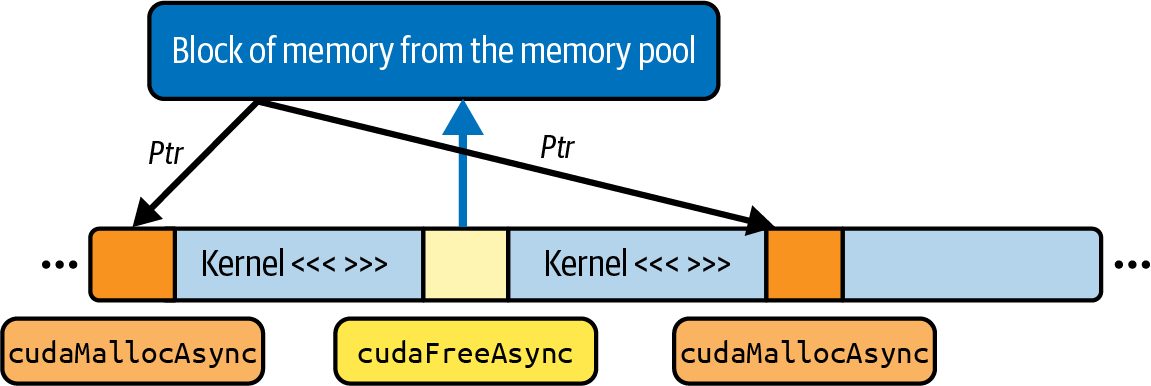
device memory at the stream level. As such, they synchronize only at the stream level—and not the device level. For instance, consider a stream that needs a scratch buffer of 16 MB for attention on a batch of input data. It would invoke cudaMallocAsync(&scratchPtr, scratch Bytes, stream1), which records this allocation request in its operation queue but does not force any other stream to wait, as shown in Figure 11-3.
Figure 11-3. Stream-ordered memory allocation
The other streams continue launching kernels, copying data, or doing whatever they were doing—even while stream 1’s allocation is in flight. And once the CUDA run‐ time has reserved the memory behind the scenes, stream 1 can make progress again and launch the attention kernel into that newly allocated region—all without halting any other streams.
                    Unlike legacy cudaMalloc, cudaMallocAsync does not stall other
                    streams. Each allocation is synchronized only within its own
                    stream.
In the context of LLM training and inference, this is particularly valuable because variable‐length sequences often produce scratch‐buffer size fluctuations. If batch N has 512 tokens per sequence and batch N+1 has 1,024 tokens, your attention module will need more space for batch N+1 than batch N, so reusing batch N’s allocation is not sufficient. With cudaMallocAsync(), you can enqueue a single, nonblocking allo‐ cation for the larger buffer without dragging all other streams to a stop. Additionally, a typical LLM’s autoregressive token‐by‐token generation (aka decod‐ ing) phase uses a growing key/value cache. Each generated token requires appending new KV pairs to a per‐sequence buffer. As the buffer grows, you need to reallocate or extend the scratch region. cudaMallocAsync(...) lets you do this in the same stream that runs the attention kernel. Meanwhile, upstream data‐loading and downstream result‐copying operations continue making progress in parallel, running in their own streams.
440 | Chapter 11: Inter-Kernel Pipelining, Synchronization, and CUDA Stream-Ordered Memory Allocations
Another use of CUDA streams in an LLM context is layerwise pipelining in large LLMs. Suppose that you divide a large, transformer-based LLM model into two halves that run on different CUDA streams—stream 0 runs layers 0–5 and stream 1 runs layers 6–11. Between these halves, you need intermediate buffers for activations. Each time stream 0 finishes its work on a mini‐batch, it might call cudaMalloc Async(...) to grab a new buffer for the next batch’s activations. Because that call does not synchronize the device, stream 1 can continue computing layers 6–11 on the previous batch’s results while stream 0 allocates memory for the next batch’s inputs. By contrast, if you had used the legacy cudaMalloc(...) inside that pipeline, every time you allocated a new scratch region for the next mini‐batch or an expanded KV cache, the entire GPU would pause until the allocation completed. That would break any chance of overlapping computation and data movement across streams. To summarize, in an LLM context, you frequently need temporary buffers for atten‐ tion, layer normalization, softmax, KV cache, or intermediate activations. These are collectively referred to as a scratch buffer. Using cudaMallocAsync(...) and cudaFreeAsync(...) to manage these scratch buf‐ fers within separate streams ensures that memory management never forces a global, cross‐stream stall. Instead, the allocation enqueues into the same stream as your ker‐ nel or copy operation. This allows all other streams to continue running and keeps your attention kernels, data transfers, and any host‐side work overlapping as much as possible. This maximi‐ zes GPU utilization in large‐scale, real‐time LLM workloads.
Legacy Default Stream
When you do not explicitly create or specify a stream, the operations go into the leg‐
acy default stream, often called stream 0. By default, stream 0 has two important
behaviors that are worth highlighting:
Implicit synchronization with itself
    Any two operations enqueued into stream 0 execute strictly one after the other.
    You cannot overlap two kernels or a copy and a kernel in stream 0, because
    stream 0 serializes all of its own commands.
Implicit synchronization with other streams
    In the legacy default stream model, any operation launched into stream 0 will
    wait for all previously enqueued work in every other stream to finish before it
    begins. Conversely, any operation launched into a nondefault stream will also
    block until all prior work in stream 0 has completed. In effect, stream 0 acts as a
    global “barrier” across the entire GPU. Even if you issue commands into different
    streams, once you submit something into stream 0, it forces every other stream
Legacy Default Stream | 441
to stall until stream 0 is caught up, and vice versa. This is very bad for perfor‐ mance and should be avoided when possible. Because of these implicit dependencies, putting all work into stream 0 prevents any form of concurrency. For instance, kernels and copy engines cannot overlap. As such, your GPU spends cycles idle waiting for the default‐stream barrier to clear. To unlock true parallelism, you should avoid using stream 0 for anything but opera‐ tions that truly need to serialize with every other stream, which is relatively rare.
Modern Per-Thread Default Stream To mitigate the “global barrier” behavior of the legacy default stream, CUDA intro‐ duced per‐thread default streams, sometimes abbreviated PTDS (as opposed to the posttraumatic stress disorder (PTSD) that the legacy stream has given us throughout the years). Under per-thread default stream semantics, each CPU thread’s default stream is inde‐ pendent. In other words, when per-thread default streams are enabled, each host thread has its own implicit “stream 0.” Operations enqueued into thread A’s default stream do not wait for work in thread B’s default stream. They run concurrently whenever hardware resources allow. Likewise, operations in thread B’s default stream do not wait for thread A’s default stream, and so on. PTDS is widely used in multithreaded CUDA applications to avoid the “host-wide barrier” issue. To enable PTDS, you can compile your code using nvcc --defaultstream per-thread or set the CUDA_API_PER_THREAD_DEFAULT_STREAM=1 environ‐ ment variable (before including any CUDA headers).
                    Once PTDS is active, each host CPU thread’s default stream
                    behaves like a user-created stream that does not implicitly syn‐
                    chronize with other threads’ default streams. If you mix PTDS with
                    the legacy default stream in the same process, PTDS streams still
                    synchronize with the legacy default stream.
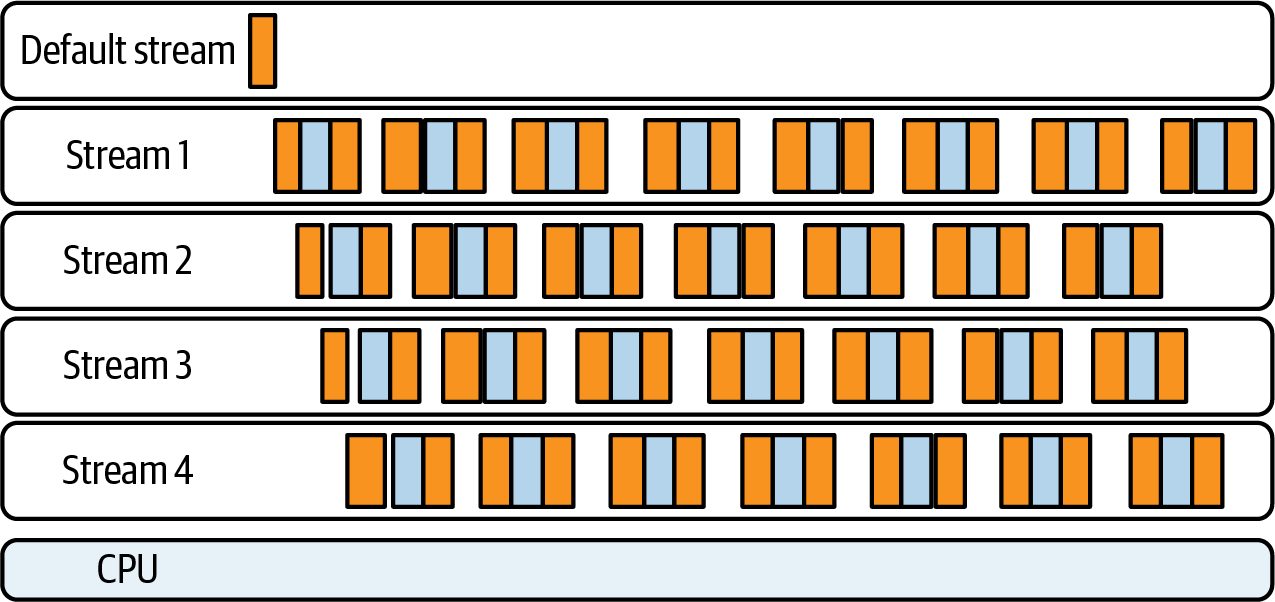
With PTDS, any kernel launch, copy, or allocation without an explicit stream param‐ eter goes into a thread‐local queue. Only commands within the same host thread’s default stream serialize, and they never impose an implicit global barrier on streams belonging to other threads. In short, by enabling per-thread default streams, the legacy default-stream synchroni‐ zation barrier is removed. Each host thread’s default stream never waits on other threads’ streams. This allows full overlap of multiple kernel launches across threads.
442 | Chapter 11: Inter-Kernel Pipelining, Synchronization, and CUDA Stream-Ordered Memory Allocations
And if you issue kernel launches (or memory copies) from different CPU threads without specifying an explicit stream, the operations will overlap on the GPU when‐ ever resources permit. This is shown in Figure 11-4.
Figure 11-4. Timeline showing multiple GPU kernels running concurrently across sepa‐ rate CUDA streams issued from different threads on their respective default streams with PTDS enabled
Default Versus Explicit (Nondefault) Streams Relying on default‐stream behavior will eventually cause problems. It always does. Any work enqueued into the legacy default stream (stream 0) implicitly waits for— and blocks—every other stream, and vice versa. In performance‐critical code, it’s best to create and use your own nondefault, explicit, and named streams so that nothing accidentally goes into stream 0. If you acciden‐ tally use one kernel on stream 0—or copy data into it—you can stall every other active stream. Many libraries, such as cuBLAS, Thrust, etc., accept an explicit stream parameter. It’s recommended that you always create explicit streams and use those.
               In PyTorch, operations are scheduled on nondefault streams under
               the hood to avoid unintended synchronization. For example,
               PyTorch’s internal calls to cuDNN, cuBLAS, etc., use their own
               streams to avoid blocking the default stream 0. Also, PyTorch’s dis‐
               tributed backend launches NCCL communication operations on
               separate CUDA streams rather than the default stream. This lets it
               overlap gradient communication with compute, for instance. In
               addition, NCCL’s communication operations often run in a high-
               priority stream, as we’ll cover in a bit.
Default Versus Explicit (Nondefault) Streams | 443
By managing your own streams—or using per-thread defaults—you retain control
over concurrency. Here is an example of creating explicit, nondefault streams in
CUDA C++ (we will show how to use streams in PyTorch in Chapters 13 and 14):
      cudaStream_t streamA, streamB;
      cudaStreamCreateWithFlags(&streamA, cudaStreamNonBlocking);
      cudaStreamCreateWithFlags(&streamB, cudaStreamNonBlocking);
      myKernel<<<grid, block, 0, streamA>>>(...);                 // streamA
      cudaMemcpyAsync(dest, src, size, cudaMemcpyHostToDevice, streamB); // streamB
Here, streamA and streamB can overlap freely. Under the legacy default‐stream model (PTDS disabled), however, any later call into stream 0 forces both streamA and streamB to wait until stream 0 is empty. Similarly, any work enqueued in streamA or streamB will block if stream 0 still has pending tasks. To avoid these hidden global barriers, keep stream 0 idle and use it only for one‐time operations for initial setup, final cleanup, etc. In short, enable per‐thread default streams so that each CPU thread’s default stream no longer synchronizes with any other thread’s default stream. Then create and use explicit streams (like streamA and streamB) for all performance-critical kernels and copies. By doing both, nothing you enqueue into your explicit streams can accidentally col‐ lide with work in another explicit stream, another thread’s default stream, or the leg‐ acy default stream 0. This ensures safe, predictable overlap without implicit synchronization. Creating streams with cudaStreamNonBlocking ensures that they do not synchronize with the legacy default stream. This is required to avoid hidden barriers.
Best Practices for Default Stream Usage
Because default streams can be problematic for performance, let’s highlight the syn‐
chronization characteristics of each type of stream—legacy default, per-thread
default, and explicit (nondefault):
Legacy default stream (cudaStreamLegacy)
    This blocks and is blocked by every other stream. Do not issue work here if you
    need any form of concurrency.
Per-thread default stream (cudaStreamPerThread)
    Each host thread’s default stream is private. It still serializes its own commands
    but does not wait on or block any other thread’s default stream or explicit
    streams.
444 | Chapter 11: Inter-Kernel Pipelining, Synchronization, and CUDA Stream-Ordered Memory Allocations
Explicit streams (created with cudaStreamCreateWithFlags())
    Explicit streams are independent queues that only synchronize when you explic‐
    itly insert dependencies using cudaStreamWaitEvent(), for instance.
Here are some best practices to help guide your use of default and explicit (nonde‐
fault) streams:
Never launch performance‐critical kernels into stream 0 (legacy default) unless you
intend to serialize all GPU work
    Even one stray kernel or copy into stream 0 will stall every other active stream.
    Older CUDA APIs, for example, might implicitly use stream 0. For example,
    when calling CUDA driver APIs without an explicit stream, you will likely use
    the legacy stream. This is another reason to migrate to newer APIs or always
    specify streams.
Enable per‐thread default streams
   Use PTDS if your application uses multiple CPU threads that each enqueue GPU
   work. This avoids hidden host‐side barriers between those threads’ default
   streams. On modern systems, you can also use cudaStreamCreateWith
   Flags(&stream, cudaStreamNonBlocking) to create a stream that does not syn‐
   chronize with stream 0.
Create and manage explicit, nondefault streams
    Explicit streams are a best practice since they allow overlapping kernels and
    memory copies. Always pass a nondefault cudaStream_t to <<<...>>>(), cuda
    MemcpyAsync(), or cudaMallocAsync(). This guarantees that no implicit default‐
    stream synchronization will interfere with your pipelined workflow.
Use cudaStreamWaitEvent() to coordinate fine‐grained dependencies instead of
cudaStreamSynchronize()
    You should use stream events rather than cudaStreamSynchronize() on the
    default stream. Call cudaStreamSynchronize() only at well‐defined global points
    (e.g., the end of a model-training epoch) to avoid stalling unrelated streams.
Be explicit about your stream flags
    If you enable PTDS, set the device flags before any CUDA call. Otherwise, you
    remain in the legacy default‐stream mode. Any mention of stream 0 will create a
    global barrier.
Put simply, the legacy default stream (stream 0) always acts as a global barrier. Any
work you enqueue there waits for, and forces, every other stream to finish, and every
other stream will wait if stream 0 has pending work.
Best Practices for Default Stream Usage | 445
To avoid these invisible stalls, don’t put performance-critical kernels or copies into stream 0. Instead, create your own named streams using cudaStreamCreateWith Flags and launch everything into those streams so they can run independently. If your program has multiple CPU threads—each issuing their own GPU work—you should also enable per-thread default streams. With PTDS turned on, each thread’s “default” stream no longer synchronizes with other threads’ defaults—or with stream 0. This way, even code that doesn’t explicitly create new streams won’t accidentally block any other threads’ work. In all cases, whenever you want two operations to overlap (e.g., a copy and a kernel), you should give them their own explicit, nondefault streams. Then you’ll avoid the hidden global synchronization rules of stream 0 and let the GPU run with maximum parallelism.
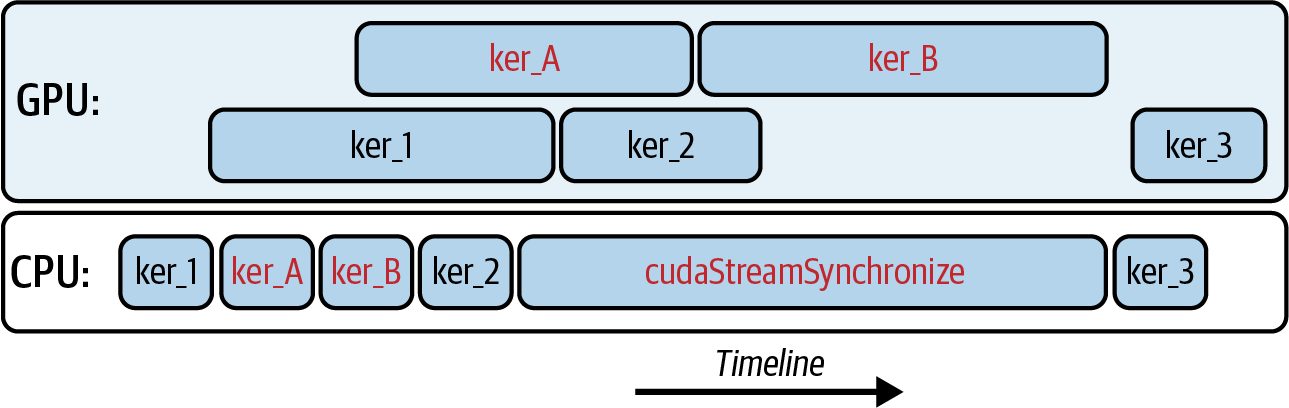
Fine-Grained Synchronization with Events and Callbacks Even when multiple streams and DMA engines overlap, there are times when one stream’s operation must wait for another. Consider a pair of producer-consumer streams. The producer stream 0 is loading and preparing data for the consumer stream 1 to process. In this case, it is tempting to synchronize these streams on the host side and block the CPU with a full cudaDeviceSynchronize(). However, this will block the CPU until all streams and all operations on the GPU complete. This is very bad for perfor‐ mance. You can also use cudaStreamSynchronize(), as shown in Figure 11-5, but this will block until all operations in the stream’s queue complete.
Figure 11-5. Using cudaStreamSynchronize() will block the CPU until all operations in the stream have synchronized
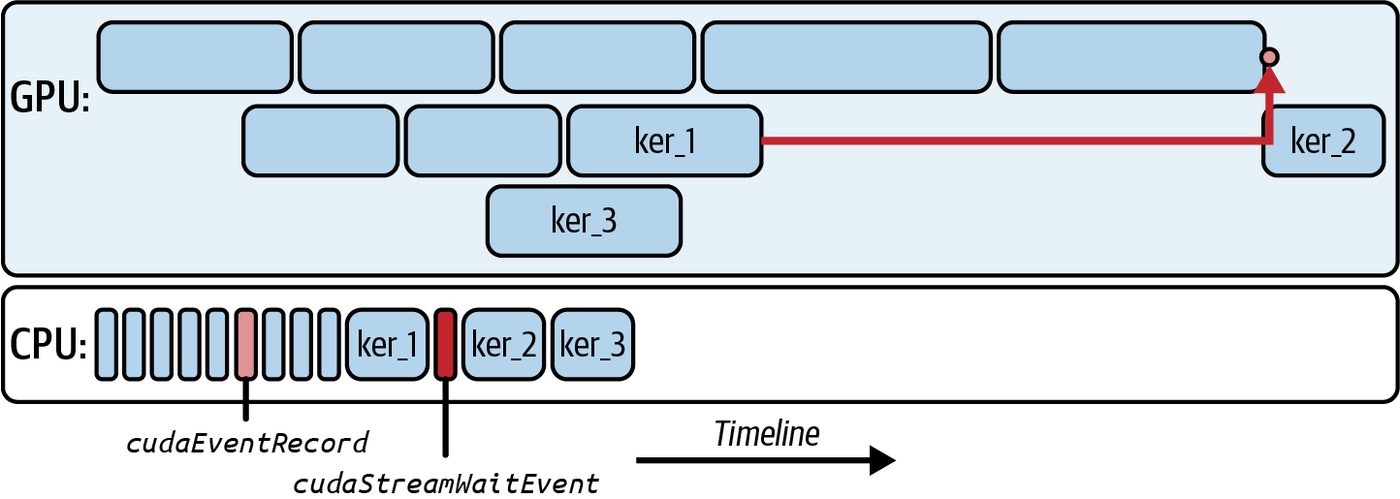
Instead, you can use CUDA events to provide a much finer-grained synchronization mechanism for streams. With CUDA events, you record a cudaEvent_t in the stream that produces data and then have the consumer stream wait for that event.
446 | Chapter 11: Inter-Kernel Pipelining, Synchronization, and CUDA Stream-Ordered Memory Allocations
For instance, you would launch a producer kernel on stream 0 and call cuda Event Record(doneEvent, stream0) when the data is ready to be consumed. In stream 1, you would then call cudaStreamWaitEvent(stream1, doneEvent, 0) before launch‐ ing the consumer kernel. In this way, only stream 1 is stalled waiting for the event to be recorded—the host thread and all other streams will continue executing, as shown in Figure 11-6.
Figure 11-6. Using CUDA events to synchronize in a fine-grained manner
In addition to using CUDA events for interstream coordination, you can also use them to communicate between the GPU device and the CPU host. To do this, you would register a host callback with cudaLaunchHostFunc() from the host. Suppose you need to recycle a custom memory pool back on the host as soon as a GPU kernel finishes in stream 0. In this case, you would register a callback from the host with cudaLaunchHostFunc() and specify the event that you are interested in. You would then launch the kernel on stream 0. When the kernel is complete, it will record the event, and the host will run the call‐ back function and update the memory pool on the CPU. All of this happens without a polling loop or a full cudaDeviceSynchronize(). The CUDA runtime executes the callback function on a host thread once the GPU work is completed. This keeps the CPU free until the precise moment that you need it—and avoids wasting host cycles and blocking unrelated GPU work. You should not call any device-side GPU APIs from within the host callback launched with cudaLaunchHostFunc(). If you call cudaMemcpy(), for instance, from inside the callback, it can deadlock because the callback runs on a host thread man‐ aged by the CUDA runtime. Calling CUDA APIs from within it can deadlock because the device may be waiting for the callback to finish.
Fine-Grained Synchronization with Events and Callbacks | 447
                    The callback should be limited to CPU-side tasks such as freeing or
                    recycling host memory. This suggestion prevents deadlocks in the
                    circular case in which a callback tries to launch new work on the
                    GPU at the same time that the GPU is waiting for the callback to
                    complete.
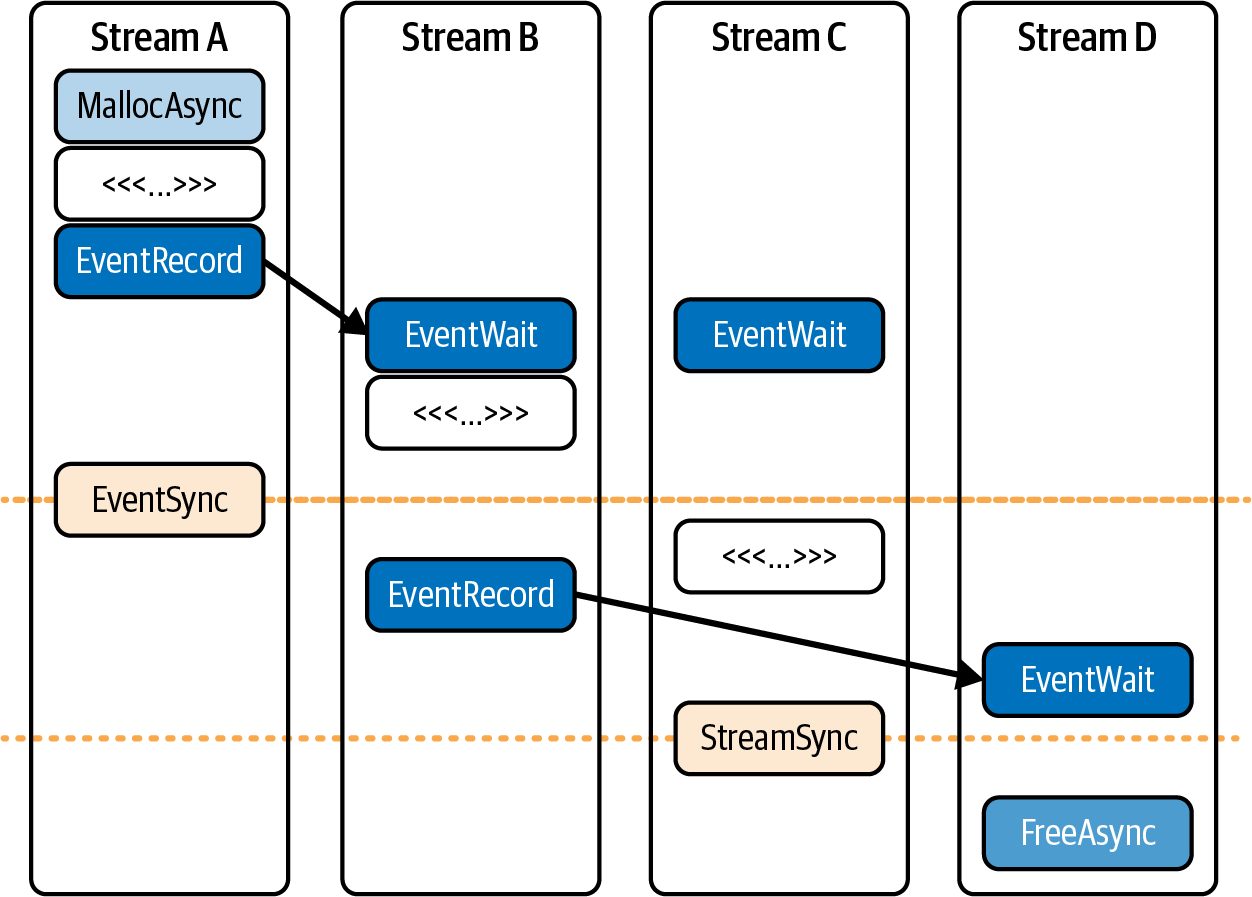
Using CUDA Events for Cross-Stream Synchronization With multiple streams running in parallel, we often need to coordinate and syn‐ chronize between them. CUDA events are the primary mechanism for cross-stream synchronization without stalling the CPU or the entire device. An event is like a marker that a stream records at a specific point. Other streams, or even the host, can wait on that marker and know when a certain event has happened (e.g., a kernel has finished). Unlike a full cudaDeviceSynchronize(), which blocks until all streams finish, events allow fine-grained ordering between streams. Streams can be used to make sure that each transformer layer’s data is present before computing. They can also improve pipeline parallelism by ensuring GPU 0 has fin‐ ished producing a tensor before GPU 1 consumes it. And all of this happens without idling other independent work. For example, consider a set of four streams (Streams A–D) that pipeline operations and depend on one another in some cases. We can enforce these dependencies using CUDA events (see Figure 11-7). To ensure stream B doesn’t start processing until stream A produces the data, we can record an event in stream A and make stream B wait for that before continuing. Simi‐ larly, stream D can wait on stream B as shown here. By chaining events in this manner, we maintain correct ordering between streams while still running different batches concurrently. This event-based synchronization is heavily used in deep learning frameworks to overlap gradient computations with all-reduce communications. The compute stream records an event when gradients are ready, and a communication stream waits on that event to start an NCCL operation, thereby overlapping communication with remaining computation. In short, CUDA events are lightweight and optimized for device signaling. A stream records an event when it reaches a specific point in its command queue. And other streams can efficiently poll/wait for it. They let us orchestrate complex dependency graphs across streams without forcing global waits. And they provide the necessary control to implement pipelined execution in multistream LLM workloads.
448 | Chapter 11: Inter-Kernel Pipelining, Synchronization, and CUDA Stream-Ordered Memory Allocations
Figure 11-7. Synchronizing CUDA streams with events (source: https://oreil.ly/MynOA)
               NVIDIA continues to improve event-time granularity and reduce
               event-recording overhead. As such, events are a good choice for
               profiling since they record event timestamps in the GPU timeline
               and can measure execution time, etc.
Pipelining with Warp Specialization (Intra-Kernel) and CUDA Streams (Inter-Kernel) Chapter 10 demonstrated how to use warp specialization and the CUDA Pipeline API to hide memory latency within a single kernel. In that section, we launched a single, persistent, and warp-specialized kernel in which each thread block is split into three different types of warps: loader, compute, and storer warps. These warps shared a contiguous chunk of shared memory and a two‐stage (double-buffered) CUDA Pipe‐ line (<cuda::pipeline>) object to coordinate their work. Let’s keep that same warp-specialized device kernel and now drive multiple batches through it using separate CUDA streams. The result is a two-level pipeline as follows: Intra-kernel overlap (within each block) The loader ↔ compute ↔ storer run concurrently using separate pipelines.
Pipelining with Warp Specialization (Intra-Kernel) and CUDA Streams (Inter-Kernel) | 449
Inter-kernel overlap (across batches)
     While stream 0 computes on batch t, stream 1 DMA-loads batch t+1, and stream
     2 returns results of batch t–1. This uses nonblocking streams, pinned host mem‐
     ory, and the stream-ordered allocator so allocations/copies don’t serialize other
     work.
If multiple blocks need the same tile, the thread block cluster + DSMEM path
described in Chapter 10 removes redundant global loads across blocks. However,
cooperative/cluster launches serialize with other cooperative kernels. The stream pat‐
tern used here targets the host ↔ device overlap and works with a noncooperative
kernel.
                    If your bottleneck is on-device tile reuse, use thread block clusters.
                    If the bottleneck is host ↔ device communication and batching,
                    use CUDA streams. We’ll show how to combine these in a bit, but
                    this is a good starting point for initial decision making.
The next kernel uses three warps per block (0 = loader, 1 = compute, 2 = storer) and two pipelines to ping-pong stages. Therefore, it requires 6 * TILE_SIZE * sizeof(float) dynamic shared memory ([A0|B0|C0|A1|B1|C1]). It’s worth noting that we are switching to use two independent block-scoped pipelines, each with depth 2. One is for the loader → compute (pipe_lc) handoff, and another is for compute → storer (pipe_cs). In addition, we are using double-buffered shared memory so the kernel can be load‐ ing tile i+1 while computing tile i and storing tile i–1. That’s why you see two cuda::pipeline objects and “[A|B|C] × 2 stages” in shared memory in the code that follows. The two pipelines are an intra-kernel choice to deepen overlap inside each kernel. (Note: you can use streams with either kernel style.) Here is the code: #include <cooperative_groups.h> // thread_block, etc. #include <cuda/pipeline> // CUDA Pipeline API namespace cg = cooperative_groups;
      // shmem bytes = 2(stages)×3(buffers)×TILE_SIZE×sizeof(float)=6×TILE_SIZE×4
      //             = 6 * 1024 * 4 = 24,576 B (24 KB) << 227 KB SMEM
      // We keep this at 1024 (versus going higher) as a safe starting point
      // (good occupancy balance)
      #define TILE_SIZE 1024 // one tile = 1,024 floats per buffer (1-Dimension)
           // Alignment / size guards for vectorized copies
           static_assert((TILE_SIZE % (32 * 4)) == 0,
                         "TILE_SIZE must be multiple of 128 for float4 vectorization");
           // If you cannot guarantee 16B alignment or sizes, handle
           // the tail/ragged edges with a fallback 4B loop.
450 | Chapter 11: Inter-Kernel Pipelining, Synchronization, and CUDA Stream-Ordered Memory Allocations
// Three warps per block: 0 loads, 1 computes, 2 stores.
// Two block-scoped pipelines (each depth=2) implement ping-pong across tiles.
__global__ void warp_specialized_two_pipelines(
    const float* __restrict__ A_global,
    const float* __restrict__ B_global,
    float*       __restrict__ C_global,
    int          numTiles)
{
    thread_block cta = this_thread_block();
    // Stage s∈{0,1}: [A_s | B_s | C_s], each length TILE_SIZE
    extern __shared__ float shared_mem[];
    // loader -> compute pipeline (2 in-flight stages)
    __shared__ cuda::pipeline_shared_state<cuda::thread_scope_block, 2> state_lc;
    auto pipe_lc = cuda::make_pipeline(cta, &state_lc);
    // compute -> storer pipeline (2 in-flight stages)
    __shared__ cuda::pipeline_shared_state<cuda::thread_scope_block, 2> state_cs;
    auto pipe_cs = cuda::make_pipeline(cta, &state_cs);
    const int warp_id = threadIdx.x >> 5;              // 0,1,2
    const int lane_id = threadIdx.x & 31;
    // Prime first tile handled by this block
    const int first = blockIdx.x;
    if (warp_id == 0 && first < numTiles) {
        const int stage0 = first & 1;
        float* A0 = shared_mem + stage0 * 3 * TILE_SIZE;
        float* B0 = A0 + TILE_SIZE;
pipe_lc.producer_acquire();
#pragma unroll
for (int chunk = 0; chunk < TILE_SIZE; chunk += 32 * 4) {
    cuda::memcpy_async(
        cta,
        reinterpret_cast<float4*>(A0 + chunk) + lane_id,
        reinterpret_cast<const float4*>(A_global + size_t(first) *
          TILE_SIZE + chunk) + lane_id,
        sizeof(float4),
        pipe_lc);
    cuda::memcpy_async(
        cta,
        reinterpret_cast<float4*>(B0 + chunk) + lane_id,
        reinterpret_cast<const float4*>(B_global + size_t(first) *
          TILE_SIZE + chunk) + lane_id,
        sizeof(float4),
        pipe_lc);
}
pipe_lc.producer_commit();
    }
Pipelining with Warp Specialization (Intra-Kernel) and CUDA Streams (Inter-Kernel) | 451
           // Walk a strided set of tiles; ping-pong stage by tile parity.
           for (int tile = blockIdx.x; tile < numTiles; tile += gridDim.x) {
               const size_t offset = size_t(tile) * TILE_SIZE;
               const int    stage = tile & 1;
                float* A_buf = shared_mem + stage * 3 * TILE_SIZE;
                float* B_buf = A_buf      + TILE_SIZE;
                float* C_buf = B_buf      + TILE_SIZE;
                // Loader prefetches next tile while compute/store work on current.
                if (warp_id == 0) {
                    const int next = tile + gridDim.x;
                    if (next < numTiles) {
                        const int next_stage = next & 1;
                        float* A_next = shared_mem + next_stage * 3 * TILE_SIZE;
                        float* B_next = A_next + TILE_SIZE;
                        pipe_lc.producer_acquire();
                        #pragma unroll
                        for (int chunk = 0; chunk < TILE_SIZE; chunk += 32 * 4) {
                             cuda::memcpy_async(
                    cta,
                                 reinterpret_cast<float4*>(A_next + chunk) + lane_id,
                                 reinterpret_cast<const float4*>(A_global + size_t(next) *
                                   TILE_SIZE + chunk) + lane_id,
                                 sizeof(float4),
                                 pipe_lc);
                             cuda::memcpy_async(
                                 cta,
                                 reinterpret_cast<float4*>(B_next + chunk) + lane_id,
                                 reinterpret_cast<const float4*>(B_global + size_t(next) *
                                   TILE_SIZE + chunk) + lane_id,
                                 sizeof(float4),
                                 pipe_lc);
                         }
                         pipe_lc.producer_commit();
                    }
                }
                // Compute consumes loader output and signals storer
                if (warp_id == 1) {
                    pipe_lc.consumer_wait();
                    #pragma unroll
                    for (int chunk = 0; chunk < TILE_SIZE; chunk += 32) {
                        C_buf[chunk+lane_id] = A_buf[chunk+lane_id]+B_buf[chunk+lane_id];
                    }
                    pipe_lc.consumer_release();
                      pipe_cs.producer_acquire();
                      pipe_cs.producer_commit();
                }
// Storer waits on compute and writes back
452 | Chapter 11: Inter-Kernel Pipelining, Synchronization, and CUDA Stream-Ordered Memory Allocations
            if (warp_id == 2) {
                pipe_cs.consumer_wait();
                #pragma unroll
                for (int chunk = 0; chunk < TILE_SIZE; chunk += 32) {
                    C_global[offset + chunk + lane_id] = C_buf[chunk + lane_id];
                }
                pipe_cs.consumer_release();
            }
        }
        // Launch requirements: blockDim.x = 96 (3 warps), gridDim as needed,
        // dynamic shared memory = 6 * TILE_SIZE * sizeof(float).
    }
Here, we are including some performance highlights worth noting. First, we are
requiring 16-byte alignment of A0, B0, A_global + base, and B_global + base. If a
path isn’t 16-byte aligned, we fall back to the 4-byte loop for the misaligned prologue/
epilogue.
               16-bytes per lane (float4/int4) aligns with modern GPU best
               practice to reach 128-byte coalesced accesses at the warp level. This
               helps to reduce pipeline overhead.
Next, we are assuming the TILE_SIZE is a multiple of 128 (32 lanes × 4 floats). If not, handle the tail with a scalar loop. In addition, we use cuda::memcpy_async with float4. This preserves the pipeline’s asynchronous semantics and lowers the per-tile copy count from 4× down to 1× per lane. And here is the host driver, which cycles batches across nonblocking streams and uses pinned host memory and the stream-ordered allocator (cudaMallocAsync ÷ cudaFreeAsync). It launches the warp_specialized_two_pipelines in the previous kernel: #include <cstdio> #include <cuda_runtime.h>
    #define TILE_SIZE   1024
    #define NUM_STREAMS 2
    #define BATCHES     8
    // Device kernel
    __global__ void warp_specialized_two_pipelines(
        const float* __restrict__ A_global,
        const float* __restrict__ B_global,
        float*       __restrict__ C_global,
        int          numTiles);
    int main() {
        // Create nonblocking streams (do NOT use legacy default stream)
Pipelining with Warp Specialization (Intra-Kernel) and CUDA Streams (Inter-Kernel) | 453
          cudaStream_t s[NUM_STREAMS];
          for (int i = 0; i < NUM_STREAMS; ++i)
              cudaStreamCreateWithFlags(&s[i], cudaStreamNonBlocking);
          // Pinned host buffers so cudaMemcpyAsync truly overlaps
          float *hA = nullptr, *hB = nullptr, *hC = nullptr;
          const size_t bytesPerBatch = TILE_SIZE * sizeof(float);
          cudaMallocHost(&hA, BATCHES * bytesPerBatch);
          cudaMallocHost(&hB, BATCHES * bytesPerBatch);
          cudaMallocHost(&hC, BATCHES * bytesPerBatch);
          // Initialize inputs
          for (int b = 0; b < BATCHES; ++b) {
              for (int i = 0; i < TILE_SIZE; ++i) {
                  hA[b * TILE_SIZE + i] = float(i);
                  hB[b * TILE_SIZE + i] = 1.0f;
              }
          }
          // Enqueue batches in a round-robin across streams
          for (int b = 0; b < BATCHES; ++b) {
              cudaStream_t st = s[b % NUM_STREAMS];
               float *dA = nullptr, *dB = nullptr, *dC = nullptr;
               cudaMallocAsync(&dA, bytesPerBatch, st);   // stream-ordered allocator
               cudaMallocAsync(&dB, bytesPerBatch, st);
               cudaMallocAsync(&dC, bytesPerBatch, st);
               cudaMemcpyAsync(dA, hA + size_t(b) * TILE_SIZE, bytesPerBatch,
                               cudaMemcpyHostToDevice, st);
               cudaMemcpyAsync(dB, hB + size_t(b) * TILE_SIZE, bytesPerBatch,
                               cudaMemcpyHostToDevice, st);
               const dim3 block(96);         // 3 warps: loader/compute/storer
               const dim3 grid(1);
               const size_t shmem = 6 * TILE_SIZE * sizeof(float); //[A0|B0|C0|A1|B1|C1]
               // Each batch is one tile in this 1-D example
               warp_specialized_two_pipelines<<<grid, block, shmem, st>>>(
                   dA, dB, dC, /*numTiles=*/1);
               cudaMemcpyAsync(hC + size_t(b) * TILE_SIZE, dC, bytesPerBatch,
                               cudaMemcpyDeviceToHost, st);
               cudaFreeAsync(dA, st);                   // stream-ordered free
               cudaFreeAsync(dB, st);
               cudaFreeAsync(dC, st);
          }
          // Clean up
          for (int i = 0; i < NUM_STREAMS; ++i) {
              cudaStreamSynchronize(s[i]);
454 | Chapter 11: Inter-Kernel Pipelining, Synchronization, and CUDA Stream-Ordered Memory Allocations
cudaStreamDestroy(s[i]); } cudaFreeHost(hA); cudaFreeHost(hB); cudaFreeHost(hC); return 0; } Here, each stream carries its own sequence: allocate → H2D → kernel → D2H → free. Because allocations and copies are enqueued in stream order and the host buffers are pinned, the GPU’s copy engines can overlap H2D/D2H with the SM compute from another stream. This is the inter-kernel layer that complements the intra-kernel over‐ lap created by warp specialization and introduced in Chapter 10. Specifically, this example shows shared memory holding two sets of three buffers of length TILE_SIZE each so that one set can be used while the next tile is prepared. A <cuda::pipeline> with two stages provides double buffering across tiles and enfor‐ ces the correct ordering so the loader, compute, and storer warps can overlap on dif‐ ferent tiles. The kernel primes the first tile before the loop and then prefetches tile i plus gridDim.x while computing tile i. In isolation, this warp‐specialized kernel hides memory latency by overlapping three roles within each tile. However, a single warp‐specialized kernel can process only one batch of tiles at a time. To keep the GPU busy with multiple batches—and overlap H2D transfers, kernel computation, and D2H transfers across those batches, we launch multiple instances of this same warp‐specialized kernel in separate CUDA streams. This will use the stream‐ordered allocator for each batch. This second layer of pipelining, inter-kernel concurrency, lets us wave successive mini-batches through the GPU. This way, while one batch’s kernel is computing in stream 0, another batch’s data is still arriving in stream 1. And, concurrently, a previ‐ ous batch’s results might be streaming back to the host in stream 2. In practice, we pick a small number of streams, two or three, and cycle through them. Each stream allocates its own device buffers using cudaMallocAsync, copies input data asynchronously with cudaMemcpyAsync, launches the warp‐specialized kernel to process those buffers, copies the results back to the host asynchronously, and then frees the buffers with cudaFreeAsync. Because each of these operations is enqueued in a specific stream, they can all overlap with equivalent operations in other streams. On modern GPUs with multiple copy engines and stream-ordered allocators, this pattern can substantially increase utiliza‐ tion by saturating every part of the chip simultaneously. The actual overlap is bounded by copy-engine counts (query cudaDeviceProp::asyncEngineCount), bandwidth, and kernel occupancy.
Pipelining with Warp Specialization (Intra-Kernel) and CUDA Streams (Inter-Kernel) | 455
As soon as the loader warp in one kernel is waiting on a global-memory fetch, the H2D copy for the next batch is in flight on the copy engine. As soon as the storer warp in a previous batch is writing back to global memory, the allocator in another stream can grab memory for the next batch without forcing a global sync. In essence, the warp‐specialization example from Chapter 10 taught us how to make one kernel hide its memory latency by overlapping load/compute/store inside a thread block. The multistream example in this chapter builds on that by showing how to feed many of those kernels—each processing a different batch—into the GPU simultaneously by overlapping host ↔ device transfers, compute, and device ↔ host transfers across the entire pipeline. Modern GPUs have multiple copy engines and perform asynchronous memory allo‐ cations. Together with Tensor Cores, they work in parallel to create a two‐level pipe‐ lining strategy with intra‐kernel warp specialization and inter‐kernel streams. These mechanisms allow our kernels to approach peak hardware utilization for LLM workloads.
Warp Specialization with Thread Block Clusters and CUDA Streams We will now put everything together from this chapter—and previous chapters—to drive multiple in‐flight mini‐batches through multiple streams, each of which launches a cooperative thread-block‐clustered, warp‐specialized kernel. This repre‐ sents the pinnacle of CUDA performance optimizations on the latest GPU hardware.
                    While we cover this topic for comprehensiveness, it’s important to
                    note that, due to the complexity, this combination of techniques is
                    rarely seen outside of very specialized research projects and ultra‐
                    latency‐sensitive inference engines. It’s still worth covering, how‐
                    ever, as it combines many of the concepts that we learned so far
                    into one code example.
Chapter 10 showed warp specialization inside a single thread block as well as combin‐ ing warp specialization with thread-block clusters using DSMEM. This way, one leader thread block loads a tile once—and every block in the thread block cluster computes from that shared on-chip copy. This removes duplicate global loads. This example reuses that exact pattern in which the leader uses a block-scoped pipe‐ line to stage the copies. All blocks are read using cluster.map_shared_rank, so it inherits the data-reuse win. In the previous warp‐specialized example with CUDA streams, each thread block was responsible for all three pipeline stages—loader, compute, and storer—within its own
456 | Chapter 11: Inter-Kernel Pipelining, Synchronization, and CUDA Stream-Ordered Memory Allocations
shared‐memory region. Now, let’s extend that earlier implementation to use a thread block cluster pipeline. This way, the loader, compute, and storer warps are distributed across the thread block cluster. This is in contrast to the previous implementation, which is confined to a single thread block. The code for the thread block cluster plus warp specialization example with CUDA streams follows. In this example, we pick NUM_STREAMS = 2 so that the host can queue two independent launches in separate CUDA streams. We reuse the same warp_speci alized_cluster_pipeline implementation from Chapter 10’s section on warp spe‐ cialization with thread block clusters and add CUDA streams: // Warp specialization across a thread block cluster using DSMEM // and a block scoped pipeline, launched from multiple CUDA streams
    #include <cuda_runtime.h>
    #include <cuda/pipeline>
    #include <cooperative_groups.h>
    #include <algorithm>
    namespace cg = cooperative_groups;
    #define TILE_SIZE   128  // 3×TILE_ELEMS×4 bytes=196,608 bytes < 227 KB SMEM
    #define TILE_ELEMS (TILE_SIZE * TILE_SIZE)
    #define NUM_STREAMS 2
    #define CLUSTER_BLOCKS 4 // blocks per cluster along x (tune to device)
// ---- Device helpers ----
    __device__ void compute_rows_from_ds(const float* __restrict__ A_src,
                                         const float* __restrict__ B_src,
                                         float*       __restrict__ C_dst,
                                         int row_begin, int row_end, int lane_id)
    {
        for (int row = row_begin + lane_id; row < row_end; row += warpSize) {
            for (int col = 0; col < TILE_SIZE; ++col) {
                float acc = 0.0f;
                #pragma unroll
                for (int k = 0; k < TILE_SIZE; ++k) {
                    acc += A_src[row * TILE_SIZE + k] * B_src[k * TILE_SIZE + col];
                }
                C_dst[row * TILE_SIZE + col] = acc;
            }
        }
    }
    // Clustered, warp-specialized kernel (leader loads once, others consume DSMEM)
    extern "C"
    __global__ void warp_specialized_cluster_pipeline(
        const float* __restrict__ A_global,
        const float* __restrict__ B_global,
        float*        __restrict__ C_global,
        int numTiles)
Warp Specialization with Thread Block Clusters and CUDA Streams | 457
      {
           thread_block cta      = this_thread_block();
           cluster_group cluster = this_cluster();
           extern __shared__ float smem[];
           float* A_tile_local = smem;
           float* B_tile_local = A_tile_local + TILE_ELEMS;
           float* C_tile_local = B_tile_local + TILE_ELEMS;
           // Leader uses a block-scoped pipeline to stage A/B exactly once per tile
           __shared__ cuda::pipeline_shared_state<cuda::thread_scope_block, 2>
               pipe_state;
           auto pipe = cuda::make_pipeline(cta, &pipe_state);
           const int lane_id = threadIdx.x & 31;
           const int warp_id = threadIdx.x >> 5;
           const int cluster_rank                 = cluster.block_rank();
           const dim3 cluster_dims                = cluster.dim_blocks();
           const int blocks_in_cluster            = cluster_dims.x*cluster_dims.y*cluster_dims.z;
           // Each iteration handles one tile per cluster (1-D cluster along x)
           auto loader = cg::tiled_partition<32>(cta);
           for (int tile = blockIdx.x / cluster_dims.x; tile < numTiles;
                tile += gridDim.x / cluster_dims.x) {
               const size_t offset = static_cast<size_t>(tile) * TILE_ELEMS;
                // Leader block’s loader warp stages A and B once for the entire cluster
                if (cluster_rank == 0 && warp_id == 0) {
                    pipe.producer_acquire();
                    cuda::memcpy_async(loader, A_tile_local, A_global + offset,
                                       cuda::aligned_size_t<32>{TILE_ELEMS
                                       * sizeof(float)}, pipe);
                    cuda::memcpy_async(loader, B_tile_local, B_global + offset,
                                       cuda::aligned_size_t<32>{TILE_ELEMS
                                       * sizeof(float)} pipe);
                    pipe.producer_commit();
                    // Make visible inside leader before publishing
                    pipe.consumer_wait();
                    pipe.consumer_release();
                }
                // Publish to all blocks in the cluster
                cluster.sync();
                const float* A_src = cluster.map_shared_rank(A_tile_local, 0);
                const float* B_src = cluster.map_shared_rank(B_tile_local, 0);
                // Divide rows among blocks in the cluster
                const int rows_per_block = (TILE_SIZE + blocks_in_cluster - 1)
                                            / blocks_in_cluster;
                const int row_begin = std::min(cluster_rank * rows_per_block, TILE_SIZE);
458 | Chapter 11: Inter-Kernel Pipelining, Synchronization, and CUDA Stream-Ordered Memory Allocations
const int row_end = std::min(row_begin + rows_per_block, TILE_SIZE);
       // Compute warp produces this block’s band into local SMEM
       if (warp_id == 1) {
           compute_rows_from_ds(A_src, B_src, C_tile_local,
                                row_begin, row_end, lane_id);
       }
        // Ensure the storer sees computed rows
        cta.sync();
        // Storer warp writes band back to global
        if (warp_id == 2) {
            for (int row = row_begin + lane_id; row < row_end; row += warpSize){
                for (int col = 0; col < TILE_SIZE; ++col) {
                    C_global[offset + row * TILE_SIZE + col] =
                        C_tile_local[row * TILE_SIZE + col];
                }
            }
        }
        // Done with this tile; allow leader to reuse buffers
        cluster.sync();
    }
    // Dynamic shared memory size: 3 * TILE_ELEMS * sizeof(float)
}
// ---- Host driver: stream-staged batches + clustered kernel launch ----
void launch_warp_specialized_cluster_pipeline_multistream(
    const float* h_A,        // Host input A: length = numBatches * batchLength
    const float* h_B,        // Host input B: length = numBatches * batchLength
    float*       h_C,        // Host output C: length = numBatches * batchLength
    int          batchLength,// elems per batch; must be multiple of TILE_ELEMS
    int          numBatches)
{
    // Basic validation
    if (batchLength % TILE_ELEMS != 0) {
        fprintf(stderr, "batchLength must be a multiple of TILE_ELEMS (%d)\n",
                TILE_ELEMS);
        return;
    }
    const int numTiles = batchLength / TILE_ELEMS;
    // Nonblocking streams avoid legacy default-stream barriers
    cudaStream_t streams[NUM_STREAMS];
    for (int i = 0; i < NUM_STREAMS; ++i)
        cudaStreamCreateWithFlags(&streams[i], cudaStreamNonBlocking);
    // Size and launch geometry
    int device = 0;
    cudaGetDevice(&device);
Warp Specialization with Thread Block Clusters and CUDA Streams | 459
           cudaDeviceProp prop{};
           cudaGetDeviceProperties(&prop, device);
           // grid.x must be a multiple of CLUSTER_BLOCKS
           const int blocksPerGrid = prop.multiProcessorCount * CLUSTER_BLOCKS;
           const dim3 blockDim(96); // 3 warps: loader/compute/storer
           const size_t shmemBytes = 3ull * TILE_ELEMS * sizeof(float);
           // Cluster attributes
           cudaLaunchAttribute attr[2]{};
           attr[0].id = cudaLaunchAttributeClusterDimension;
           attr[0].val.clusterDim = dim3(CLUSTER_BLOCKS, 1, 1);
           attr[1].id = cudaLaunchAttributeNonPortableClusterSizeAllowed;
           attr[1].val.nonPortableClusterSizeAllowed = 1;
           // Enqueue batches round-robin across streams
           for (int b = 0; b < numBatches; ++b) {
               cudaStream_t st = streams[b % NUM_STREAMS];
                float *dA = nullptr, *dB = nullptr, *dC = nullptr;
                const size_t bytes = static_cast<size_t>(batchLength) * sizeof(float);
                // Stream-ordered allocator avoids global sync
                cudaMallocAsync(&dA, bytes, st);
                cudaMallocAsync(&dB, bytes, st);
                cudaMallocAsync(&dC, bytes, st);
                // H2D (host pointers should be pinned for true overlap)
                cudaMemcpyAsync(dA, h_A + static_cast<size_t>(b) * batchLength, bytes,
                                cudaMemcpyHostToDevice, st);
                cudaMemcpyAsync(dB, h_B + static_cast<size_t>(b) * batchLength, bytes,
                                cudaMemcpyHostToDevice, st);
                // Clustered launch config
                void* args[] = { &dA, &dB, &dC, (void*)&numTiles };
                cudaLaunchConfig_t cfg{};
                cfg.gridDim = dim3(blocksPerGrid);
                cfg.blockDim = blockDim;
                cfg.dynamicSmemBytes = shmemBytes;
                cfg.stream = st;
                cfg.attrs = attr;
                cfg.numAttrs = 2;
                // Launch the clustered kernel (cooperative/cluster launch)
                cudaKernel_t k;
                cudaGetKernel(&k, warp_specialized_cluster_pipeline);
                void* fptr = reinterpret_cast<void*>(k);
                cudaLaunchKernelExC(&cfg, fptr, args);
                // D2H and cleanup
                cudaMemcpyAsync(h_C + static_cast<size_t>(b) * batchLength, dC, bytes,
                                cudaMemcpyDeviceToHost, st);
460 | Chapter 11: Inter-Kernel Pipelining, Synchronization, and CUDA Stream-Ordered Memory Allocations
            cudaFreeAsync(dA, st);
            cudaFreeAsync(dB, st);
            cudaFreeAsync(dC, st);
        }
        for (int i = 0; i < NUM_STREAMS; ++i) {
            cudaStreamSynchronize(streams[i]);
            cudaStreamDestroy(streams[i]);
        }
    }
               This example uses a cluster launch configured with cudaLaunchKer
               nelExC. Cooperative launches (including cluster launches) require
               enough resources to keep their blocks resident per the launch con‐
               straints. This often limits concurrency, but cooperative kernels may
               still be interleaved with other work when resources permit. Con‐
               currency is not guaranteed as it’s topology- and launch-dependent.
               (Note: data transfers and kernels in other streams can still overlap
               subject to resource limits and launch constraints.)
As in Chapter 10, we launch the kernel with a cluster dimension so that blocks join a cluster_group and can access each other’s distributed shared memory. The leader block stages its copies through a block-scoped cuda::thread_scope_block, while all blocks read the leader’s tiles using cluster.map_shared_rank. Using cluster scope and distributed shared memory, the load stage runs once per cluster in the leader, while compute and store run concurrently across the cluster’s blocks. As before, each warp’s warp_id determines its role, and warps loop persis‐ tently over all tiles, fetching, computing, and storing in a synchronized rotation. By adding CUDA streams and launching independent copies of this kernel in sepa‐ rate CUDA streams (NUM_STREAMS = 2), we keep the GPU busy on multiple batches of input data. In each stream, we perform the following steps:
1. Allocate per-batch device buffers for each thread block to use with cudaMalloc Async. 2. Stage inputs from host to device with cudaMemcpyAsync. 3. Launch the clustered warp‐specialized kernel using cudaLaunchKernelExC. 4. Copy the outputs back to the host with cudaMemcpyAsync. 5. Free device buffers with cudaFreeAsync.
Because each stream enqueues its own cooperative launch along with its asynchro‐ nous copies and frees, the host can keep several mini‐batches in flight even though only one cooperative kernel runs at a time. Remember that the GPU serializes
Warp Specialization with Thread Block Clusters and CUDA Streams | 461
cooperative kernel launches because each cooperative kernel pins every thread block simultaneously (this limitation will be reemphasized after the code example). Using multiple streams (NUM_STREAMS = 2) still lets us overlap host‐side allocations and copies with the previous kernel’s execution. For instance, while stream 0’s thread block cluster works on tile n, stream 1 can asynchronously allocate buffers (cudaMalloc Async) and copy tile n+1 into device memory, and stream 2 could be writing tile n–1’s results back to the host.
                    The cooperative kernel must occupy every thread‐block slot (CTA)
                    that it needs on the GPU. This prevents any other cooperative
                    launch from running simultaneously because all those CTA
                    resources are already in use.
In practice, stream 0 issues its cooperative launch and begins executing, while stream 1 can immediately enqueue its own launch. But the second launch remains pending until stream 0’s kernel finishes. However, as soon as stream 0 completes, stream 1’s launch starts instantly. This is because its inputs were already staged by cudaMemcpyAsync—and its buffers were already allocated by cudaMallocAsync. Combining thread block clusters, intra‐kernel warp specialization (the three‐stage cuda::thread_scope_cluster), and inter-kernel CUDA streams, we create two lay‐ ers of pipelining that span multiple thread blocks. These two-layer pipelines push the hardware to its peak. In the first layer, the thread block cluster pipeline lets loader, compute, and storer warps cooperate across all thread blocks. Thread block clusters can use TMA multi‐ cast to replicate a global memory tile transfer into the shared memory of each block within the cluster. Multicast is local to the thread block cluster. In essence, the thread block cluster fetches each tile exactly once. In the second layer, multiple streams hide host‐side allocations, copies, and kernel launches behind one another. In short, these combined techniques make sure that memory latency is hidden at both the grid level and the host‐to‐device level. This drives hardware utilization close to peak on modern GPUs—and maximizes throughput for LLM workloads.
462 | Chapter 11: Inter-Kernel Pipelining, Synchronization, and CUDA Stream-Ordered Memory Allocations
              In many scenarios, memory-hierarchy bottlenecks like DRAM
              bandwidth and model‐parallel communication like NCCL all‐
              reduce will dominate the workload. So once your kernel is close to
              saturating the HBM bandwidth and your streams already hide
              CPU → GPU latency, the additional few percent of SM utilization
              that you’d get by adding warp specialization on top of that—and
              then adding thread block clusters on top of that—rarely justifies
              the steep engineering cost. In practice, most real-world LLM train‐
              ing and inference workloads benefit sufficiently from simpler
              designs presented earlier, such as double-buffered kernels or two-
              stage pipelines with CUDA streams.
Multi-GPU Compute and Data Transfer Overlap with CUDA Streams When training or serving LLMs across multiple GPUs, CUDA streams let you over‐ lap local compute, peer-to-peer transfers, collective communication, data prepara‐ tion, and memory management so that no device idles. For instance, suppose you split a transformer model across two GPUs such that GPU 0 handles layers 0–3 and GPU B handles layers 4–7. On GPU A, you might write: // Stream 0 on GPU A: compute layers 0–3 myTransformerLayers0to3<<<gridA, blockA, 0, stream0_A>>>( inputActivationsA, outputActivationsA); cudaEvent_t eventA, eventFromA; cudaEventCreateWithFlags(eventA, cudaEventDisableTiming); // lowers overhead for sync-only events cudaEventCreateWithFlags(eventFromA, cudaEventDisableTiming); // lowers overhead for sync-only events cudaEventRecord(eventA, stream0_A); Meanwhile, on the CPU, you have already decoded or prepared the next microbatch (N+1) and issued a cudaMemcpyAsync into a pinned host buffer. This way, by the time GPU A’s stream 0 finishes the forward pass for batch N, the CPU-to-GPU copy for batch N+1 can begin immediately without waiting. At the same time, you call cudaStreamWaitEvent(stream1_A, eventA, 0) to ensure that stream1_A waits until outputActivationsA is ready before launching the direct NVLink/PCIe copy into GPU B’s memory, as shown here: // Stream 1 on GPU A: wait for layer computation, then copy to GPU B cudaStreamWaitEvent(stream1_A, eventA, 0); cudaMemcpyPeerAsync( destActivationsB, /*dstGPU=*/1, outputActivationsA, /*srcGPU=*/0, bytes, stream1_A);
Multi-GPU Compute and Data Transfer Overlap with CUDA Streams | 463
As soon as you record eventA, GPU A’s stream0 can immediately launch the next for‐ ward kernel for batch N+1, using cudaMemcpyAsync to copy its inputs from the pin‐ ned host buffer into device memory without blocking. On GPU B, you record a matching event when the copy begins or ends: // Stream 1 on GPU A: after peer copy starts, // record eventFromA cudaEventRecord(eventFromA, stream1_A); Then on GPU B, you wait for data to arrive and run layers 4–7, as shown here: // Stream 1 on GPU B: wait for data arrival, then run layers 4–7 cudaStreamWaitEvent(stream1_B, eventFromA, 0); myTransformerLayers4to7<<<gridB, blockB, 0, stream1_B>>>( destActivationsB, nextActivationsB); This explicit event-and-wait pattern guarantees that GPU B’s layers 4–7 compute only begins after the peer copy has completed. Meanwhile, GPU B’s stream0_B can simul‐ taneously prefetch weights or perform other preparatory work. The P2P transfer used here runs on GPU A’s DMA copy engine and doesn’t use any of GPU A’s SMs. This way, GPU A’s compute stream can immediately proceed to batch N+1 without having to manage the data transfer. The result is a three-way overlap: GPU A’s SMs can immediately start batch N+1 in stream0_A, GPU A’s peer DMA engine can shuttle batch N activations to GPU B in stream1_A, and GPU B’s SMs can run batch N in stream0_B or begin batch N in its stream1_B. By partitioning work into separate streams and using pinned memory on the host, we hide P2P and H2D latency behind ongoing computation and data preparation. When it’s time to synchronize gradients or broadcast parameters across many GPUs, NCCL handles the communication at scale using low-occupancy device kernels that drive GPUDirect P2P or RDMA over NVLink, PCIe, or InfiniBand. Under the hood, NCCL breaks the tensors into multiple contiguous chunks. This design shows that each GPU can have multiple streams, including a compute stream for its primary work, a receive stream for incoming data, and a communica‐ tion stream for reductions. Using dedicated streams per role—and giving communi‐ cation streams higher priority—allows for optimal overlap. In fact, frameworks like PyTorch typically run NCCL collectives on these dedicated streams with higher prior‐ ity for network transfers.
                    PyTorch and NCCL both use dedicated, high-priority streams to
                    interleave communication with compute-intensive operations. This
                    way, they don’t get delayed behind large compute kernels.
464 | Chapter 11: Inter-Kernel Pipelining, Synchronization, and CUDA Stream-Ordered Memory Allocations
NCCL will choose a ring or tree algorithm based on NVLink or PCIe topology. Con‐ sider a four-GPU ring, as shown in Figure 11-8, with four chunks (1–4).
Figure 11-8. Chunked all-reduce with four GPUs in a ring
In this ring all-reduce, each GPU sends chunk i to its neighbor (k → k+1) while receiving chunk i−1 from its other neighbor (k−1 → k), using device kernels to move and reduce chunks over NVLink or PCIe. By pipelining these chunked sends and receives, NCCL keeps NVLink fully saturated. While chunk i traverses from GPU 0 → GPU 1, chunk i−1 moves GPU 1 → GPU 2, and so on. This minimizes idle gaps. In code, you would see something like the following: // In a high-priority communication stream on each GPU: cudaEventRecord(eventK, computeStream); cudaStreamWaitEvent(commStream, eventK, 0); ncclAllReduce( // this is asynchronous gradBuffer, gradBuffer, numElements, ncclFloat, ncclSum, comm, commStream); Because NCCL uses only a few SM thread blocks, it orchestrates the chunked send/ recv + reduce across NVLink or NVSwitch in a low-occupancy manner on the SMs. Meanwhile, your main compute stream running a backward pass for layer k+1, for instance, can continue running. When the all-reduce completes, the event is recorded as shown here: cudaEventRecord(eventAllReduceDone, commStream); // signals collective completion cudaStreamWaitEvent(computeStream, eventAllReduceDone, 0); // Now apply optimizer updates on computeStream... Remember that NCCL collectives like all-reduce are asynchronous. They return con‐ trol immediately. By recording an event after the call and waiting on it in the compute stream, you ensure that the compute stream doesn’t resume until the reduction is actually completed.
Multi-GPU Compute and Data Transfer Overlap with CUDA Streams | 465
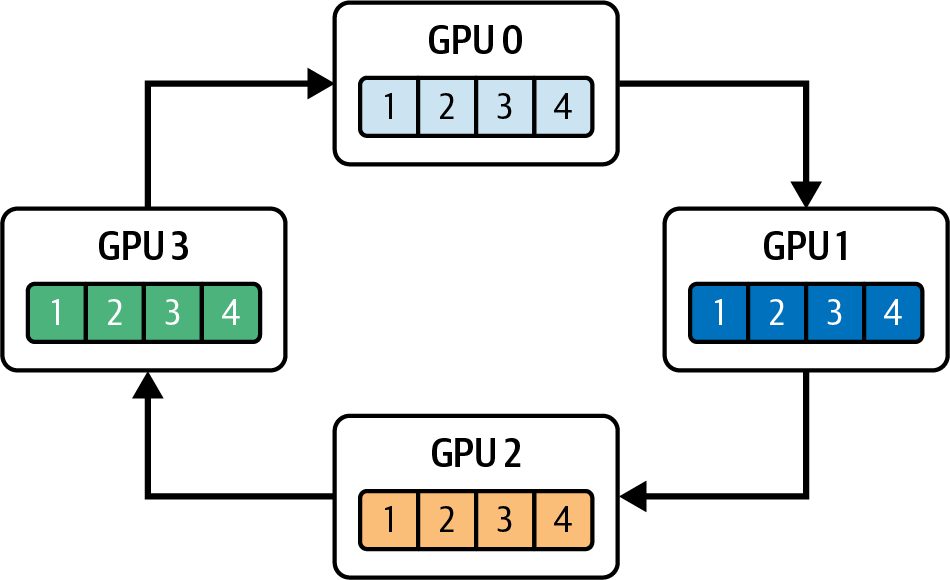
                    NCCL’s kernels have been purposely optimized to achieve maxi‐
                    mum bandwidth at low occupancy using a small amount of SM
                    resources per GPU. In practice, NCCL can saturate NVLink or
                    PCIe bandwidth with a small number of thread blocks per GPU,
                    thanks to low-occupancy kernels tuned for the interconnect. In
                    addition, you can offload some of these collective aggregation
                    operations to NVIDIA SHARP if your network hardware supports
                    it. This will free up even more SM resources to perform more use‐
                    ful computational work.
NIXL provides a unified, high-throughput API for point-to-point and disaggregated transfers across NVLink, RDMA, and storage backends, so you typically use NIXL APIs instead of calling cudaMemcpyPeerAsync yourself. NIXL moves data quickly and asynchronously across different tiers of memory and interconnects. When you invoke a NIXL operation with nixlCommStream, the data is chunked and pipelined over the network using the fastest transport mechanism available, such as GPUDirect RDMA or NVLink. And like NCCL, NIXL can use dedicated high‐priority streams for chunked peer‐to‐ peer and collective data transfers. This can reduce queuing delays so their copy com‐ mands hit the GPU’s DMA engines soon after they are issued—likely preempting lower‐priority work. Marking these transfer streams as high priority doesn’t mean they consume SM resources upfront. It simply guarantees that when the copy commands are ready, they’ll be issued ahead of other low-priority operations. In practice, the copy engines then take advantage of whatever DRAM‐to‐DRAM bandwidth isn’t already being used by your compute kernels. As such, they effectively use only idle memory‐fabric bandwidth to move data across the interconnects. This design maximizes overlap such that while one stream drives cudaMemcpyPeer Async transfers or NCCL reduction kernels on the copy engine, another stream’s SM kernels can continue processing forward/backward work. And a third stream can perform asynchronous allocations or event waits. This keeps all of the hardware units busy and without contention. Peer‐to‐peer transfers launched using cudaMemcpyPeerAsync run entirely on the GPU’s copy engines, so they consume only DRAM‐to‐DRAM bandwidth and no SM cycles. Collective operations such as all-reduce, on the other hand, are implemented as device kernels that use a small number of SMs while driving interconnect band‐ width toward the peak. At the same time, temporary buffers for activations or mixed-precision gradients are allocated and freed asynchronously to avoid global stalls. For example, inside each GPU’s compute stream, you would call the following code:
466 | Chapter 11: Inter-Kernel Pipelining, Synchronization, and CUDA Stream-Ordered Memory Allocations
cudaMallocAsync(&tempBuffer, tempBytes, computeStream); // ...use tempBuffer in kernels... cudaFreeAsync(tempBuffer, computeStream); Because the stream-ordered memory allocator records these operations without forc‐ ing a device-wide synchronization, CUDA does not pause the other streams such as P2P, NCCL, and NIXL streams when allocating or freeing memory. This makes sure that buffer management never interrupts the overlapped compute and communica‐ tion pipeline.
               This is exactly the stream-ordered memory allocator that we dis‐
               cussed earlier—but now applied to multiple GPUs. Using this will
               help prevent memory management from bottlenecking your dis‐
               tributed workloads.
After you enqueue the forward pass, backward pass, P2P copies, NCCL all-reduce, memory free, and event-wait operations for a single iteration, you can capture an exe‐ cution chain (e.g., training or inference iteration) into a single CUDA Graph. Specifically, when you call cudaStreamBeginCapture, every operation you enqueue into the stream (e.g., kernel launches, computations, communications, data transfers, events, etc.) are inserted as nodes in the graph. This can include ncclAllReduce(), cudaMemcpyAsync, cudaMemcpyPeerAsync, cudaMallocAsync, cudaFreeAsync, cuda EventRecord, cudaStreamWaitEvent—as well as their dependencies. You end the cap‐ ture with cudaStreamEndCapture(stream, &graph). The code looks something like this: cudaStreamBeginCapture(streamA, cudaStreamCaptureModeGlobal);
    computeGradientsLayer1<<<... , 0, streamA>>>(...);
    ncclAllReduce(..., comm, streamB);
    computeGradientsLayer2<<<... , 0, streamA>>>(...);
    ncclAllReduce(..., comm, streamB);
    cudaStreamEndCapture(streamA, &graph);
When capturing work submitted to multiple streams, use cudaStreamCaptureMode Global so operations enqueued on any participating stream in the same thread are recorded into the same capture session—and cross-stream dependencies are pre‐ served. Otherwise, only the operations enqueued on the stream passed to cudaStream BeginCapture are captured. You can then instantiate and launch the graph with cudaGraphLaunch(). This will replay the entire DAG with near-zero CPU overhead. By capturing the whole multiGPU iteration once, you eliminate per-operation enqueue and launch overhead.
Multi-GPU Compute and Data Transfer Overlap with CUDA Streams | 467
Moreover, CUDA Graphs support conditional nodes (e.g., gradient clipping), so infrequent branches stay inside the graph’s logic. We’ll cover CUDA Graphs in more detail in the next chapter, but it’s important to understand their relationship to CUDA streams, including cudaStreamBeginCapture and cudaStreamEndCapture.
                    Modern frameworks like PyTorch hide much of this complexity.
                    For example, PyTorch’s DistributedDataParallel automatically
                    schedules data transfers, compute, and communications in separate
                    streams. It also uses CUDA Graphs to reduce per-iteration over‐
                    head. While it can use CUDA Graphs to reduce overhead, you
                    must explicitly enable this by using capture-safe code and APIs
                    because it’s not automatically enabled.
While you don’t need to explicitly use these CUDA stream begin and end APIs to build a CUDA Graph, they are convenient when you want to capture the graph at the same time you are enqueuing operations into your stream (we’ll cover CUDA Graphs in more detail in the next chapter). CUDA streams enable finely tuned pipelines in multi-GPU systems by overlapping work across CPUs, DMA engines, and SMs. On the CPU side, cudaMemcpyAsync into pinned host buffers stages data for the next batch while the GPU executes the current workload, ensuring that inputs for batch N+1 are ready before batch N completes. At the same time, peer-to-peer transfers between GPUs (using cudaMemcpyPeerAsync) can be scheduled on dedicated streams, synchronized with cudaStreamWaitEvent to hand off activations or gradients without stalling ongoing compute. As mentioned, collective communication libraries like NCCL or NIXL are lowoccupancy communication kernels that use separate streams. This way, while one GPU is reducing gradients or broadcasting parameters, other streams on that same GPU can continue executing local compute kernels (e.g., forward or backward passes for subsequent layers). In addition, using cudaMallocAsync and cudaFreeAsync in stream order prevents global synchronization for temporary buffers, letting allocation and deallocation proceed concurrently with compute and communication. Capturing the entire iteration (e.g., CPU staging, P2P transfers, compute kernels, NCCL calls, allocations, frees, and events/waits) into a CUDA Graph can further reduce CPU overhead. Once the graph is instantiated, invoking cudaGraphLaunch() replays the recorded DAG in one go. This eliminates per-call enqueue overhead and preserves all dependencies automatically. Together, these techniques ensure that each GPU’s SM pipelines, copy engines, and interconnect links remain busy. While one stream runs matrix-multiply kernels, another performs peer-to-peer copies, a third executes collective communication, and the CPU stages data for the next microbatch.
468 | Chapter 11: Inter-Kernel Pipelining, Synchronization, and CUDA Stream-Ordered Memory Allocations
In short, you can use CUDA streams to orchestrate work across multiple layers and overlap computation, memory operations, and data transfers. This approach drives every hardware unit to its limits by hiding peer-to-peer and collective communica‐ tion latencies behind active compute. Overall, CUDA streams maximize throughput, utilization, and efficiency for many AI workloads, including LLM training and inference.
Programmatic Dependent Launch Another type of inter-kernel pipelining and communication is called Programmatic Dependent Launch (PDL). PDL lets a kernel trigger another kernel’s execution directly on the device using the same CUDA stream—and without involving the CPU. For instance, Kernel A, the primary kernel, can trigger Kernel B, the secondary kernel, which is waiting on a signal from Kernel A. This trigger can happen even before Kernel A finishes execution. To do this, it uses cudaTriggerProgrammaticLaunchCompletion(), as shown in Figure 11-9. Here, Ker‐ nel B is waiting on Kernel A with a call to cudaGridDependencySynchronize().
Figure 11-9. Using PDL to launch Kernel B from Kernel A—partially overlapping Kernel B’s execution with Kernel A’s epilogue (in the same CUDA stream)
Using the constructs provided by PDL, Kernel A can signal Kernel B to execute dur‐ ing Kernel A’s epilogue (e.g., wrap-up) phase. This way, Kernel A can execute along‐ side Kernel B for a bit of time. It’s important to note that Kernel A should not trigger Kernel B to execute until Kernel A has produced and synchronized all data (e.g., L2/ shared memory/global memory) needed by Kernel B.
               The data dependencies of the dependent kernel should be visible in
               L2, shared memory, global memory, etc., before it continues
               processing.
Programmatic Dependent Launch | 469
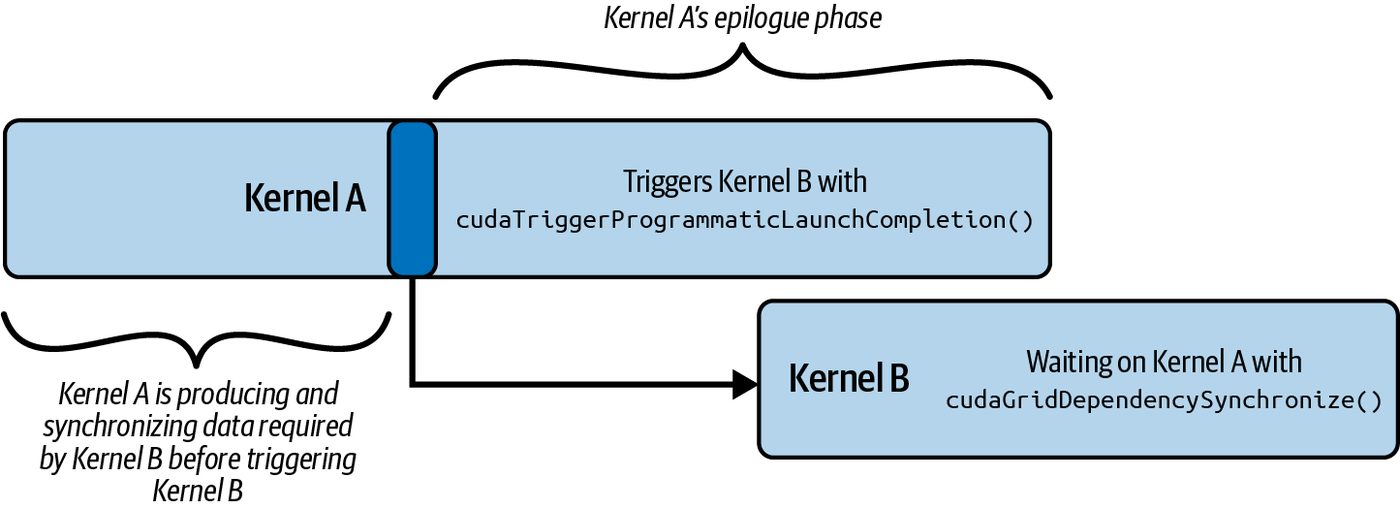
The code here shows Kernel A using cudaTriggerProgrammaticLaunchComple tion() to signal to Kernel B that its main work has completed. This also notifies Ker‐ nel B that all necessary global-memory flushes have occurred—and that it’s safe to continue: #include <cuda_runtime.h> #include <cuda_runtime_api.h>
      // Kernel A must trigger the PDL flag when it's
      //    safe to launch Kernel B
      __global__ void kernel_A(int *d_ptr) {
          // Perform work that produces data used by
          //   Kernel B
           // Signals that Kernel A's global-memory
           //   flushes are complete
           // This enables dependent Kernel B's launch
cudaTriggerProgrammaticLaunchCompletion();
           // ... any further work that can overlap with                   ...
      }
      // Kernel B must wait for Kernel A to write its memory
      //    to global memory and become visible to Kernel B
      __global__ void kernel_B(int *d_ptr) {
           // Wait on Kernel A to complete.
           // This ensures the Kernel B waits for the
           //   memory flush before accessing shared data
           cudaGridDependencySynchronize();
           // ... dependent work on d_ptr ...
      }
      int main() {
          // 1) Allocate device buffer
          int *d_ptr = nullptr;
          // Allocate an int (example)
          cudaMalloc((void**)&d_ptr, sizeof(int));
           // 2) Create a nonblocking stream for maximum overlap
           cudaStream_t stream;
           cudaStreamCreateWithFlags(&stream,
               cudaStreamNonBlocking); // Nonblocking
           // 3) Define grid/block sizes
           dim3 gridDim(128), blockDim(256);
// 4) Launch Kernel A asynchronously
470 | Chapter 11: Inter-Kernel Pipelining, Synchronization, and CUDA Stream-Ordered Memory Allocations
        kernel_A<<<gridDim, blockDim, 0,
            stream>>>(d_ptr);    // Async launch
        // 5) Configure PDL for Kernel B
        cudaLaunchConfig_t launch_cfg{};
        launch_cfg.gridDim           = gridDim;
        launch_cfg.blockDim          = blockDim;
        launch_cfg.dynamicSmemBytes = 0;
        launch_cfg.stream            = stream;
        // Sets the PDL flag so cudaLaunchKernelExC overlaps
        //   with Kernel A's epilogue
        static cudaLaunchAttribute attrs[1];
        attrs[0].id = cudaLaunchAttributeProgrammaticStreamSerialization;
        attrs[0].val.programmaticStreamSerializationAllowed =
            1;
        launch_cfg.attrs    = attrs;
        launch_cfg.numAttrs = 1;
        // 6) Pack the pointer argument
        void* kernelArgs[] = { &d_ptr };
        // 7) Launch Kernel B kernel early using PDL
        // Lookup device pointer for secondary_kernel
        cudaKernel_t kB;
        cudaGetKernel(&kB, kernel_B);
        void* funcPtr_kernel_B = reinterpret_cast<void*>(kB);
        cudaLaunchKernelExC(&launch_cfg, funcPtr_kernel_B, kernelArgs);
        // 8) Wait until all work in the stream completes
        cudaStreamSynchronize(stream);
        // 9) Cleanup
        cudaStreamDestroy(stream);
        cudaFree(d_ptr);
        return 0;
    }
Here, Kernel B is waiting on cudaGridDependencySynchronize() until it receives this programmatic-launch completion signal from Kernel A. Once the handoff occurs, the two kernels can overlap their execution. By pairing the trigger in Kernel A, the syn‐ chronize in Kernel B, and the launch attribute on the host, this code achieves as much overlap as possible between kernels A and B. As seen in this example, you need to create a cudaLaunchConfig_t and use special attributes with the cudaLaunchKernelExC() CUDA call when using PDL. Specifically, on the host side, PDL is enabled by configuring a cudaLaunchConfig_t for Kernel B’s launch with the cudaLaunchAttributeProgrammaticStreamSerialization attribute enabled to allow early, overlapped dispatch.
Programmatic Dependent Launch | 471
Calling cudaLaunchKernelExC() with cudaLaunchAttributeProgrammaticStream Serialization tells the CUDA runtime that it’s safe to enqueue Kernel B—even if Kernel A isn’t fully complete. cudaLaunchKernelExC() is then used to perform the actual launch with these extended attributes, which relies on the trigger mechanism to perform the handoff.
Combining PDL and Thread Block Clusters with Warp Specialization Let’s bring together three orthogonal techniques—PDL, warp-specialized pipelining, and thread block clusters—into one execution model. PDL provides the mechanism for one kernel to signal completion of its prologue and trigger a dependent kernel to execute. It will then ramp down while the dependent kernel ramps up and executes. Warp specialization subdivides each thread block into producer and consumer warps. Specifically, the producer warp asynchronously transfers tiles using TMA, while the compute warp executes matrix-multiply-accumulate (MMA) operations. And thread block clusters guarantee that multiple thread blocks run on nearby groups of SMs. This facilitates multi-SM cooperation and shared-memory multicast for large-scale workloads. Together, this combination of inter-kernel and intra-kernel techniques hides DRAM latency, reduces kernel-boundary overheads, and maximizes Tensor Core utilization. They create a pipeline with the following characteristics: Intra-kernel pipelining Warp specialization makes sure that within each thread block, data transfers (producer warps) and compute (consumer warps) are fully overlapped using a multistage pipeline. Inter-kernel overlap PDL allows the prologue of a dependent GEMM kernel, potentially operating on the next layer in a neural network, to begin as soon as the primary kernel finishes prefetching data (weights)—without waiting for the full thread block to tear down. Interblock cooperation Thread block clusters enable groups of thread blocks to coordinate prefetch (e.g., multicast) and perform dynamic load balancing across SMs. This way, both pro‐ ducer and consumer tasks are evenly distributed cluster-wide.
472 | Chapter 11: Inter-Kernel Pipelining, Synchronization, and CUDA Stream-Ordered Memory Allocations
For example, you can overlap the movement of model weights (data transfer) with GEMMs (compute) inside the same kernel so that one tile is being computed while the next tile is in flight. A warp-specialized, multistage software pipeline (stages 0… N) can coordinate these roles using PDL and mbarrier primitives, as shown in Figure 11-10.
Figure 11-10. Warp-specialized, multistage pipeline with PDL and thread block clusters and TMA multicast for a high-performance, inter-kernel and intra-kernel GEMM implementation
Here is a CUDA C++ example that shows how to combine PDL, thread block clus‐ ters, and warp specialization with a simple TMA-style async copy + compute pipe‐ line. Specifically, the primary kernel, primary_gemm, uses cudaTriggerProgrammatic LaunchCompletion() to signal to the secondary kernel that all memory flushes have
Combining PDL and Thread Block Clusters with Warp Specialization | 473
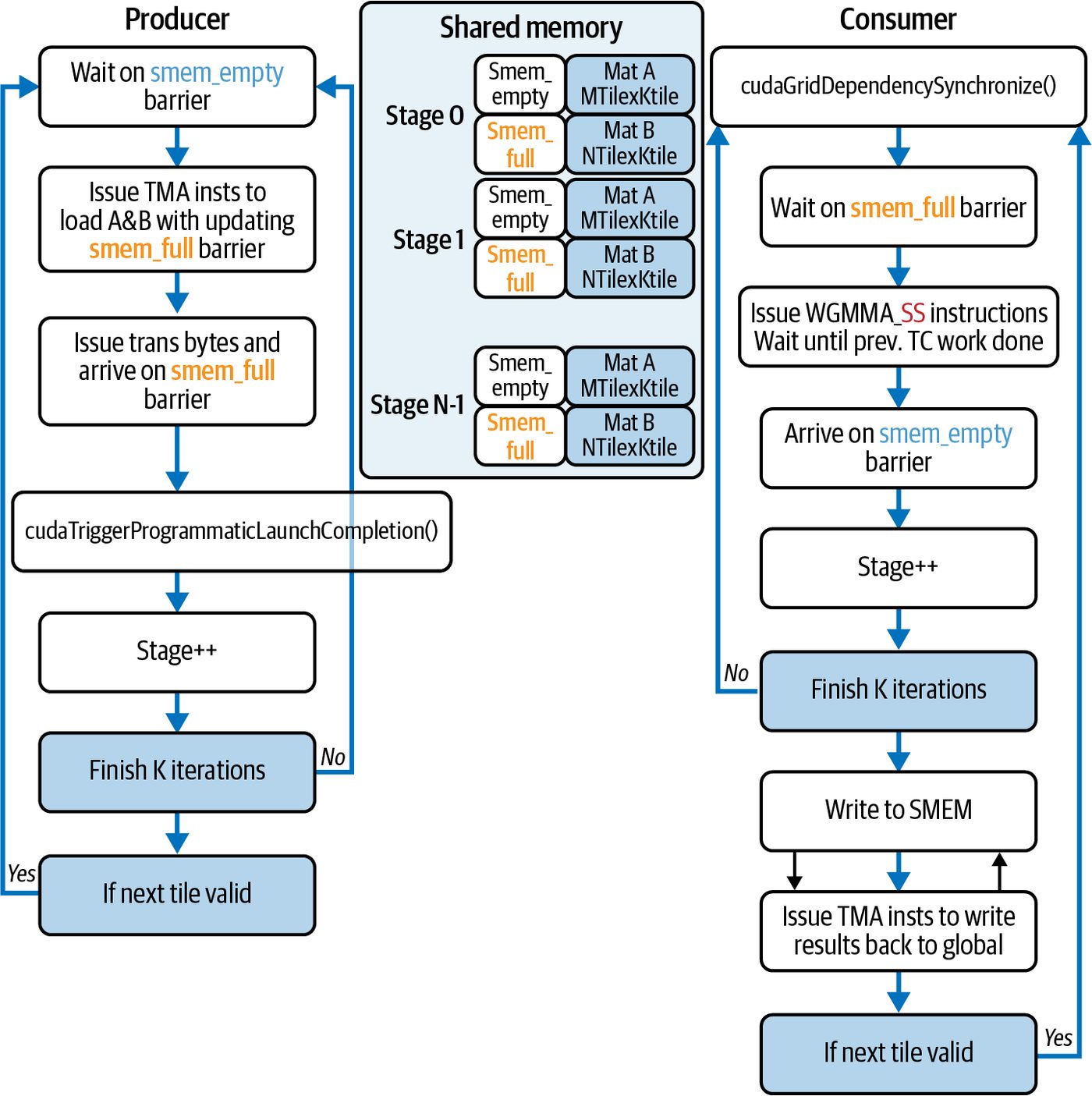
completed and the data is ready to be consumed. As such, it’s now safe for the secon‐
dary kernel, secondary_gemm, to continue from cudaGridDependencySynchronize(),
as shown here:
      #include <cstdio>
      #include <cuda_runtime.h>
      // Cooperative Groups for clusters/barriers
      #include <cooperative_groups.h>
      // C++ barrier for TMA-like sync
      #include <cuda/barrier>
      // Async copy API
      #include <cuda/pipeline>
namespace cg = cooperative_groups;
      // Tile size for our toy GEMM
      constexpr int TILE_M = 128;
      constexpr int TILE_K = 128;
      constexpr int TILE_N = 128;
      // A very simple “producer/consumer” pipeline within each CTA
      __global__ __cluster_dims__(2,1,1)     // Compile-time cluster of 2 CTAs
      void primary_gemm(const float* __restrict__ A,
                        const float* __restrict__ B,
                              float* __restrict__ C,
                        int M, int N, int K)
      {
          // Identify thread-block cluster & within-block group
          cg::thread_block_cluster cluster = cg::this_thread_block_cluster();
          cg::thread_block       cta      = cg::this_thread_block();
          int tid = threadIdx.x + threadIdx.y * blockDim.x;
          int warpId = tid / warpSize;
          const int numProducerWarps = 1;
          // Shared-memory tile buffers
          __shared__ float tileA[TILE_M * TILE_K];
          __shared__ float tileB[TILE_K * TILE_N];
          __shared__
          cuda::pipeline_shared_state<cuda::thread_scope_block, 1> pipe_state;
          auto pipe = cuda::make_pipeline(cta, &pipe_state);
          if (warpId < numProducerWarps) {
          pipe.producer_acquire();
          cuda::memcpy_async(cta, tileA, A, cuda::aligned_size_t<32>{TILE_M
                             * TILE_K * sizeof(float)}, pipe);
          cuda::memcpy_async(cta, tileB, B, cuda::aligned_size_t<32>{TILE_K
                             * TILE_N * sizeof(float)}, pipe);
          pipe.producer_commit();
          }
          cta.sync();
          pipe.consumer_wait();
          pipe.consumer_release();
474 | Chapter 11: Inter-Kernel Pipelining, Synchronization, and CUDA Stream-Ordered Memory Allocations
// ... perform “compute” on the tile ... // (e.g., a few fused multiply-adds) do_compute();
    // Inter-CTA cluster-scope sync for load balancing
    cluster.sync();
    // Signal to dependent kernel that prologue is done
    cudaTriggerProgrammaticLaunchCompletion();
    // ... perform remaining epilogue work ...
    // ...
}
__global__ __cluster_dims__(2,1,1)
void secondary_gemm(const float* __restrict__ A,
                    const float* __restrict__ B,
                          float* __restrict__ C,
                    int M, int N, int K)
{
    // Wait for primary’s PDL signal before starting
    cudaGridDependencySynchronize();
    // Similar warp-specialized pipeline as above...
    // (Omitted for brevity. Duplicate of primary logic,
    // but reading from different offsets to compute
    // next GEMM tile.)
}
// cudaLaunchKernelExC, cudaGetKernel #include <cuda_runtime_api.h> // cudaLaunchConfig_t #include <cuda/launch_config.h>
int main()
{
    // Problem dimensions (must be multiples of TILE_)
    int M = TILE_M, N = TILE_N, K = TILE_K;
    // Allocate and initialize matrices A, B, C on device
    float *d_A, *d_B, *d_C;
    cudaMalloc(&d_A, M*K*sizeof(float));
    cudaMalloc(&d_B, K*N*sizeof(float));
    cudaMalloc(&d_C, M*N*sizeof(float));
    // (Initialize d_A, d_B via cudaMemcpy or kernels...)
    // Create a nonblocking stream for overlap
    cudaStream_t stream;
    cudaStreamCreateWithFlags(&stream,
        cudaStreamNonBlocking);
// Launch primary GEMM
Combining PDL and Thread Block Clusters with Warp Specialization | 475
          dim3 gridDim(M/TILE_M, N/TILE_N), blockDim(256);
          primary_gemm<<<gridDim, blockDim, 0, stream>>>(d_A,
      d_B, d_C, M, N, K);
           // Configure PDL attributes for secondary launch
           cudaLaunchConfig_t launch_cfg = {};
           launch_cfg.gridDim          = gridDim;
           launch_cfg.blockDim         = blockDim;
           launch_cfg.dynamicSmemBytes = 0;
           launch_cfg.stream           = stream;
           static cudaLaunchAttribute attrs[1];
           attrs[0].id = cudaLaunchAttributeProgrammaticStreamSerialization;
           attrs[0].val.programmaticStreamSerializationAllowed = 1;
           launch_cfg.attrs    = attrs;
           launch_cfg.numAttrs = 1;
           // Prepare arguments and get function pointer
           //    for secondary_gemm
           void* kernelArgs[] = {&d_A, &d_B, &d_C, &M, &N, &K};
           cudaKernel_t k;
           cudaGetKernel(&k, secondary_gemm);
           void* funcPtr = reinterpret_cast<void*>(k);
           // Early enqueue of secondary GEMM via PDL
           cudaLaunchKernelExC(&launch_cfg, funcPtr, kernelArgs);
           // Wait for everything to finish
           cudaStreamSynchronize(stream);
           // Cleanup
           cudaFree(d_A);
           cudaFree(d_B);
           cudaFree(d_C);
           cudaStreamDestroy(stream);
           return 0;
      }
On the host, you launch the primary kernel (primary_gemm) into a nonblocking stream and create a cudaLaunchConfig_t with the ProgrammaticStreamSerializa tion attribute. You use this to call cudaLaunchKernelExC for the secondary kernel (secondary_gemm). Inside primary_gemm, a call to cudaTriggerProgrammaticLaunchCompletion() marks the completion of the memory flush and allows the dependent kernel’s pro‐ cessing to begin—even before the primary has fully torn down. The dependent kernel then calls cudaGridDependencySynchronize(). This waits for the signal and the necessary memory flush from the primary kernel so that it can start executing in parallel with the primary kernel’s epilogue.
476 | Chapter 11: Inter-Kernel Pipelining, Synchronization, and CUDA Stream-Ordered Memory Allocations
Within each thread block, we use warp specialization to overlap data movement and computation. By splitting each block into a single “producer” warp and multiple “consumer” warps, the producer issues cuda::memcpy_async calls into shared mem‐ ory. This uses TMA multicast to broadcast a single DMA transfer to all thread blocks in the cluster, as shown in Figure 11-11.
Figure 11-11. TMA multicast: a leader CTA issues cp.async.bulk.tensor into DSMEM (cluster shared memory); the follower CTAs consume tiles using clus ter.map_shared_rank; cuda::memcpy_async drives TMA
While the producer warp is loading data with TMA multicast, the consumers spin on a C++ block-scope barrier (cuda::barrier<cuda::thread_scope_block>) before executing their matrix-multiply steps (do_compute()). This lets each tile’s load and its fused-multiply-add (FMA) operations interleave in a fine-grained, multistage soft‐ ware pipeline that hides global-memory latency inside the kernel. To coordinate work across SMs, we annotate both kernels with __clus ter_dims__(2,1,1). This groups pairs of thread blocks on nearby SMs. A call to clus ter.sync() (the cooperative-group’s wrapper over PTX’s mbarrier instructions) serves as a cluster-wide barrier and shared-memory fence. This way, all of the thread blocks in the cluster see the same TMA-loaded data and can dynamically rebalance remaining tiles. This interblock cooperation prevents idle SMs and increases the ben‐ efit of the warp-specialized pipeline.
Combining PDL and Thread Block Clusters with Warp Specialization | 477
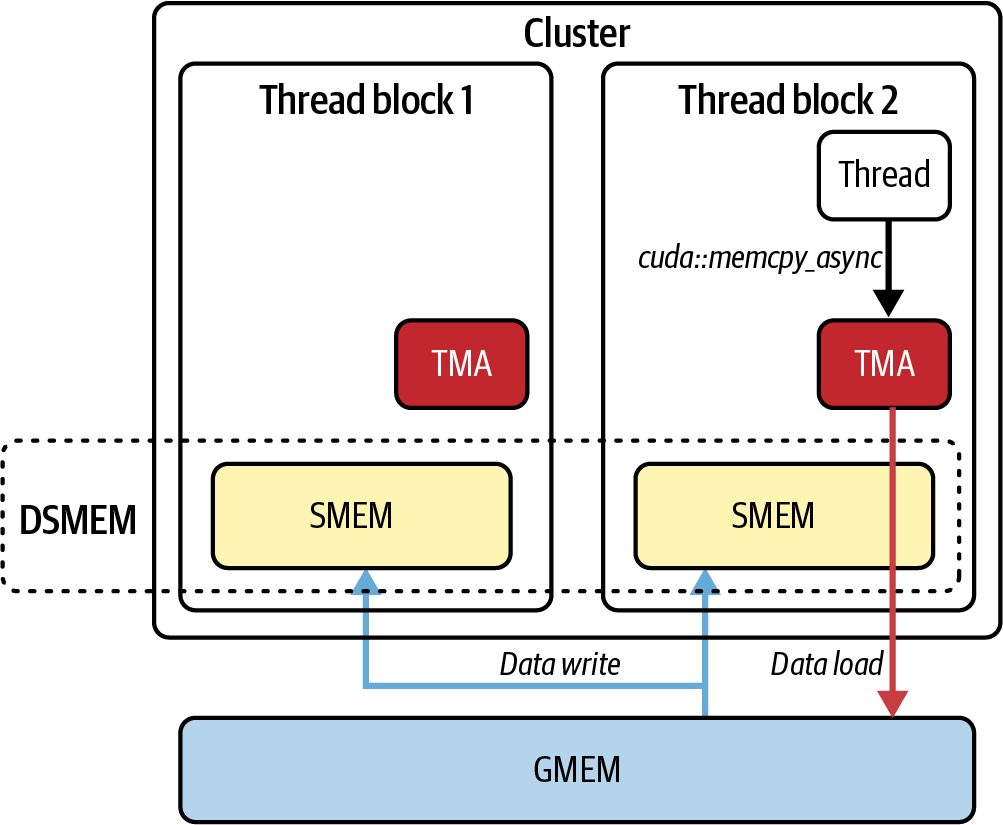
                    Production kernels typically use the Tensor Memory Accelerator
                    (TMA) cp.async.bulk.tensor for 2D tiles and multicast across a
                    thread block cluster when multiple thread blocks need the same
                    tile.
                    Consider using descriptor-based TMA reduce operations (e.g.,
                    cp.reduce.async.bulk(.tensor)) for on-the-fly reductions dur‐
                    ing tiled copies on Blackwell. Prefer descriptor-based loads/stores
                    plus TMA reduce operations when fusing small reductions into the
                    data-movement pipeline. This will reduce register pressure and
                    improver overlap.
Let’s wrap up by revisiting the three characteristics of this high-performance GEMM
pipeline:
Intra-kernel pipelining
     Achieved within each thread block using warp specialization to subdivide work
     so that producer warps issue cuda::memcpy_async tiles while consumer warps
     spin on a block-scope barrier. This lets data transfer and compute operations
     fully overlap.
Inter-kernel pipelining
     Uses PDL, which lets the next GEMM kernel’s processing begin (using the cuda
     TriggerProgrammaticLaunchCompletion() → cudaGridDependencySynchron
     ize() mechanism) before the primary kernel is completely torn down. This
     masks kernel-launch overhead.
Interblock cooperation
     By annotating kernels with __cluster_dims__, this code creates thread block
     pairs that are coscheduled on nearby SMs. Along with calling cluster.sync()
     (the mbarrier-based cluster barrier), these thread blocks share TMA-multicast
     data and dynamically load balance work across the grid.
In short, by layering warp-level pipelining with TMA, cluster-level synchronization
and multicast, and inter-kernel overlap using PDL, you form a highly overlapping
pipeline that hides DRAM latency, masks kernel-launch overheads, and maximizes
Tensor Core utilization. The result is a high-performance GEMM in every stage:
within warp copies, cross-thread-block barriers, and during kernel handoffs. These
operate together to keep the hardware busy and avoid stalls.
Key Takeaways This chapter covered some advanced topics related to CUDA streams, streamordered memory allocators, event-based synchronization, inter-kernel pipelining,
478 | Chapter 11: Inter-Kernel Pipelining, Synchronization, and CUDA Stream-Ordered Memory Allocations
thread block clusters, and PDLs. These help to create highly efficient pipelines for
inference and training workloads. The following are some key takeaways:
Explicit versus default streams
    Avoid the legacy default stream (stream 0), which serializes all work and acts as a
    global barrier. Instead, create explicit non-blocking streams (cudaStreamCreate
    WithFlags(..., cudaStreamNonBlocking)) so kernels and copies can run con‐
    currently without hidden synchronizations.
Stream-ordered memory allocator
    Use cudaMallocAsync and cudaFreeAsync to allocate/free device memory within
    a specific stream. This nonblocking allocator records requests in the stream’s
    queue, avoids global device synchronizations, and enables allocation overlap with
    in-flight kernels and copies.
Overlapping H2D, compute, and D2H
   By enqueuing asynchronous host-to-device (cudaMemcpyAsync), kernel launches,
   and device-to-host copies on different streams, you can achieve three-way over‐
   lap. While one stream runs a kernel, another can copy the next batch H2D, and a
   third can copy results D2H. This hides latency and reduces idle periods.
CUDA events for fine-grained synchronization
   Use cudaEventRecord and cudaStreamWaitEvent to coordinate producer-
   consumer dependencies across streams without stalling the entire GPU or CPU.
   Events enable a consumer stream to wait precisely until a producer stream fin‐
   ishes a copy or kernel, preserving maximum concurrency.
Inter-kernel pipelining
     Combine warp-specialized (multirole), two-stage (double-buffered) pipeline
     within a kernel with multistream launches. Launching multiple instances of a
     warp-specialized kernel (loader → compute → storer) in separate streams feeds
     successive mini-batches into the GPU. This combines intra-kernel memory/
     compute overlap with inter-kernel concurrency.
Thread block clusters with streams
    Extending intra-kernel warp-specialized pipelines to a grid-wide thread block
    cluster (cooperative launch) allows loader/compute/storer warps across blocks.
    Launching these cooperative kernels in multiple streams lets host-side allocations
    and copies for subsequent batches occur while a cooperative kernel is executing.
In-kernel signaling and overlap with PDL
    Kernel A calls cudaTriggerProgrammaticLaunchCompletion() once its data
    writes are flushed, and Kernel B uses cudaGridDependencySynchronize() to wait
    on that signal. This allows Kernel B’s prologue to begin and overlap with A’s epi‐
    logue—without CPU intervention.
Key Takeaways | 479
Host-side PDL setup
    The host configures Kernel B’s launch via cudaLaunchKernelExC() with a cuda
    LaunchConfig_t that sets cudaLaunchAttributeProgrammaticStreamSerializa
    tion. This allows the driver to enqueue B early and maximize inter-kernel overlap.
    PDL uses cudaTriggerProgrammaticLaunchCompletion in the primary kernel,
    cudaGridDependencySynchronize in the dependent kernel, and the cudaLaunchAt
    tributeProgrammaticStreamSerialization launch attribute on the host.
Conclusion In conclusion, inter-kernel concurrency with CUDA streams has evolved from a manual optimization to an automatic feature used by modern AI frameworks and GPU runtimes. By understanding the core principles such as streams, resource occu‐ pancy, and synchronization points, developers can maximize GPU utilization. Inter-kernel concurrency is critical for maximizing GPU utilization in modern workloads by overlapping kernel execution and data transfers both within a single GPU and across multiple GPUs. As hardware continues to add more parallelism—and software abstracts more of the scheduling complexity—understanding how to maximize concurrency is a critical part of getting the most from your high-performance AI system hardware. This chapter demonstrated how to orchestrate kernels, memory operations, and allo‐ cations across multiple CUDA streams to keep all GPU hardware units actively run‐ ning. These hardware units include compute pipelines, DMA engines, and interconnects. CUDA streams serve as the foundational mechanism to enqueue ker‐ nels, memory operations, and allocations in independent queues, allowing the GPU’s compute engines and DMA engines to run simultaneously. By avoiding the default stream’s hidden barriers, leveraging the stream-ordered allo‐ cator, employing events for precise synchronization, and combining intra-kernel warp specialization with inter-kernel multistream pipelines (extending to thread block clusters from Chapter 10), you can achieve near-peak utilization even for com‐ plex LLM workloads. In multi-GPU contexts, overlapping peer-to-peer transfers, collective communica‐ tions, and computations across distinct streams further minimize idle time. We looked back at Chapter 10 by showing how to capture these stream workflows using CUDA Graphs to reduce CPU overhead for repeated iterations. In the next chapter, we will dive even deeper and build upon these principles by introducing dynamic kernel orchestration and meta-scheduling with dynamic paral‐ lelism and CUDA Graphs. We’ll coordinate entire pipelines of kernels and data movements—at runtime—to adapt to changing workloads. This dynamic resource balancing and device-side orchestration will push us to the next level of performance optimizations for large-scale AI systems.
480 | Chapter 11: Inter-Kernel Pipelining, Synchronization, and CUDA Stream-Ordered Memory Allocations